Question 26
Note: This question is part of a series of questions that present the same scenario. Each question in the series contains a unique solution that might meet the stated goals. Some question sets might have more than one correct solution, while others might not have a correct solution.
After you answer a question in this section, you will NOT be able to return to it. As a result, these questions will not appear on the review screen.
A team is implementing ALM for agents in Copilot Studio across multiple environments.
The team requires a consistent way to manage and transport agent assets.
You need to recommend a solution that supports creation and use of ALM scenarios for agents in Copilot Studio.
Solution: Publishing an agent to a channel is the required ALM container for transporting agents between environments.
Does the solution meet the goal?
Question 27
Case Study 1 - Blue Yonder Airlines
Background
Blue Yonder Airlines is a global carrier headquartered in Los Angeles, California, operating domestic and international flights. The company serves millions of passengers annually through its website, mobile app, and call centers. To improve customer service efficiency and reduce call center volume, Blue Yonder is deploying an AI agent in Microsoft Copilot Studio.
The agent will handle customer inquiries across multiple channels - web chat, mobile app, and Microsoft Teams (for internal support staff). It will answer questions, retrieve data from enterprise systems, and escalate to human agents when needed.
The project is led by a cross-function team:
- Product manager: Defines requirements and success metrics.
- Lead agent author: Designs topics, intents, and generative behavior.
- Flow designers: Build agent flows and integrations.
- IT/security and compliance: Oversees identity, data protection, and Responsible AI (RAI) compliance.
Current environment
Channels
Public website: Embedded web chat
Mobile app: In-app chatbot
Microsoft Teams: Internal support agent access
Identity and access
Customers: Anonymous access for general inquiries (e.g., flight status, baggage policy).
Authentication is required for personal data access (e.g., bookings, loyalty points).
Internal staff: Authenticate via Microsoft Entra ID.
Data sources
Reservation and Ticketing System (internal): REST API, no prebuilt connector with custom enterprise database.
Flight Status and Weather APIs (external): REST APIs with API keys.
Customer Support Knowledge Base: SharePoint library with PDFs and policy documents.
Loyalty Program Data: Stored in Dynamics 365 and Dataverse.
Travel Advisory Content: Uses REST API with partner services.
Integration mechanisms
Custom connectors must be used for internal APIs that lack prebuilt connectors.
HTTP request nodes may be used for lightweight external APIs.
Knowledge sources must be used for unstructured content.
Agent flows must be used to encapsulate reusable logic (e.g., rebooking).
Business requirements
Omnichannel support
Deploy the agent across web, mobile, and Teams with a consistent user experience. The Teams deployment must also support internal staff.
Self-service capabilities
The agent must handle common inquiries such as:
- Flight status
- Booking and rebooking
- Loyalty program questions
- Travel policies and baggage rules
Human escalation
If the agent cannot resolve an issue or the user requests help, it must:
- Escalate to a human agent.
- Transfer the conversation transcript and relevant context.
- Redact any sensitive personal data before escalation.
Knowledge integration
The agent must use scalable methods for knowledge integration and must not rely on manually authored Q&A topics for each document.
Performance metrics
First-contact resolution: +25%
Tier-1 call deflection: ≥20%
Response time: 90% of queries answered within 30 seconds
Accuracy: ≥95% for known FAQs
CSAT: ≥85% for AI-handled interactions
Technical requirements
Platform constraints
No custom code is permitted; only Copilot Studio's built-in tools may be used.
All backend logic must be implemented using agent flows.
Markdown must be used for formatting (e.g., bold, bullet points); HTML is not supported.
Authentication
Sign-in is required for personal data access.
Anonymous access is allowed for general inquiries.
User identity must be used for data access; shared or builder credentials must not be used.
Compliance and security
Power Platform DLP policies must be enforced to block unauthorized data flows.
Responsible AI content moderation filters must be enabled.
Prompt modifications must be added to enforce tone, disclaimers, and refusal behavior.
Disclaimers must be applied consistently across all generative responses. Manual edits to individual topics must be avoided.
Monitoring and maintenance
All conversations and actions must be logged for auditing.
Weekly reviews of transcripts and metrics must be conducted.
Topics, flows, and knowledge sources must be updated as policies or systems evolve.
Issues and constraints
API rate limits: External APIs (e.g., flight status) have usage limits. Agent flows must handle retries and caching to avoid exceeding quotas.
Knowledge base limits: Copilot Studio has limits on the number and size of indexed documents.
Large files must be split or summarized.
Generative answer risks: Generative responses must be constrained to avoid policy violations.
Prompt modifications and filters must be used to enforce tone, safety, and compliance.
User input variability: Users phrase questions in diverse ways. Topics must include varied trigger phrases and fallback handling.
Authentication UX: The agent must clearly explain when sign-in is required and handle transitions smoothly across channels.
Problem statement
Blue Yonder Airlines must deploy a secure, scalable, and policy-compliant AI agent using Microsoft Copilot Studio. The agent must deliver accurate, helpful, and safe responses across multiple channels, integrate with enterprise systems, and support both anonymous and authenticated users. It must adhere to strict data protection and Responsible AI standards while improving customer service efficiency and satisfaction.
Drag and Drop Question
You need to determine which authentication model should be applied to each Blue Yonder Copilot interaction scenario to comply with the company's security and governance requirements.
Which authentication requirement should you apply to each scenario? To answer, move the appropriate authentication requirements to the correct user scenarios. You may use each authentication requirement once, more than once, or not at all. You may need to move the split bar between panes or scroll to view content.
NOTE: Each correct selection is worth one point.

Question 28
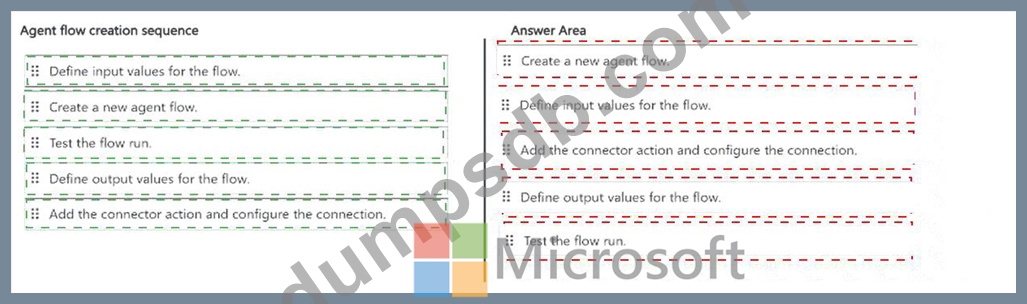
A company is building an agent that uses an agent flow to retrieve data from an external system and return structured output.
The company needs to create a flow that the agent can invoke to process requests and return results. To support this business need, the flow must meet the following requirements:
Accept parameters from the agent.
Execute an action to retrieve data from the database.
Ensure the agent receives the relevant output information.
Question 29
A team is standardizing ALM for agents in Copilot Studio.
The team requires a custom solution that includes agents. The solution must support ALM scenarios, such as managing and transporting agent assets across environments and pipeline deployments.
You need to create an ALM-ready custom solution in Copilot Studio.
What should you do?
Question 30
Drag and Drop Question
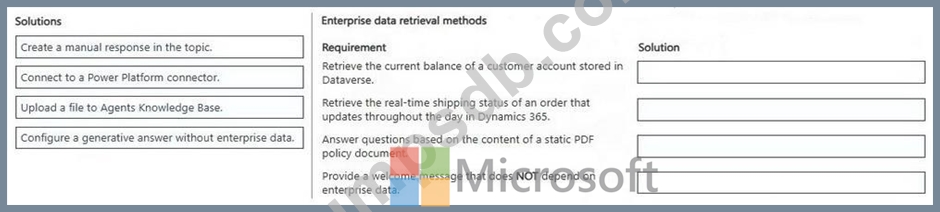
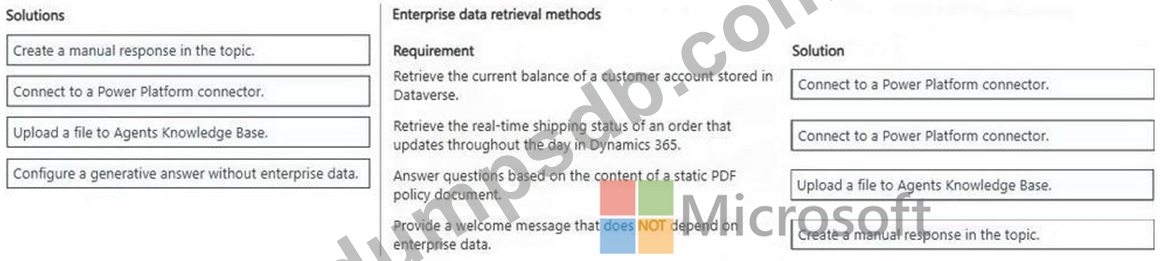
You are configuring an agent in Copilot Studio for an organization. The organization uses Microsoft Dataverse, Dynamics 365, and SharePoint Online.
The agent must retrieve information from enterprise systems and internal documents. The agent must meet the following requirements:
- Must retrieve the current balance of a customer account stored in
Dataverse.
- Must retrieve the real-time shipping status of an order that updates
throughout the day in Dynamics 365.
- Must answer questions based on the content of a static PDF policy
document.
- Must provide a welcome message that does NOT depend on enterprise
data.
You need to configure the agent to meet the requirements.
How should the agent retrieve the data? To answer, move the appropriate solutions to the correct requirements. You may use each solution once, more than once, or not at all. You may need to move the split bar between panes or scroll to view content.
NOTE: Each correct selection is worth one point.