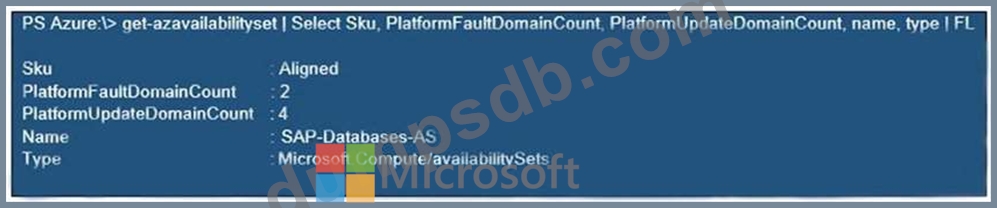
You have an Azure Availability Set that is configured as shown in the following exhibit. Use the drop-down menus to select the answer choice that completes each statement based on the information presented in the graphic. NOTE: Each correct selection is worth one point.
Correct Answer:
Explanation Box 1: the same fault domain Fault domains define the group of virtual machines that share a common power source and network switch. If a storage fault domain fails due to hardware or software failure, only the VM instance with disks on the storage fault domain fails. Box 2: managed disks Managed disks provide better reliability for Availability Sets by ensuring that the disks of VMs in an Availability Set are sufficiently isolated from each other to avoid single points of failure. It does this by automatically placing the disks in different storage fault domains (storage clusters) and aligning them with the VM fault domain. References: https://docs.microsoft.com/en-us/azure/virtual-machines/windows/manage-availability
Question 12
Note: This question is part of a series of questions that present the same scenario. Each question in the series contains a unique solution that might meet the stated goals. Some question sets might have more than one correct solution, while others might not have a correct solution. After you answer a question in this section, you will NOT be able to return to it. As a result, these questions will not appear in the review screen. You deploy SAP HANA on Azure (Large Instances). You need to back up the SAP HANA database to Azure. Solution: You configure DB13 to back up directly to a local disk. Does this meet the goal?
Correct Answer: B
You need to back up the SAP HANA database to Azure, not to a local disk. References: https://docs.microsoft.com/en-us/azure/backup/sap-hana-db-about https://docs.microsoft.com/en-us/azure/backup/backup-azure-sap-hana-database#configure-backup Build and Deploy Azure SAP Workloads Testlet 1 Case Study This is a case study. Case studies are not timed separately. You can use as much exam time as you would like to complete each case. However, there may be additional case studies and sections on this exam. You must manage your time to ensure that you are able to complete all questions included on this exam in the time provided. To answer the questions included in a case study, you will need to reference information that is provided in the case study. Case studies might contain exhibits and other resources that provide more information about the scenario that is described in the case study. Each question is independent of the other questions in this case study. At the end of this case study, a review screen will appear. This screen allows you to review your answers and to make changes before you move to the next section of the exam. After you begin a new section, you cannot return to this section. To start the case study To display the first question in this case study, click the Next button. Use the buttons in the left pane to explore the content of the case study before you answer the questions. Clicking these buttons displays information such as business requirements, existing environment, and problem statements. If the case study has an All Information tab, note that the information displayed is identical to the information displayed on the subsequent tabs. When you are ready to answer a question, click the Question button to return to the question. Overview Litware, Inc. is an international manufacturing company that has 3,000 employees. Litware has two main offices. The offices are located in Miami, FL, and Madrid, Spain. Existing Environment Infrastructure Litware currently uses a third-party provider to host a datacenter in Miami and a disaster recovery datacenter in Chicago, IL. The network contains an Active Directory domain named litware.com. Litware has two third-party applications hosted in Azure. Litware already implemented a site-to-site VPN connection between the on-premises network and Azure. SAP Environment Litware currently runs the following SAP products: * Enhancement Pack6 for SAP ERP Central Component 6.0 (SAP ECC 6.0) * SAP Extended Warehouse Management (SAP EWM) * SAP Supply Chain Management (SAP SCM) * SAP NetWeaver Process Integration (PI) * SAP Business Warehouse (SAP BW) * SAP Solution Manager All servers run on the Windows Server platform. All databases use Microsoft SQL Server. Currently, you have 20 production servers. You have 30 non-production servers including five testing servers, five development servers, five quality assurance (QA) servers, and 15 pre-production servers. Currently, all SAP applications are in the litware.com domain. Problem Statements The current version of SAP ECC has a transaction that, when run in batches overnight, takes eight hours to complete. You confirm that upgrading to SAP Business Suite on HANA will improve performance because of code changes and the SAP HANA database platform. Litware is dissatisfied with the performance of its current hosted infrastructure vendor. Litware experienced several hardware failures and the vendor struggled to adequately support its 24/7 business operations. Requirements Business Goals Litware identifies the following business goals: * Increase the performance of SAP ECC applications by moving to SAP HANA. All other SAP databases will remain on SQL Server. * Move away from the current infrastructure vendor to increase the stability and availability of the SAP services. * Use the new Environment, Health and Safety (EH&S) in Recipe Management function. * Ensure that any migration activities can be completed within a 48-hour period during a weekend. Planned Changes Litware identifies the following planned changes: * Migrate SAP to Azure. * Upgrade and migrate SAP ECC to SAP Business Suite on HANA Enhancement Pack 8. Technical Requirements Litware identifies the following technical requirements: * Implement automated backups. * Support load testing during the migration. * Identify opportunities to reduce costs during the migration. * Continue to use the litware.com domain for all SAP landscapes. * Ensure that all SAP applications and databases are highly available. * Establish an automated monitoring solution to avoid unplanned outages. * Remove all SAP components from the on-premises network once the migration is complete. * Minimize the purchase of additional SAP licenses. SAP HANA licenses were already purchased. * Ensure that SAP can provide technical support for all the SAP landscapes deployed to Azure.
Question 13
You have an SAP environment on Azure. Your on-premises network connects to Azure by using a site-to-site VPN connection. You need to alert technical support if the network bandwidth usage between the on-premises network and Azure exceeds 900 Mbps for 10 minutes. What should you use?
Correct Answer: D
You set up alerts on Azure VPN Gateway metrics. Azure Monitor provides the ability to set up alerts for Azure resources. You can set up alerts for virtual network gateways of the "VPN" type. Metric: AverageBandwidth: Average combined bandwidth utilization of all site-to-site connections on the gateway. Reference: https://docs.microsoft.com/bs-latn-ba/azure/vpn-gateway/vpn-gateway-howto-setup-alerts-virtual-network- gateway-metric Validate Azure Infrastructure for SAP Workloads Testlet 1 Case Study This is a case study. Case studies are not timed separately. You can use as much exam time as you would like to complete each case. However, there may be additional case studies and sections on this exam. You must manage your time to ensure that you are able to complete all questions included on this exam in the time provided. To answer the questions included in a case study, you will need to reference information that is provided in the case study. Case studies might contain exhibits and other resources that provide more information about the scenario that is described in the case study. Each question is independent of the other questions in this case study. At the end of this case study, a review screen will appear. This screen allows you to review your answers and to make changes before you move to the next section of the exam. After you begin a new section, you cannot return to this section. To start the case study To display the first question in this case study, click the Next button. Use the buttons in the left pane to explore the content of the case study before you answer the questions. Clicking these buttons displays information such as business requirements, existing environment, and problem statements. If the case study has an All Information tab, note that the information displayed is identical to the information displayed on the subsequent tabs. When you are ready to answer a question, click the Question button to return to the question. Overview Litware, Inc. is an international manufacturing company that has 3,000 employees. Litware has two main offices. The offices are located in Miami, FL, and Madrid, Spain. Existing Environment Infrastructure Litware currently uses a third-party provider to host a datacenter in Miami and a disaster recovery datacenter in Chicago, IL. The network contains an Active Directory domain named litware.com. Litware has two third-party applications hosted in Azure. Litware already implemented a site-to-site VPN connection between the on-premises network and Azure. SAP Environment Litware currently runs the following SAP products: * Enhancement Pack6 for SAP ERP Central Component 6.0 (SAP ECC 6.0) * SAP Extended Warehouse Management (SAP EWM) * SAP Supply Chain Management (SAP SCM) * SAP NetWeaver Process Integration (PI) * SAP Business Warehouse (SAP BW) * SAP Solution Manager All servers run on the Windows Server platform. All databases use Microsoft SQL Server. Currently, you have 20 production servers. You have 30 non-production servers including five testing servers, five development servers, five quality assurance (QA) servers, and 15 pre-production servers. Currently, all SAP applications are in the litware.com domain. Problem Statements The current version of SAP ECC has a transaction that, when run in batches overnight, takes eight hours to complete. You confirm that upgrading to SAP Business Suite on HANA will improve performance because of code changes and the SAP HANA database platform. Litware is dissatisfied with the performance of its current hosted infrastructure vendor. Litware experienced several hardware failures and the vendor struggled to adequately support its 24/7 business operations. Requirements Business Goals Litware identifies the following business goals: * Increase the performance of SAP ECC applications by moving to SAP HANA. All other SAP databases will remain on SQL Server. * Move away from the current infrastructure vendor to increase the stability and availability of the SAP services. * Use the new Environment, Health and Safety (EH&S) in Recipe Management function. * Ensure that any migration activities can be completed within a 48-hour period during a weekend. Planned Changes Litware identifies the following planned changes: * Migrate SAP to Azure. * Upgrade and migrate SAP ECC to SAP Business Suite on HANA Enhancement Pack 8. Technical Requirements Litware identifies the following technical requirements: * Implement automated backups. * Support load testing during the migration. * Identify opportunities to reduce costs during the migration. * Continue to use the litware.com domain for all SAP landscapes. * Ensure that all SAP applications and databases are highly available. * Establish an automated monitoring solution to avoid unplanned outages. * Remove all SAP components from the on-premises network once the migration is complete. * Minimize the purchase of additional SAP licenses. SAP HANA licenses were already purchased. * Ensure that SAP can provide technical support for all the SAP landscapes deployed to Azure.
Question 14
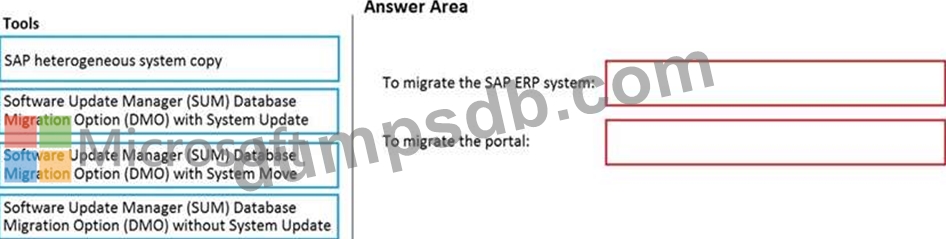
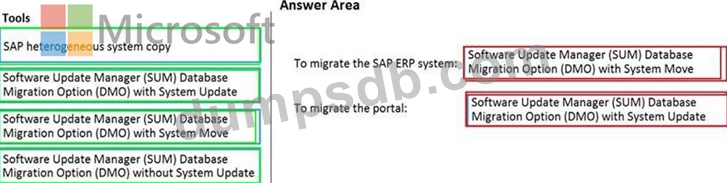
You have an on-premises SAP environment that runs on SUSE Linux Enterprise Server (SLES) servers and Oracle. The version of the SAP ERP system is 6.06 and the version of the portal is SAP NetWeaver 7.3. You need to recommend a migration strategy to migrate the SAP ERP system and the portal to Azure. The solution must be hosted on SAP HANA. What should you recommend? To answer, drag the appropriate tools to the correct components. Each tool may be used once, more than once, or not at all. You may need to drag the split bar between panes or scroll to view content. NOTE: Each correct selection is worth one point.
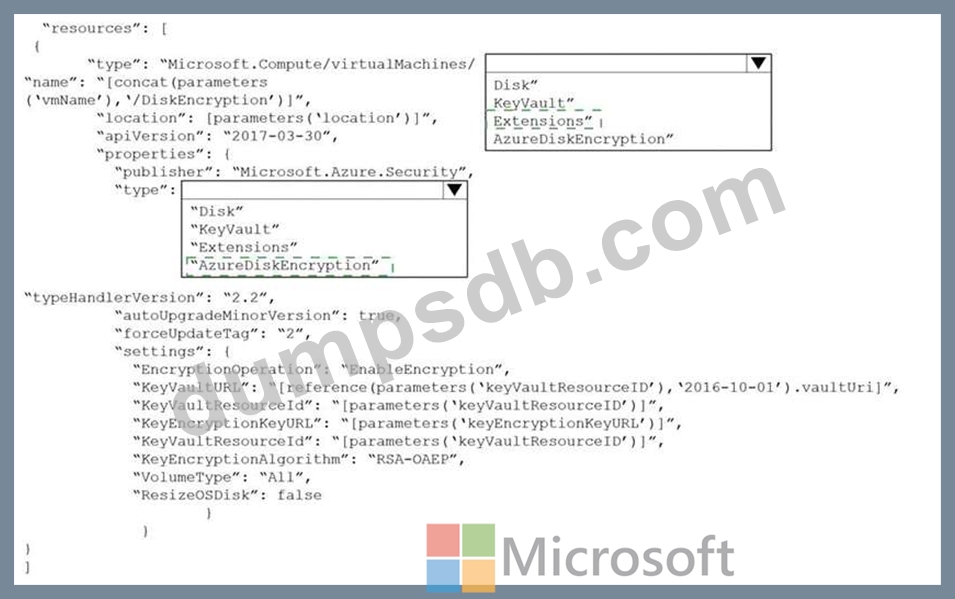
You have an SAP landscape on Azure. You plan to deploy a new SAP application server by using an Azure Resource Manager template. You need to ensure that all new servers are deployed with Azure Disk Encryption enabled. How should you complete the relevant component of the template? To answer, select the appropriate options in the answer area. NOTE: Each correct selection is worth one point.
Correct Answer:
Explanation Graphical user interface, text, application, email Description automatically generated Box 1: extensions Azure Disk Encryption can be enabled via Azure PowerShell or Azure CLI. That is normally seen in remediation. In a real-world scenario you would like to see a virtual machine during its creation include disk encryption process. This is technically possible thanks to Disk Encryption VM extension. Box 2: AzureDiskEncryption Example: "type": "Microsoft.Compute/virtualMachines/extensions", "name": "[concat(parameters('vmName'),'/diskEncryption')]", "apiVersion": "2019-03-01", "location": "[parameters('location')]", "dependsOn": [ "[resourceId('Microsoft.Compute/virtualMachines/', parameters('vmName'))]" ], "properties": { "publisher": "Microsoft.Azure.Security", "type": "AzureDiskEncryption", Reference: https://azsec.azurewebsites.net/2019/12/28/azure-disk-encryption-arm-template-for-windows-vm/