

Question 181
You have unrooted devices enrolled in Microsoft Intune as shown in the following table.
The devices are members of a group named Group1.
In Intune, you create a device compliance location that has the following configurations:
* Name: Network1
* IPv4 range: 192.168.0.0/16
In Intune, you create a device compliance policy for the Android platform. The policy has following configurations:
* Name: Policy1
* Device health: Rooted devices: Block
* Locations: Location: Network1
* Mark device noncompliant: Immediately
* Assigned: Group1
In Intune device compliance policy has the following configurations:
* Mark devices with no compliance policy assigned as: Compliant
* Enhanced jailbreak detection: Enabled
* Compliance status validity period (days): 20
For each of the following statements, select Yes if the statement is true. Otherwise, select No.
NOTE: Each correct selection is worth one point.


Question 182
Your network contains an Active Directory domain named constoso.com that is synced to Microsoft Azure Active Directory (Azure AD). All computers are enrolled in Microsoft Intune.
The domain contains the computers shown in the following table.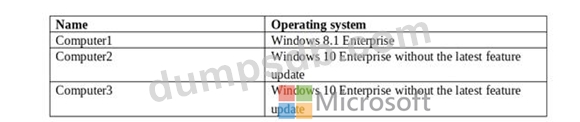
You are evaluating which Intune actions you can use to reset the computers to run Windows 10 Enterprise with the latest update.
Which computers can you reset by using each action? To answer, select the appropriate options in the answer area.
NOTE: Each correct selection is worth one point.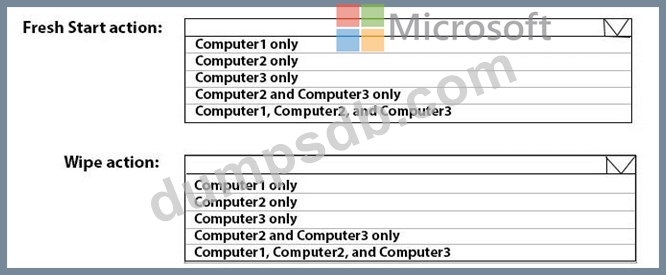

Question 183
You need to meet the technical requirements for the LEG department computers.
Which three actions should you perform in sequence? To answer, move the appropriate actions from the list of actions to the answer area and arrange them in the correct order.

Question 184
Your network contains an Active Directory domain named contoso.com that syncs to Azure Active Directory (Azure AD). The domain contains computers that run Windows 10. The computers are configured as shown in the following table.
All the computers are enrolled in Microsoft Intune.
You configure the following Maintenance Scheduler settings in the Default Domain Policy:
Turn off auto-restart for updates during active hours: Enabled
Active hours start: 08:00
Active hours end: 22:00
In Intune, you create a device configuration profile named Profile1 that has the following OMA-URI settings:
./Device/Vendor/MSFT/Policy/Config/ControlPolicyConflict/MDMWinsOverGP set to value 1
./Device/Vendor/MSFT/Policy/Config/Update/ActiveHoursStart set to value 9
./Device/Vendor/MSFT/Policy/Config/Update/ActiveHoursEnd set to value 21 You assign Profile to Group1.
How are the active hours configured on Computer1 and Computer2? To answer, select the appropriate options in the answer area.
NOTE: Each correct selection is worth one point.

Question 185
You have 200 computers that run Windows 10.
You need to create a provisioning package to configure the following tasks:
* Remove the Microsoft News and the Xbox Microsoft Store apps.
* Add a VPN connection to the corporate network.
Which two customizations should you configure? To answer, select the appropriate customizations in the answer area.
NOTE: Each correct selection is worth one point.
