Question 251
Your network contains an Active Directory domain that is synced to Microsoft Azure Active Directory (Azure AD). All computers are joined to the domain and registered to Azure AD.
The network contains a Microsoft System Center Configuration Manager (Current Batch) deployment that is configured for co-management with Microsoft Intune.
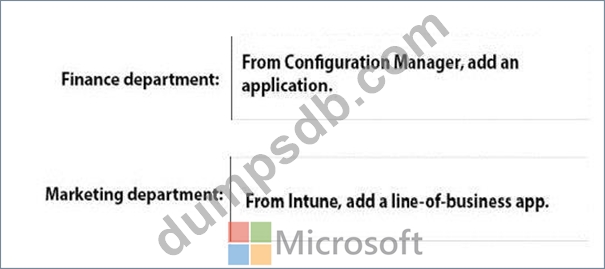
All the computers in the finance department are managed by using Configuration Manager. All the computers in the marketing department are managed by using Intune.
You install new computers for the users in the marketing department by using the Microsoft Deployment Toolkit (MDT).
You purchase an application named App1 that uses an MSI package.
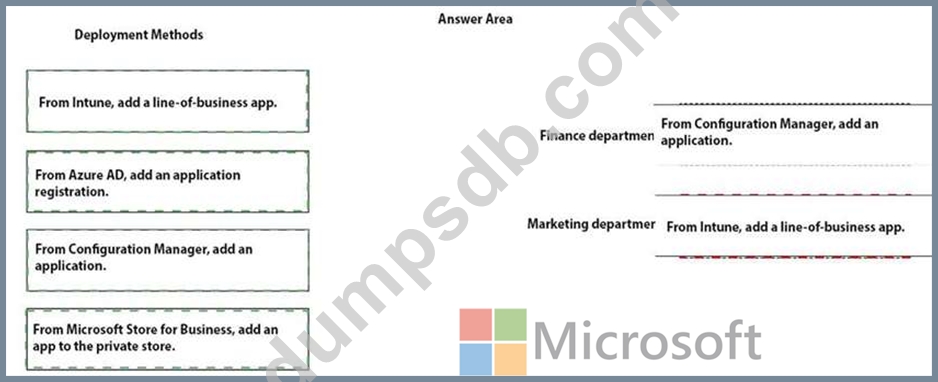
You need to install App1 on the finance department computers and the marketing department computers.
How should you deploy App1 to each department? To answer, drag the appropriate deployment methods to the correct departments. Each deployment method may be used once, more than once, or not at all. You may need to drag the split bat between panes or scroll to view content.
NOTE: Each correct selection is worth one point.
Question 252
Case Study 1 - Litware inc
Existing Environment
Current Business Model
The Los Angeles office has 500 developers. The developers work flexible hours ranging from 11:00 to 22:00. Litware has a Microsoft System Center 2012 R2 Configuration Manager deployment.
During discovery, the company discovers a process where users are emailing bank account information of its customers to internal and external recipients.
Current Environment
The network contains an Active Directory domain that is synced to Microsoft Azure Active Directory (Azure AD). The functional level of the forest and the domain is Windows Server 2012 R2. All domain controllers run Windows Server 2012 R2.
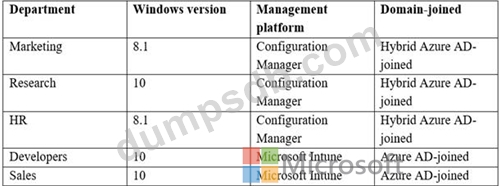
Litware has the computers shown in the following table.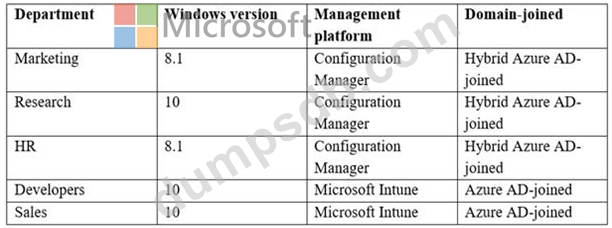
The development department uses projects in Azure DevOps to build applications. Most of the employees in the sales department are contractors. Each contractor is assigned a computer that runs Windows 10. At the end of each contract, the computer is assigned to different contractor.
Currently, the computers are re-provisioned manually by the IT department.
Problem Statements
Litware identifies the following issues on the network:
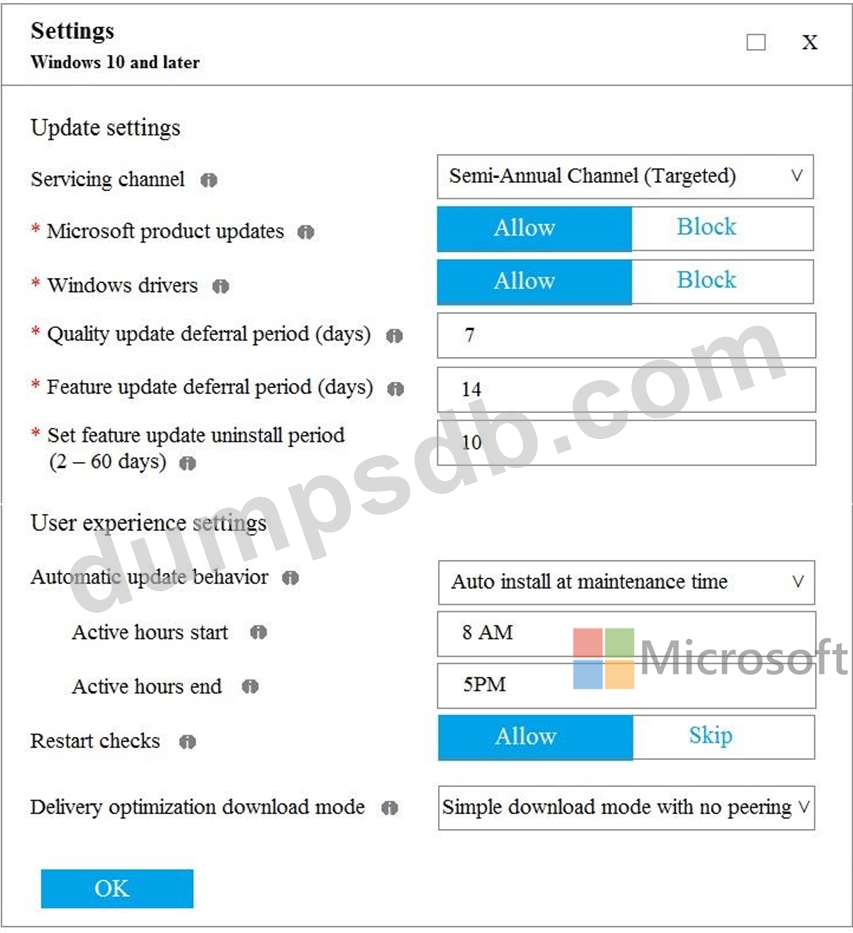
- Employees in the Los Angeles office report slow Internet performance when updates are downloading. The employees also report that the updates frequently consume considerable resources when they are installed. The Update settings are configured as shown in the Updates exhibit. (Click the Updates button.)
- Management suspects that the source code for the proprietary applications in Azure DevOps in being shared externally.
- Re-provisioning the sales department computers is too time consuming.
Requirements
Business Goals
Litware plans to transition to co-management for all the company-owned Windows 10 computers.
Whenever possible, Litware wants to minimize hardware and software costs.
Device Management Requirements
Litware identifies the following device management requirements:
- Prevent the sales department employees from forwarding email that contains bank account information.
- Ensure that Microsoft Edge Favorites are accessible from all computers to which the developers sign in.
- Prevent employees in the research department from copying patented information from trusted applications to untrusted applications.
Technical Requirements
Litware identifies the following technical requirements for the planned deployment:
- Re-provision the sales department computers by using Windows AutoPilot.
- Ensure that the projects in Azure DevOps can be accessed from the corporate network only.
- Ensure that users can sign in to the Azure AD-joined computers by using a PIN. The PIN must expire every 30 days.
- Ensure that the company name and logo appears during the Out of Box Experience (OOBE) when using Windows AutoPilot.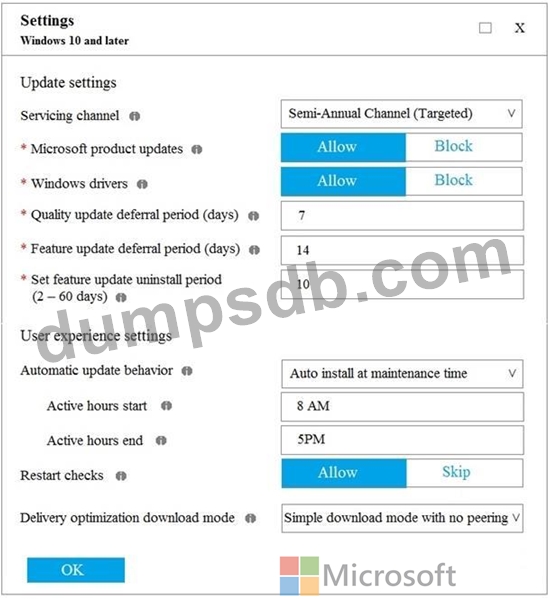
What should you use to meet the technical requirements for Azure DevOps?
Question 253
You have 200 computers that run Windows 10. The computers are joined to Microsoft Azure Active
Directory (AD) and enrolled in Microsoft Intune.
You need to enable self-service password reset on the sign-in screen.
Which settings should you configure from the Microsoft Intune blade?

Question 254
Your company has a computer named Computer1 that runs Windows 10.
Computer1 was used by a user who left the company.
You plan to repurpose Computer1 and assign the computer to a new user. You need to redeploy Computer1 by using Windows AutoPilot.
Which three actions should you perform in sequence? To answer, move the appropriate actions from the list of actions to the answer area and arrange them in the correct order.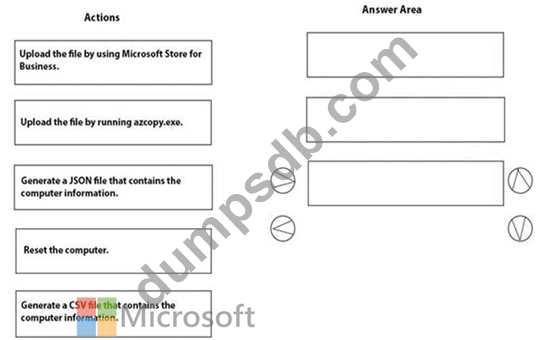

Question 255
Your network contains an Active Directory domain that is synced to Microsoft Azure Active Directory (Azure AD).
You have a Microsoft Office 365 subscription. All computers are joined to the domain and have the latest Microsoft OneDrive sync client (OneDrive.exe) installed.
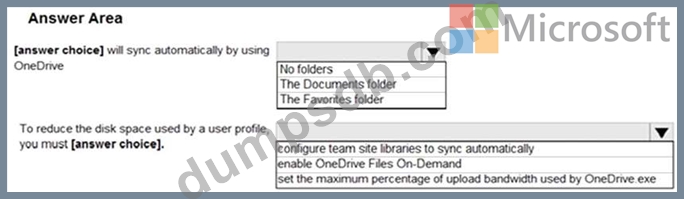
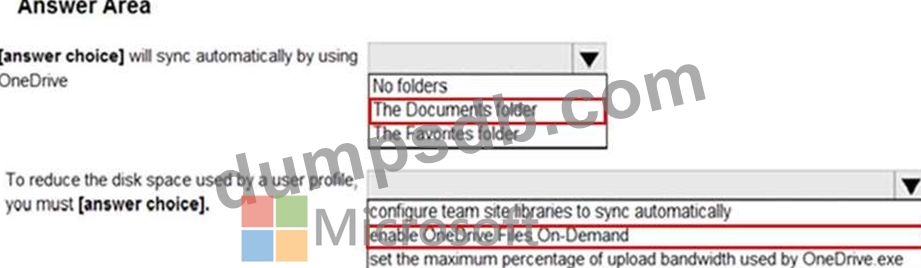
On all the computers, you configure the OneDrive settings as shown in the following exhibit.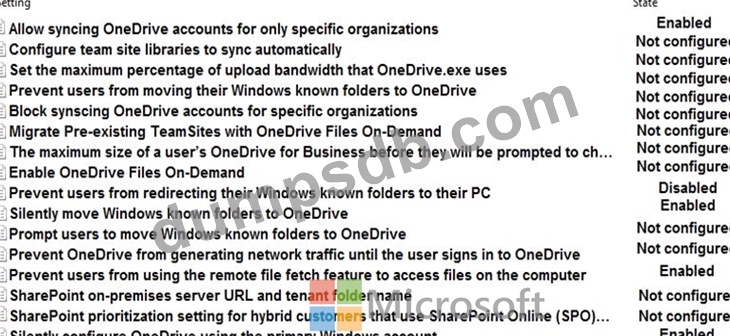
Use the drop-down menus to select the answer choice that completes each statement based on the information presented in the graphic.
NOTE: Each correct selection is worth one point.