Question 46
You have unrooted devices enrolled in Microsoft Intune as shown in the following table.
The devices are members of a group named Group1.
In Intune, you create a device compliance location that has the following configurations:
* Name: Network1
* IPv4 range: 192.168.0.0/16
In Intune, you create a device compliance policy for the Android platform. The policy has following configurations:
* Name: Policy1
* Device health: Rooted devices: Block
* Locations: Location: Network1
* Mark device noncompliant: Immediately
* Assigned: Group1
In Intune device compliance policy has the following configurations:
* Mark devices with no compliance policy assigned as: Compliant
* Enhanced jailbreak detection: Enabled
* Compliance status validity period (days): 20
For each of the following statements, select Yes if the statement is true. Otherwise, select No.
NOTE: Each correct selection is worth one point.

Question 47
You have an Azure Active Directory (Azure AD) tenant that contains a user named User1. User1 has the device shown in the following table.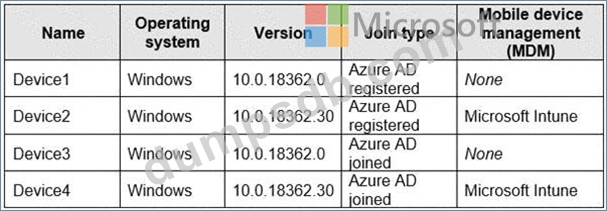
Enterprise State Roaming is configured for User1.
User1 signs in to Device4 and changes the desktop.
You need to identify on which devices User1 will have a changed desktop.
Which devices should you identify?
Question 48
Note: This question is part of a series of questions that present the same scenario. Each question in the series contains a unique solution that might meet the stated goals. Some question sets might have more than one correct solution, while others might not have a correct solution. After you answer a question in this section, you will NOT be able to return to it. As a result, these questions will not appear in the review screen.
You need to ensure that feature and quality updates install automatically during a maintenance window.
Solution: From the Maintenance Scheduler settings, you configure Automatic Maintenance Activation Boundary.
Does this meet the goal?
Question 49
Your network contains an Active Directory domain named constoso.com that is synced to Microsoft Azure Active Directory (Azure AD). All computers are enrolled in Microsoft Intune.
The domain contains the computers shown in the following table.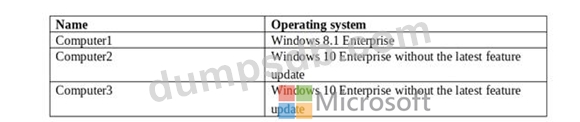
You are evaluating which Intune actions you can use to reset the computers to run Windows 10 Enterprise with the latest update.
Which computers can you reset by using each action? To answer, select the appropriate options in the answer area.
NOTE: Each correct selection is worth one point.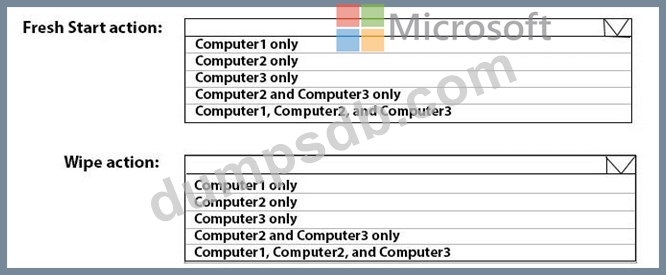

Question 50
You have a Microsoft Intune subscription.
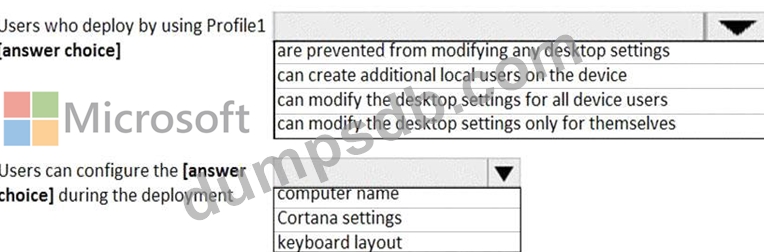
You create the Windows Autopilot deployment profile-shown in the following exhibit.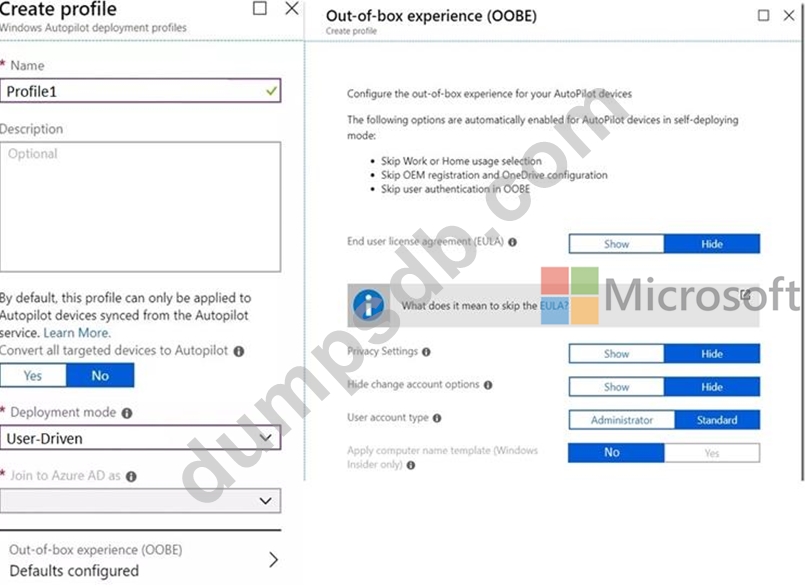
Use the drop-down menus to select the answer choice that completes each statement based on the information presented in the graphic.
NOTE: Each correct selection is worth one point.