

Question 101
You need to meet the technical requirements for Windows AutoPilot.
Which two settings should you configure from the Azure Active Directory blade? To answer, select the appropriate settings in the answer area.
NOTE: Each correct selection is worth one point.

Question 102
You have a Microsoft 365 subscription.
You need to configure access to Microsoft Office 365 for unmanaged devices. The solution must meet the following requirements:
Allow only the Microsoft Intune Managed Browser to access Office 365 web interfaces.
Ensure that when users use the Intune Managed Browser to access Office 365 web interfaces, they can only copy data to applications that are managed by the company.
Which two settings should you configure from the Microsoft Intune blade? To answer, select the appropriate settings in the answer area.
NOTE: Each correct selection is worth one point.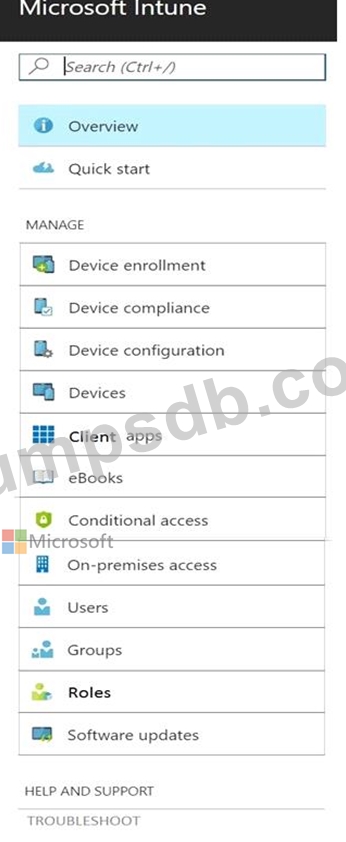

Question 103
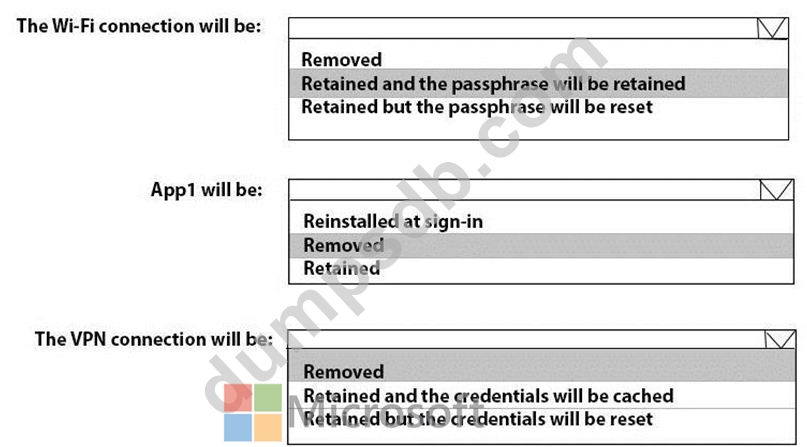
You have computers that run Windows 10 and are configured by using Windows AutoPilot.
A user performs the following tasks on a computer named Computer1:
* Creates a VPN connection to the corporate network
* Installs a Microsoft Store app named App1
* Connects to a Wi-Fi network
You perform a Windows AutoPilot Reset on Computer1.
What will be the state of the computer when the user signs in? To answer, select the appropriate options in the answer area.
NOTE: Each correct selection is worth one point.

Question 104
Your network contains an Active Directory domain.
You install the Microsoft Deployment Toolkit (MDT) on a server
You have a custom image of Windows 10.
You need to deploy the image to 100 devices by using MDT.
Which three actions should you perform in sequence? To answer, move the appropriate actions from the List of actions to the answer area and arrange them in the correct order.

Question 105
You have 200 computers that run Windows 10. The computers are joined to Microsoft Azure Active Directory (AD) and enrolled in Microsoft Intune.
You need to enable self-service password reset on the sign-in screen.
Which settings should you configure from the Microsoft Intune blade?