Question 171
You have the devices shown in the following table.
You plan to implement Desktop Analytics.
You need to identify which devices support the following:
Compatibility insights
App usage insights
Which devices should you identify? To answer, select the appropriate options in the answer area.
NOTE: Each correct selection is worth one point.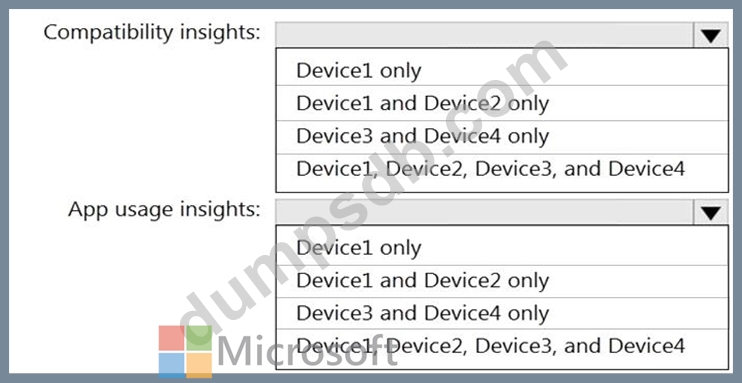

Question 172
Your network contains an on-premises Active Directory domain named contoso.com that syncs to Azure Active Directory (Azure AD).
You have the Windows 10 devices shown in the following table.
You need to ensure that you can use co-management to manage all the Windows 10 devices.
Which two actions should you perform? Each correct answer presents part of the solution.
NOTE: Each correct selection is worth one point.
Question 173
Your company has a Microsoft 365 subscription.
A new user named Admin1 is responsible for deploying Windows 10 to computers and joining the computers to Microsoft Azure Active Directory (Azure AD).
Admin1 successfully joins computers to Azure AD.
Several days later, Admin1 receives the following error message: "This user is not authorized to enroll. You can try to do this again or contact your system administrator with the error code (0x801c0003)." You need to ensure that Admin1 can join computers to Azure AD and follow the principle of least privilege.
Question 174
You have a Microsoft 365 subscription.
You plan to enroll devices in Microsoft Endpoint Manager that have the platforms and versions shown in the following table.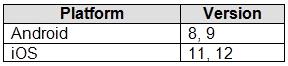
You need to configure device enrollment to meet the following requirements:
Ensure that only devices that have approved platforms and versions can enroll in Endpoint Manager.
Ensure that devices are added to Microsoft Azure Active Directory (Azure AD) groups based on a selection made by users during the enrollment.
Which device enrollment setting should you configure for each requirement? To answer, select the appropriate options in the answer area.
NOTE: Each correct selection is worth one point.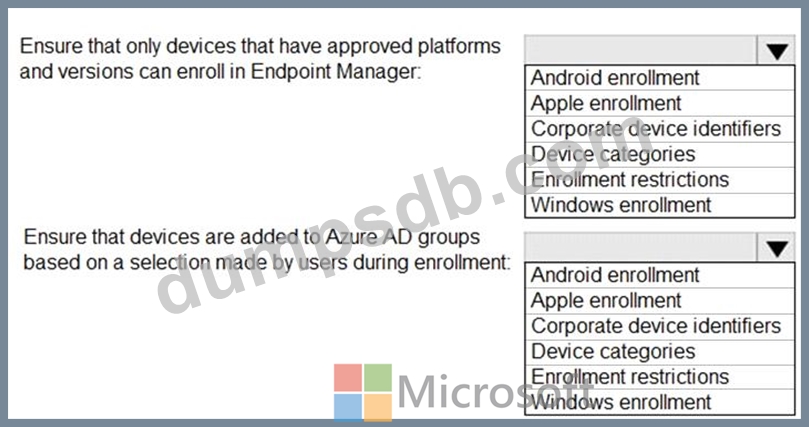

Question 175
Your network contains an Active Directory domain that is synced to Microsoft Azure Active Directory (Azure AD).
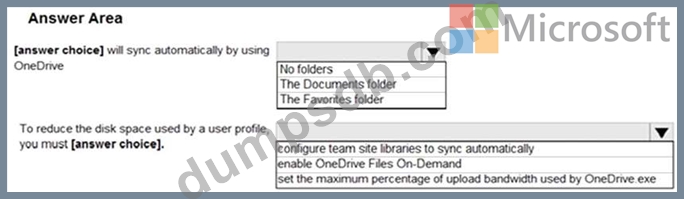
You have a Microsoft Office 365 subscription. All computers are joined to the domain and have the latest Microsoft OneDrive sync client (OneDrive.exe) installed.
On all the computers, you configure the OneDrive settings as shown in the following exhibit.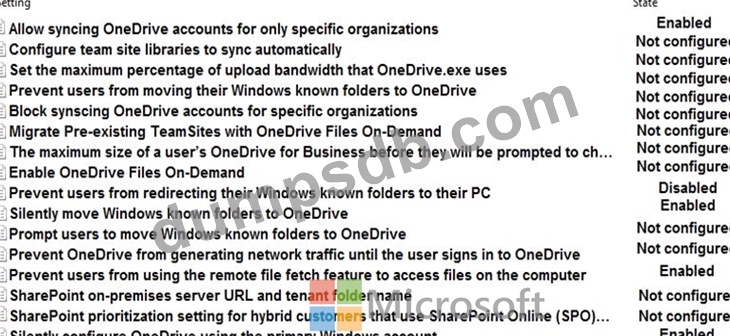
Use the drop-down menus to select the answer choice that completes each statement based on the information presented in the graphic.
NOTE: Each correct selection is worth one point.