

Question 226
You have computers that run Windows 10 as shown in the following table.
Computer2 and Computer3 are enrolled in Microsoft Intune.
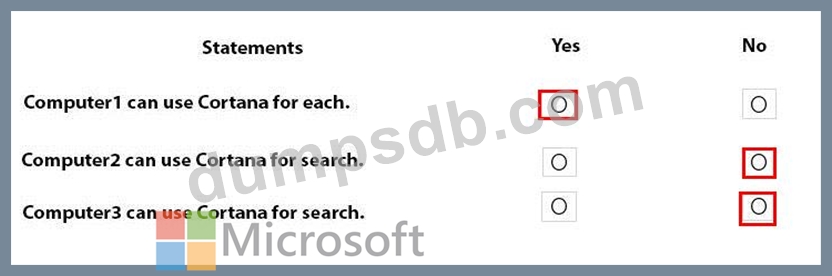
In a Group Policy object (GPO) linked to the domain, you enable the Computer Configuration/Administrative Templates/Windows Components/Search/Allow Cortana setting.
In an Intune device configuration profile, you configure the following:
Device/Vendor/MSFT/Policy/Config/ControlPolicyConflict/MDMWinsOverGP to a value of 1 Experience/AllowCortana to a value of 0.
Each of the following statement, select Yes if the statement is true. Otherwise, select No.
NOTE: Each correct selection is worth one point.
Question 227
You have a Microsoft 365 subscription.
All computers are enrolled in Microsoft Intune.
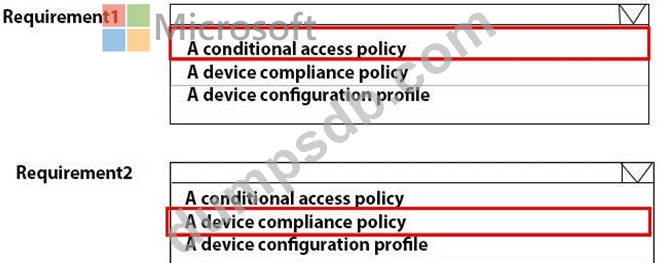
You have business requirements for securing your Windows 10 environment as shown in the following table.
What should you implement to meet each requirement? To answer, select the appropriate options in the answer area.
NOTE: Each correct selection is worth one point.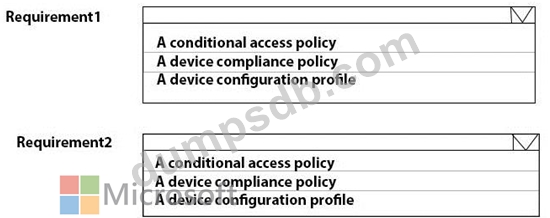
Question 228
Your network contains an Active Directory domain. Active Directory is synced with Microsoft Azure Active Directory (Azure AD).
There are 500 domain-joined computers that run Windows 10. The computers are joined to Azure AD and enrolled in Microsoft Intune.
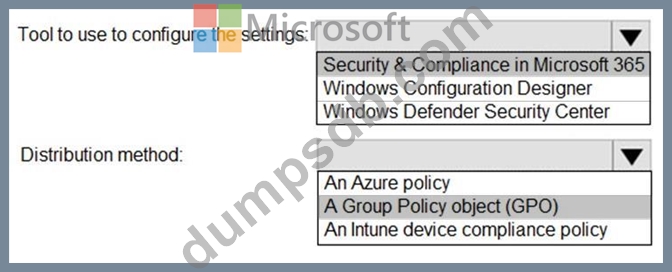
You plan to implement Windows Defender Exploit Guard.
You need to create a custom Windows Defender Exploit Guard policy, and then distribute the policy to all the computers.
What should you do? To answer, select the appropriate options in the answer area.
NOTE: Each correct selection is worth one point.

Question 229
Case Study 2 - Contoso Ltd
Overview
Contoso, Ltd, is a consulting company that has a main office in Montreal and two branch offices in Seattle and New York.
Contoso has the users and computers shown in the following table.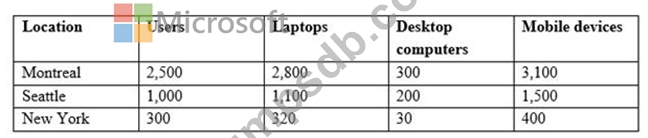
The company has IT, human resources (HR), legal (LEG), marketing (MKG) and finance (FIN) departments.
Contoso uses Microsoft Store for Business and recently purchased a Microsoft 365 subscription.
The company is opening a new branch office in Phoenix. Most of the users in the Phoenix office will work from home.
Existing Environment
The network contains an Active Directory domain named contoso.com that is synced to Microsoft Azure Active Directory (Azure AD).
All member servers run Windows Server 2016. All laptops and desktop computers run Windows
10 Enterprise.
The computers are managed by using Microsoft System Center Configuration Manager. The mobile devices are managed by using Microsoft Intune.
The naming convention for the computers is the department acronym, followed by a hyphen, and then four numbers, for example, FIN-6785. All the computers are joined to the on-premises Active Directory domain.
Each department has an organization unit (OU) that contains a child OU named Computers. Each computer account is in the Computers OU of its respective department.
Intune Configuration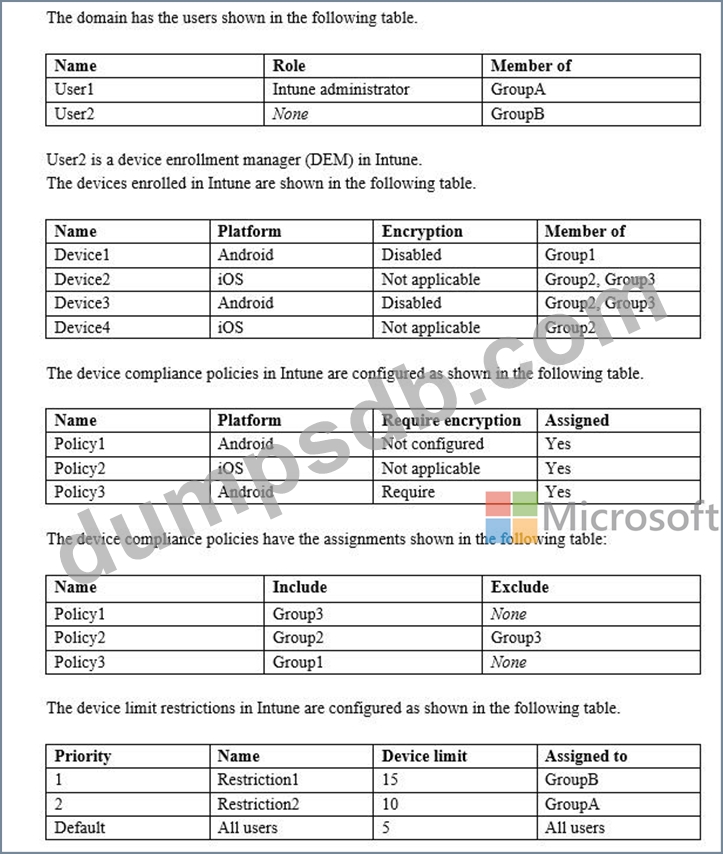
Requirements
Planned Changes
Contoso plans to implement the following changes:
- Provide new computers to the Phoenix office users. The new computers have Windows 10 Pro preinstalled and were purchased already.
- Start using a free Microsoft Store for Business app named App1.
- mplement co-management for the computers.
Technical Requirements
Contoso must meet the following technical requirements:
- Ensure that the users in a group named Group4 can only access Microsoft Exchange Online from devices that are enrolled in Intune.
- Deploy Windows 10 Enterprise to the computers of the Phoenix office users by using Windows Autopilot.
- Monitor the computers in the LEG department by using Windows Analytics.
- Create a provisioning package for new computers in the HR department.
- Block iOS devices from sending diagnostic and usage telemetry data.
- Use the principle of least privilege whenever possible.
- Enable the users in the MKG department to use App1.
- Pilot co-management for the IT department.
Hotspot Question
You are evaluating which devices are compliant.
For each of the following statements, select Yes if the statement is true. Otherwise, select No.
NOTE: Each correct selection is worth one point.

Question 230
Note: This question is part of a series of questions that present the same scenario. Each question in the series contains a unique solution that might meet the stated goals. Some question sets might have more than one correct solution, while others might not have a correct solution.
After you answer a question in this section, you will NOT be able to return to it. As a result, these questions will not appear in the review screen.
Your company uses Windows Autopilot to configure the computer settings of computers issued to users.
A user named User1 has a computer named Computer1 that runs Windows 10. User1 leaves the company.
You plan to transfer the computer to a user named User2.
You need to ensure that when User2 first starts the computer, User2 is prompted to select the language setting and to agree to the license agreement.
Solution: You create a new Windows AutoPilot self-deploying deployment profile.
Does this meet the goal?