Question 61
You have a Microsoft 365 subscription.
You plan to enroll devices in Microsoft Endpoint Manager that have the platforms and versions shown in the following table.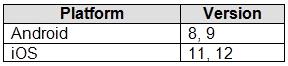
You need to configure device enrollment to meet the following requirements:
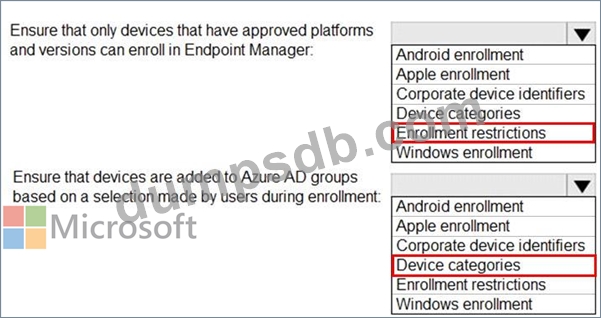
Ensure that only devices that have approved platforms and versions can enroll in Endpoint Manager.
Ensure that devices are added to Microsoft Azure Active Directory (Azure AD) groups based on a selection made by users during the enrollment.
Which device enrollment setting should you configure for each requirement? To answer, select the appropriate options in the answer area.
NOTE: Each correct selection is worth one point.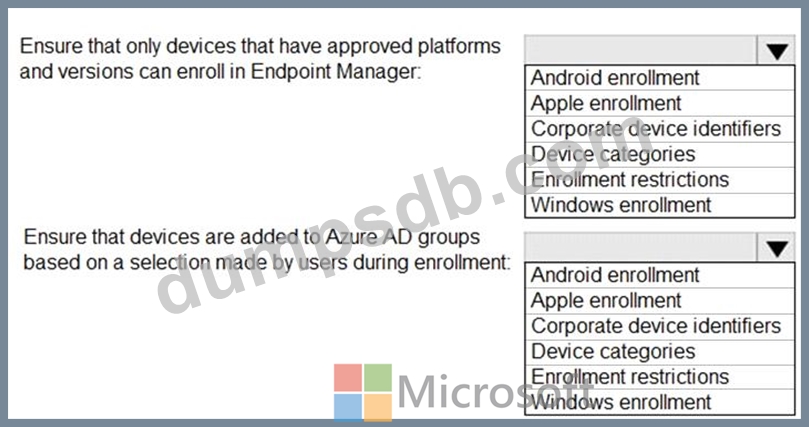
Question 62
Your company has a main office and six branch offices. The branch offices connect to the main office by using a WAN link. All offices have a local Internet connection and a Hyper-V host cluster.
The company has a Microsoft System Center Configuration Manager deployment. The main office is the primary site. Each branch has a distribution point. All computers that run Windows 10 are managed by using both Configuration Manager and Microsoft Intune.
You plan to deploy the latest build of Microsoft Office 365 ProPlus to all the computers.
You need to minimize the amount of network traffic on the company's Internet links for the planned deployment.
What should you include in the deployment plan?
Question 63
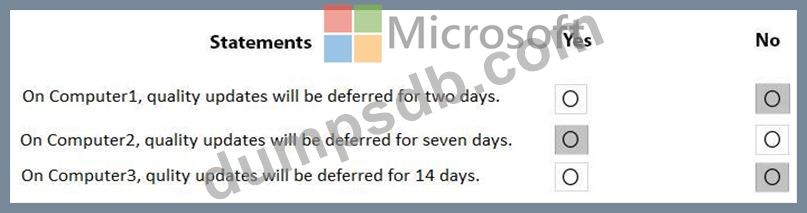
You use Microsoft Intune to manage Windows updates.
You have computers that run Windows 10. The computers are in a workgroup and are enrolled in Intune. The computers are configured as shown in the following table.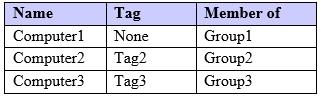
On each computer, the Select when Quality Updates are received Group Policy setting is configured as shown in the following table.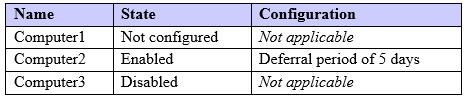
You have Windows 10 update rings in Intune as shown in the following table.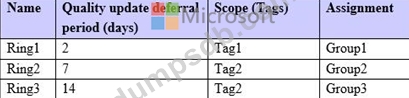
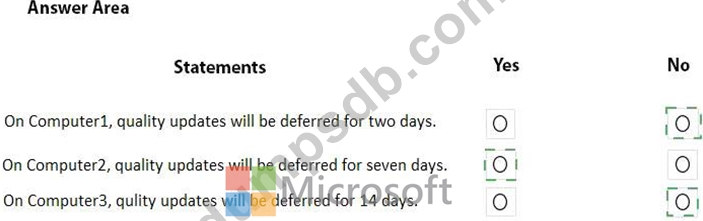
For each of the following statements, select Yes if the statement is true. Otherwise, select No.
NOTE: Each correct selection is worth one point.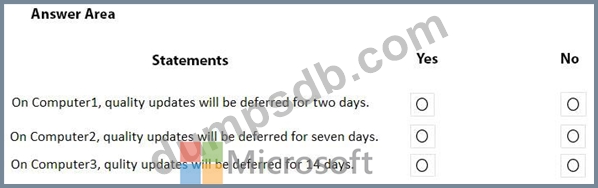
Question 64
Your network contains an Active Directory domain. Active Directory is synced with Microsoft Azure Active Directory (Azure AD).
There are 500 domain-joined computers that run Windows 10. The computers are joined to Azure AD and enrolled in Microsoft Intune.
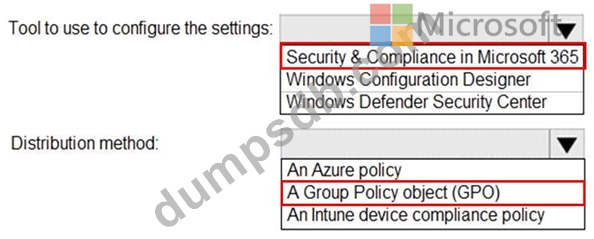
You plan to implement Windows Defender Exploit Guard.
You need to create a custom Windows Defender Exploit Guard policy, and then distribute the policy to all the computers.
What should you do? To answer, select the appropriate options in the answer area.
NOTE: Each correct selection is worth one point.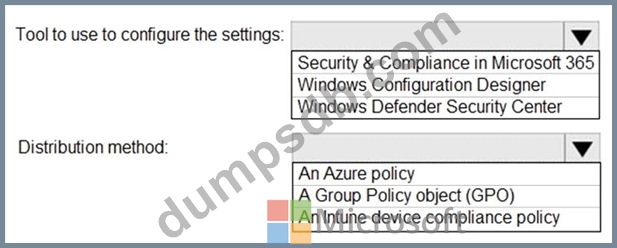
Question 65
You have a Microsoft Azure Active Directory (Azure AD) tenant named contoso.com. All Windows 10 devices are enrolled in Microsoft Intune.
You configure the following settings in Windows Information Protection (WIP):
* Protected apps: App1
* Exempt apps: App2
* Windows Information Protection mode: Silent
App1, App2, and App3 use the same file format.
You create a file named File1 in App1.
You need to identify which apps can open File1.
What apps should you identify? To answer, select the appropriate options in the answer area, NOTE: Each correct selection is worth one point.