

Question 121
Note: This question is part of a series of questions that present the same scenario. Each question in the series contains a unique solution that might meet the stated goals. Some question sets might have more than one correct solution, while others might not have a correct solution.
After you answer a question in this section, you will NOT be able to return to it. As a result, these questions will not appear in the review screen.
Your company uses Windows Update for Business.
The research department has several computers that have specialized hardware and software installed.
You need to prevent the video drivers from being updated automatically by using Windows Update.
Solution: From the Windows Update settings in a Group Policy object (GPO), you enable Do not include drivers with Windows Updates.
Does this meet the goal?
Question 122
Your network contains an Active Directory domain that is synced to Microsoft Azure Active Directory (Azure AD).
You have a Microsoft Office 365 subscription. All computers are joined to the domain and have the latest Microsoft OneDrive sync client (OneDrive.exe) installed.
On all the computers, you configure the OneDrive settings as shown in the following exhibit.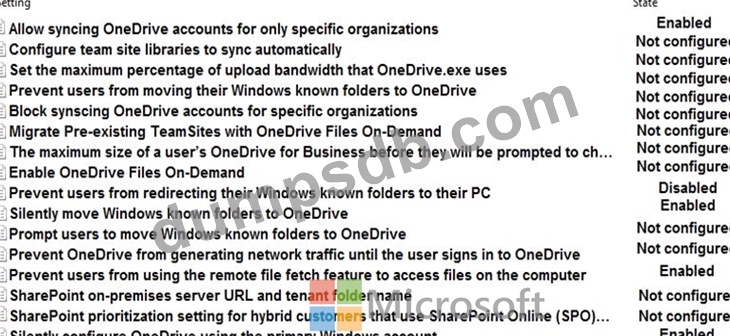
Use the drop-down menus to select the answer choice that completes each statement based on the information presented in the graphic.
NOTE: Each correct selection is worth one point.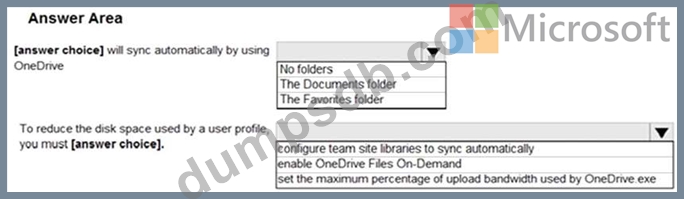

Question 123
You have two computers that run Windows 10. The computers are enrolled in Microsoft Intune as shown in the following table.
Windows 10 update rings are defined in Intune as shown in the following table.
You assign the update rings as shown in the following table.
What is the effect of the configurations on Computer1 and Computer2? To answer, select the appropriate options in the answer area.
NOTE: Each correct selection is worth one point.

Question 124
Your network contains an Active Directory domain. The functional level of the forest and the domain is Windows Server 2012 R2.
The domain contains 500 computers that run Windows 10. All the computers are managed by using Microsoft System Center 2012 R2 Configuration Manager.
You need to enable co-management.
What should you do first?
Question 125
Your company has a Microsoft Azure Active Directory (Azure AD) tenant and computers that run Windows
10.
The company uses Microsoft Intune to manage the computers.
The Azure AD tenant has the users shown in the following table.
The device type restrictions in Intune are configured as shown in the following table:
User3 is a device enrollment manager (DEM) in Intune.
For each of the following statements, select Yes if the statement is true. Otherwise, select No.
NOTE: Each correct selection is worth one point.

