Question 231
Your network contains an Active Directory domain that is synced to Microsoft Azure Active Directory (Azure AD). All computers are joined to the domain and registered to Azure AD.
The network contains a Microsoft System Center Configuration Manager (Current Batch) deployment that is configured for co-management with Microsoft Intune.
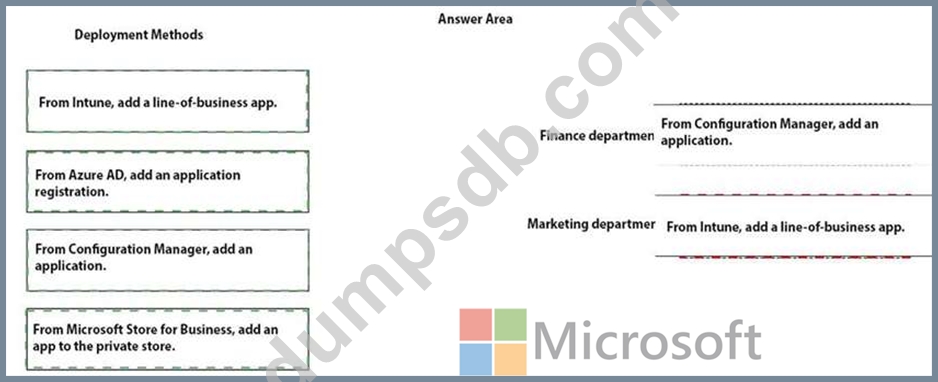
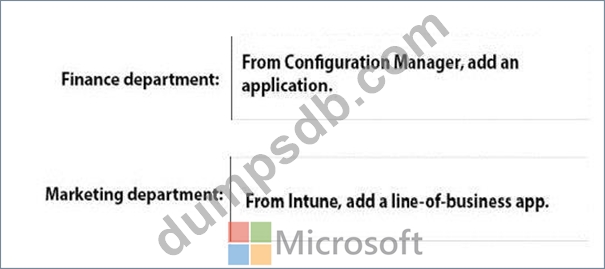
All the computers in the finance department are managed by using Configuration Manager. All the computers in the marketing department are managed by using Intune.
You install new computers for the users in the marketing department by using the Microsoft Deployment Toolkit (MDT).
You purchase an application named App1 that uses an MSI package.
You need to install App1 on the finance department computers and the marketing department computers.
How should you deploy App1 to each department? To answer, drag the appropriate deployment methods to the correct departments. Each deployment method may be used once, more than once, or not at all. You may need to drag the split bat between panes or scroll to view content.
NOTE: Each correct selection is worth one point.
Question 232
You have a Microsoft Azure Active Directory (Azure AD) tenant named contoso.com. All Windows 10 devices are enrolled in Microsoft Intune.
You configure the following settings in Windows Information Protection (WIP):
Protected apps: App1
Exempt apps: App2
Windows Information Protection mode: Silent
App1, App2, and App3 use the same file format.
You create a file named File1 in App1.
You need to identify which apps can open File1.
What apps should you identify? To answer, select the appropriate options in the answer area, NOTE: Each correct selection is worth one point.

Question 233
You have computers that run Windows 10 Pro. The computers are joined to Microsoft Azure Active Directory (Azure AD) and enrolled in Microsoft Intune.
You need to upgrade the computers to Windows 10 Enterprise.
What should you configure in Intune?

Question 234
Note: This question is part of a series of questions that present the same scenario. Each question in the series contains a unique solution that might meet the stated goals. Some question sets might have more than one correct solution, while others might not have a correct solution.
After you answer a question in this section, you will NOT be able to return to it. As a result, these questions will not appear in the review screen.
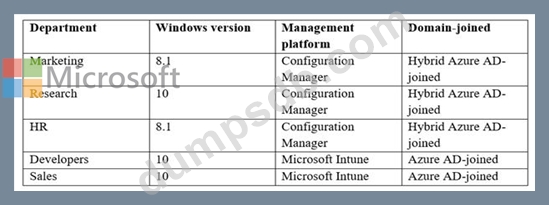
You have a computer that runs Windows 8.1.
Two days ago, you upgraded the computer to Windows 10.
You need to downgrade the computer to Windows 8.1.
Solution: From Windows Update in the Settings app, you use the Advanced options.
Does this meet the goal?
Question 235
You have two computers that run Windows 10. The computers are enrolled in Microsoft Intune as shown in the following table.
Windows 10 update rings are defined in Intune as shown in the following table.
You assign the update rings as shown in the following table.
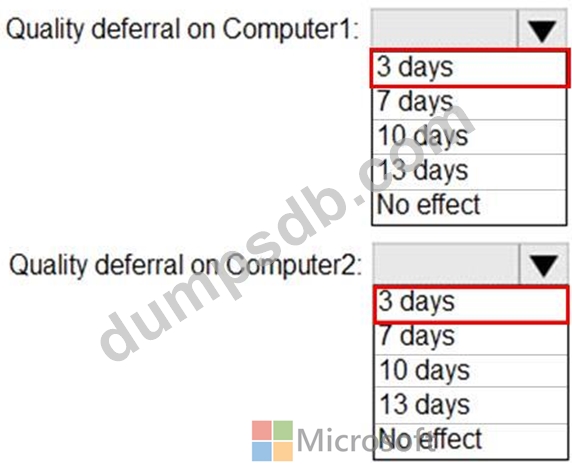
What is the effect of the configurations on Computer1 and Computer2? To answer, select the appropriate options in the answer area.
NOTE: Each correct selection is worth one point.