MS-101 Premium Dumps
Latest MS-101 Exam Premium Dumps provide by TrainingQuiz.com to help you Passing MS-101 Exam! TrainingQuiz.com offers the updated MS-101 exam dumps, the TrainingQuiz.com MS-101 exam questions has been updated to correct Answer. Get the latest TrainingQuiz.com MS-101 pdf dumps with Exam Engine here:
(408 Q&As Dumps, 40%OFF Special Discount: DumpsDB)

Question 226
You have a Microsoft 365 subscription.
Some users have iPads that are managed by your company.
You plan to prevent the ipad users from copying corporate data in Microsoft Word and pasting the data into other applications.
What should you create?
Question 227
From the Security & Compliance admin center, you create a content export as shown in the exhibit. (Click the Exhibit tab.)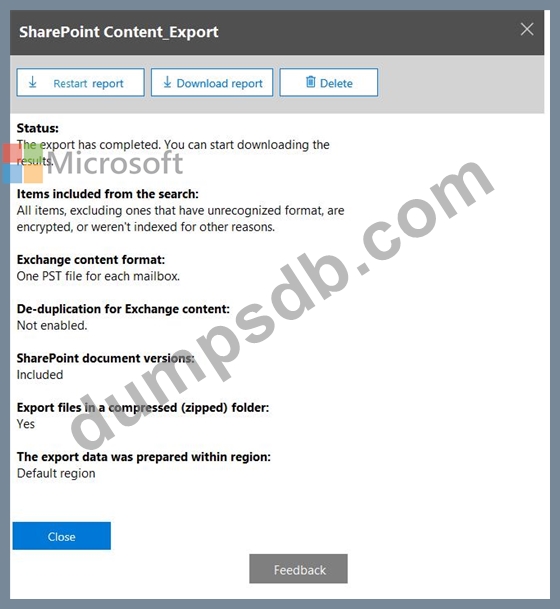
What will be excluded from the export?
Question 228
Your network contains an Active Directory forest named contoso.com that is synced to Microsoft Azure Active Directory (Azure AD).
You use Microsoft System Center Configuration Manager (Current Branch) for device management.
You have the Windows 10 devices shown in the following table.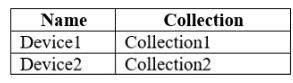
You configure Configuration Manager co-management as follows:
* Automatic enrollment in Intune: Pilot
* Pilot collection: Collection2
You configure co-management workloads as shown in the following exhibit.
For each of the following statements, select Yes if the statement is true. Otherwise, select No.
NOTE: Each correct selection is worth one point.

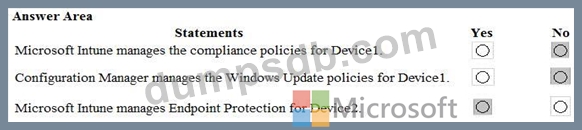
Question 229
Your company has a Microsoft 365 subscription that uses an Azure Active Directory (Azure AD) tenant named contoso.com.
The company purchases a cloud app named App1 that supports Microsoft (loud App Security monitoring.
You configure App1 to be available from the My Apps portal.
You need to ensure that you can monitor App1 from Cloud App Security
What should you do?
Question 230
You have a Microsoft 365 subscription that uses a default domain named contoso.com.
Three files were created on February 1, 2019, as shown in the following table.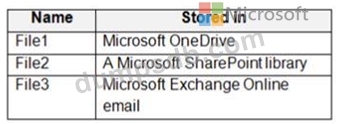
On March 1, 2019, you create two retention labels named Label1 and Label2.
The settings for Lable1 are configured as shown in the Label1 exhibit. (Click the Label1 tab.)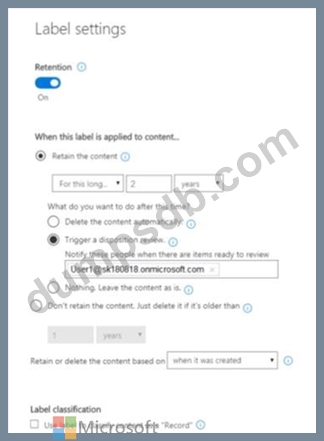
The settings for Lable2 are configured as shown in the Label2 exhibit. (Click the Label2 tab.)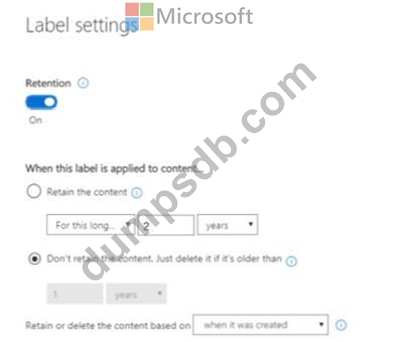
You apply the retention labels to Exchange email, SharePoint sites, and OneDrive accounts.
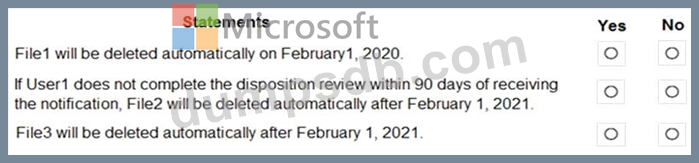
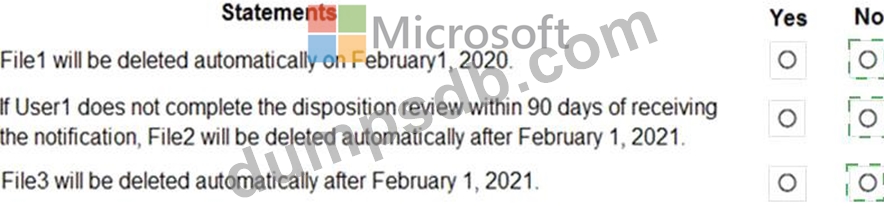
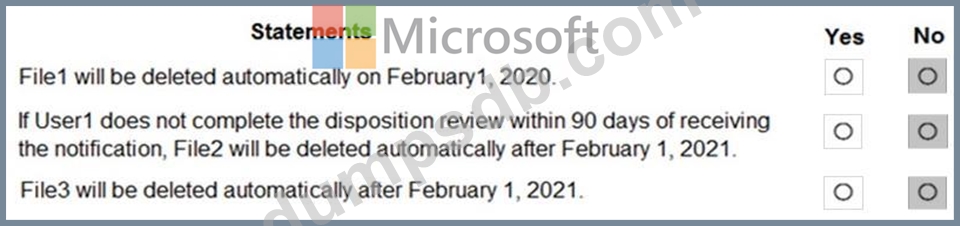
For each of the following statements, select Yes if the statement is true. Otherwise, select No.
NOTE: Each correct selection is worth one point.