Question 321
You have a Microsoft 365 tenant.
Company policy requires that all Windows 10 devices meet the following minimum requirements:
Require complex passwords.
Require the encryption of data storage devices.
Have Microsoft Defender Antivirus real-time protection enabled.
You need to prevent devices that do not meet the requirements from accessing resources in the tenant.
Which two components should you create? Each correct answer presents part of the solution.
NOTE: Each correct selection is worth one point.
Question 322
You are reviewing alerts in the Microsoft Defender XDR portal.
How long are the alerts retained in the portal?

Question 323
You have a Microsoft 365 tenant and a LinkedIn company page.
You plan to archive data from the LinkedIn page to Microsoft 365 by using the LinkedIn connector.
Where can you store data from the LinkedIn connector?
Question 324
You have a Microsoft 365 subscription that contains the users shown in the following table.
You have the named locations shown in the following table.
You create a conditional access policy that has the following configurations:
* Users or workload identities:
o Include: Group1
o Exclude: Group2
* Cloud apps or actions: Include all cloud apps
* Conditions:
o Include: Any location
o Exclude: Montreal
* Access control: Grant access, Require multi-factor authentication
User1 is on the multi-factor authentication (MFA) blocked users list.
For each of the following statements, select Yes if the statement is true. Otherwise, select No.
NOTE: Each correct selection is worth one point.


Question 325
HOTSPOT
You have a Microsoft 365 E5 subscription that contains a Microsoft SharePoint Online site named Site1 and the users shown in the following table.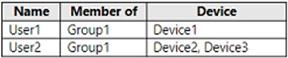
The devices are configured as shown in the following table.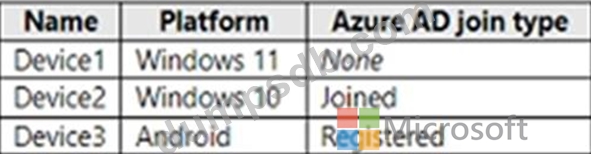
You have a Conditional Access policy named CAPolicy1 that has the following settings:
1.Assignments
* Users or workload identities: Group1
* Cloud apps or actions: Office 365 SharePoint Online
* Conditions
- Filter for devices: Exclude filtered devices from the policy
- Rule syntax: device.displayName -startsWith "Device"
2.Access controls
* Grant
- Grant: Block access
* Session: 0 controls selected
3.Enable policy: On
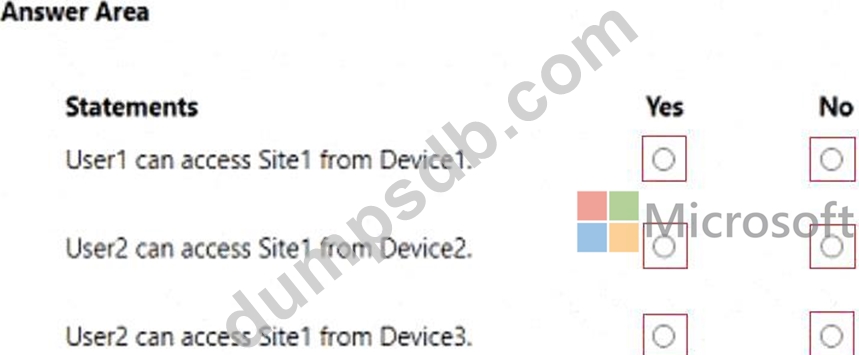
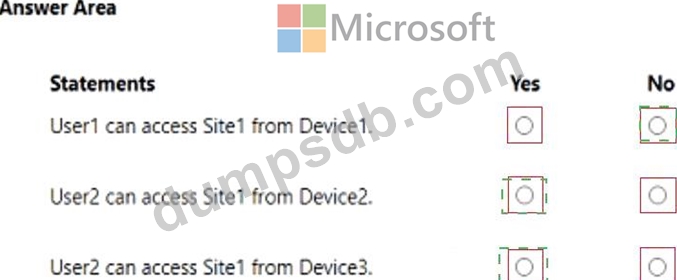
For each of the following statements, select Yes if the statement is true. Otherwise, select No.
NOTE: Each correct selection is worth one point.