

Question 371
You have a Microsoft 365 E5 tenant that contains the users shown in the following table.
The tenant contains the devices shown in the following table.
You have the apps shown in the following table.
You plan to use Microsoft Endpoint Manager to manage the apps for the users.
For each of the following statements, select Yes if the statement is true. Otherwise, select No.
NOTE: Each correct selection is worth one point.


Question 372
You have a Microsoft 365 E5 subscription that contains two users named [email protected] and [email protected] and a Microsoft SharePoint site named Site1.
You create a data loss prevention {DLP) policy named DLP1 that has the advanced DLP rules shown in the following table.
DLP1 is applied to Site1.
You have the files shown in the following table.
You copy the files to Site1.
low many notifications will each user receive? To answer, select the appropriate options in the answer area.
NOTE: Each correct selection is worth one point.

Question 373
You have a Microsoft 365 E5 subscription that uses Microsoft intune. The subscription contains the resources shown in the following table.
User1 is the owner of Device1.
You add Microsoft 365 Apps Windows 10 and later app types to Intune as shown in the following table.
On Thursday, you review the results of the app deployments.
For each of the following statements, select Yes if the statement is true. Otherwise, select No.
NOTE: Each correct selection is worth one point.


Question 374
You have a Microsoft 365 subscription.
You have an Azure AD tenant that contains the users shown in the following table.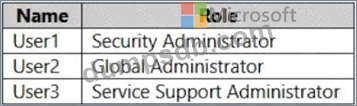
You configure Tenant properties as shown in the following exhibit.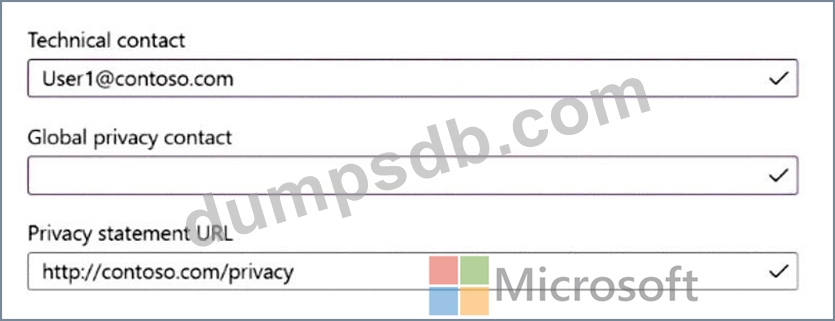
Which users will be contacted by Microsoft if the tenant experiences a data breach?
Question 375
Note: This question is part of a series of questions that present the same scenario. Each question in the series contains a unique solution that might meet the stated goals. Some question sets might have more than one correct solution, while others might not have a correct solution.
After you answer a question in this section, you will NOT be able to return to it. As a result, these questions will not appear in the review screen.
You have a computer that runs Windows 10.
You need to verify which version of Windows 10 is installed.
Solution: From the Settings app, you select System, and then you select About to view information about the system.
Does this meet the goal?