Question 446
You have a Microsoft 365 E5 subscription that contains the devices shown in the following table.
You need to onboard the devices to Microsoft Defender for Endpoint. The solution must minimize administrative effort.
What should you use to onboard each type of device? To answer, drag the appropriate onboarding methods to the correct device types. Each onboarding method may be used once, more than once, or not at all. You may need to drag the split bar between panes or scroll to view content.
NOTE: Each correct selection is worth one point.


Question 447
You have a Microsoft 365 E5 tenant that contains a Microsoft SharePoint Online site named Site1. Site1 contains the files shown in the following table.
You create a sensitivity label named Sensitivity1 and an auto-label policy that has the following configurations:
Name: AutoLabel1
Label to auto-apply: Sensitivity1
Rules for SharePoint Online sites: Rule1-SPO
Choose locations where you want to apply the label: Site1
Rule1-SPO is configured as shown in the following exhibit.
For each of the following statements, select Yes if the statement is true. Otherwise, select No.
NOTE: Each correct selection is worth one point.


Question 448
You have a Microsoft 365 E5 subscription that contains a user named User1. User1 has a Windows 11 device named Device1 that is onboarded to Microsoft Defender for Endpoint.
User1 reports that various files were deleted from Device1.
You need to create a filter to identify which service deleted the files.
Which settings should you configure, and which type of filter should you create in the Microsoft Defender portal? To answer, select the appropriate options in the answer area.
NOTE: Each correct selection is worth one point.


Question 449
Your network contains an Active Directory Domain Services (AD DS) domain. The domain contains a server named Server1 that runs Windows Server. The domain contains the users shown in the following table.
You have a Microsoft 365 subscription that contains the following user accounts:


Question 450
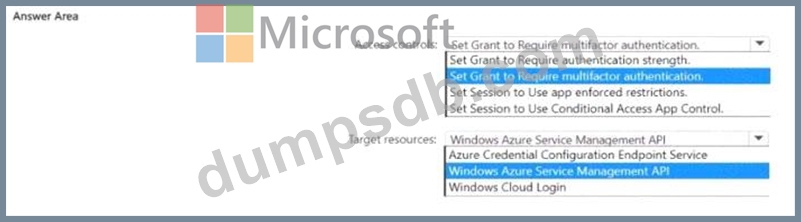
You have a Microsoft 365 E5 subscription.
You plan to create a Conditional Access policy named Policy.
You need to ensure that only Passwordless MFA authentication methods are used when administrators attempt to access the Azure portal. Azure PowerShell. or Azure Command-Line Interlace (CU).
How should you configure Policy1? To answer, select the appropriate options in the answer area.
NOTE: Each correct selection is worth one point.