

Question 101
You have a Microsoft Exchange Server 2019 hybrid deployment.
You run the Get-HybridConfiguration cmdlet and receive the output shown in the following exhibit.
Use the drop-down menus to select the answer choice that completes each statement based on the information presented in the graphic.
NOTE: Each correct selection is worth one point.


Question 102
You purchase a Microsoft 365 subscription.
You create mailboxes for 10 users. Each user has a PST file stored in a network share.
You need to migrate the PST files to the mailboxes.
In which order should you perform the actions? To answer, move all actions from the list of actions to the answer area and arrange them in the correct order.
NOTE: More than one order of answer choices is correct. You will receive credit for any of the correct orders you select.

Question 103
Your company has a Microsoft 365 subscription.
All users are assigned Microsoft 365 E5 licenses.
The users receive email messages that appear to come from managers at the company. However, the messages are not from the managers and often include links to malicious websites.
You need to provide a solution to protect the mailboxes of the managers and to inform the users when phishing occurs.
Which two settings should you modify in the anti-phishing policy? To answer, select the appropriate settings in the answer area.
NOTE: Each correct selection is worth one point.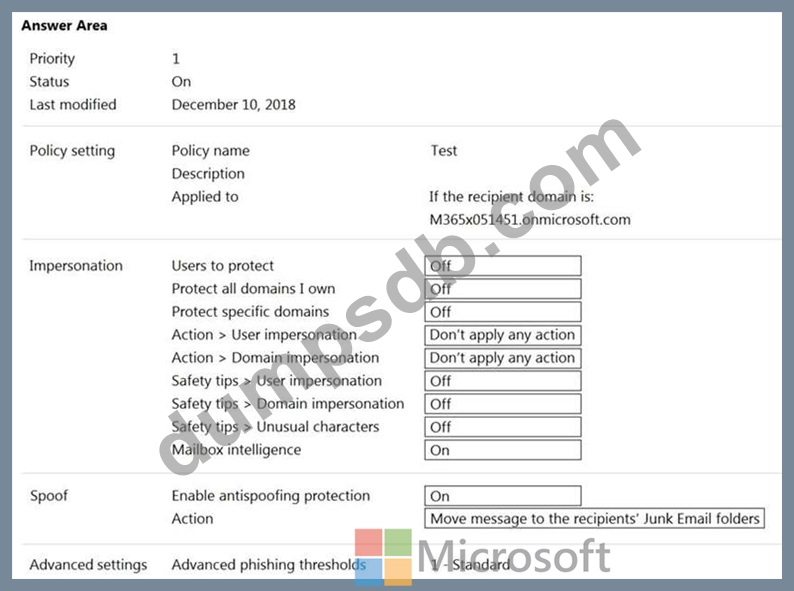

Question 104
You need to ensure that In-Place Archiving is enabled for the marketing department users.
Which user should perform the change, and which tool should the user use? To answer, select the appropriate options in the answer area.
NOTE: Each correct selection is worth one point.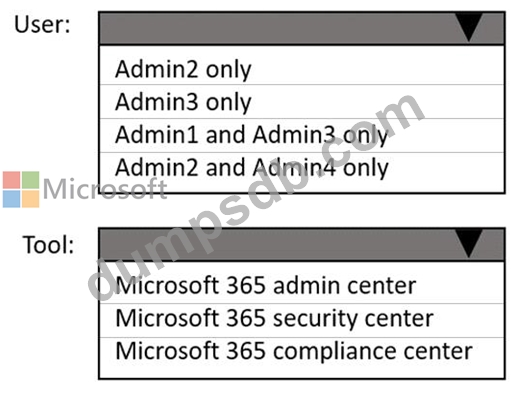


Question 105
You have a Microsoft Exchange Server 2019 organization.
You run the following commands.
New-Management-Scope -Name "VIP Mailboxes" -RecipientRoot "Contoso.com/ Executives"
-RecipientRestrictionFilter (RecepientType -eq "UserMailbox")
New-ManagementRoleAssignment -SecurityGroup "VIP Admins" -Role "Mail Recipients"
-CustomRecipientWriteScope "VIP Mailboxes"
You have a user named Admin1.
You need to ensure that Admin1 can manage the mailboxes of users in the Executives organizational unit (OU) only.
What should you do?