Question 11
You have a hybrid Microsoft Exchange Server organization. All users have Microsoft 365 E5 licenses.
You plan to implement an Advanced Threat Protection (ATP) anti-phishing policy.
You need to enable mailbox intelligence for all users.
What should you do first?
Question 12
You have an Azure Active Directory (Azure AD) tenant named contoso.com that contains the users shown in the following table.
You register devices in contoso.com as shown in the following table.
You create app protection policies in Intune as shown in the following table.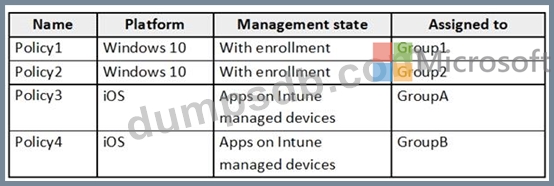
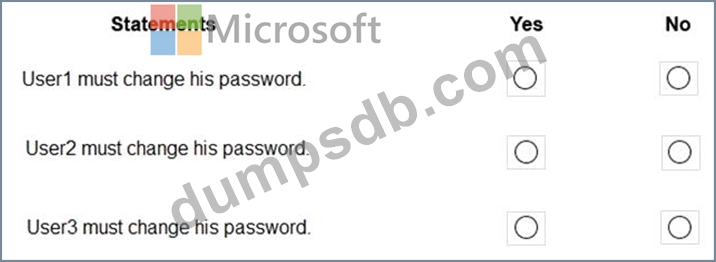
For each of the following statements, select Yes if the statement is true. Otherwise, select No.
NOTE: Each correct selection is worth one point.

Question 13
You have a Microsoft 365 E5 subscription.
All computers run Windows 10 and are onboarded to Windows Defender Advanced Threat Protection (Windows Defender ATP).
You create a Windows Defender machine group named MachineGroupl.
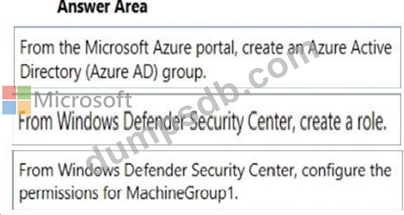
You need to enable delegation for the security settings of the computers in MachineGroupl.
Which three actions should you perform in sequence? To answer, move the appropriate actions from the list of actions to the answer area and arrange them in the correct order.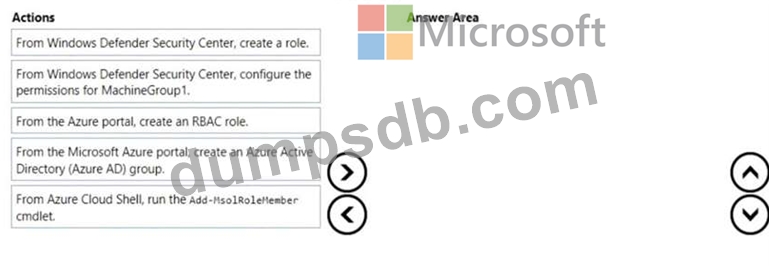

Question 14
You have a Microsoft Defender Advanced Threat Protection (Microsoft Defender ATP) deployment that has the custom network indicators turned on. Microsoft Defender ATP protects two computers that run Windows 10 as shown in the following table.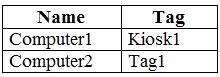
Microsoft Defender ATP has the machine groups shown in the following table.
From Microsoft Defender Security Center, you create the URLs/Domains indicators shown in the following table.
For each of the following statements, select Yes if the statement is true. Otherwise, select No.
NOTE: Each correct selection is worth one point.

Question 15
You have a Microsoft 365 subscription that contains the users shown in the following table.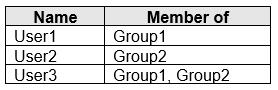
You create and enforce an Azure Active Directory (Azure AD) Identity Protection sign-in risk policy that has the following settings:
Assignments: Include Group1, Exclude Group2
Conditions: User risk level of Medium and above
Access: Allow access, Require password change
The users attempt to sign in. The risk level for each user is shown in the following table.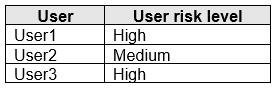
For each of the following statements, select Yes if the statement is true. Otherwise, select No.
NOTE: Each correct selection is worth one point.