

Question 41
You have an Azure Active Directory (Azure AD) tenant that contains the users shown in the following table.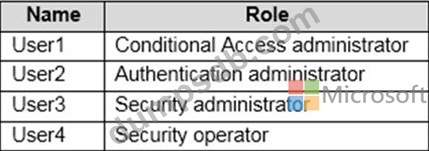
You plan to implement Azure AD Identity Protection.
Which users can configure the user risk policy, and which users can view the risky users report? To answer, select the appropriate options in the answer area.
NOTE: Each correct selection is worth one point.

Question 42
Hotspot Question
You have an Azure Active Directory (Azure AD) tenant contains the users shown in the following table.
In Azure AD Privileged Identity Management (PIM), you configure the Global administrator role as shown in the following exhibit.
User1 is eligible for the Global administrator role.
For each of the following statements, select Yes if the statement is true. Otherwise, select No.
NOTE: Each correct selection is worth one point.

Question 43
Your company has a Microsoft 365 tenant.
The company has a call center that contains 300 users. In the call center, the users share desktop computers and might use a different computer every day. The call center computers are NOT configured for biometric identification.
The users are prohibited from having a mobile phone in the call center.
You need to require multi-factor authentication (MFA) for the call center users when they access Microsoft 365 services.
What should you include in the solution?
Question 44
You have an on-premises datacenter that contains the hosts shown in the following table.
You have an Azure Active Directory (Azure AD) tenant that syncs to the Active Directory forest. Multi-factor authentication (MFA) is enforced for Azure AD.
You need to ensure that you can publish App1 to Azure AD users.
What should you configure on Server and Firewall1? To answer, select the appropriate options in the answer area.
NOTE: Each correct selection is worth one point.


Question 45
You have an Azure Active Directory (Azure AD) tenant that contains an administrative unit named Department1.
Department1 has the users shown in the Users exhibit. (Click theUserstab.)
Department1 has the groups shown in the Groups exhibit. (Click theGroupstab.)
Department1 has the user administrator assignments shown in the Assignments exhibit. (Click theAssignmentstab.)
The members of Group2 are shown in the Group2 exhibit. (Click theGroup2tab.)
For each of the following statements, select Yes if the statement is true. Otherwise, select No.
NOTE:Each correct selection is worth one point.

