

Question 176
You have a Microsoft 365 tenant that contains a group named Group1 as shown in the Group1 exhibit. (Click the Group1 tab.)
You create an enterprise application named App1 as shown in the App1 Properties exhibit. (Click the App1 Properties tab.)
You configure self-service for App1 as shown in the App1 Self-service exhibit. (Click the App1 Self-service tab.)
For each of the following statements, select Yes if the statement is true. Otherwise, select No.
NOTE: Each correct selection is worth one point.

Question 177
You have a Microsoft 365 tenant.
All users have mobile phones and laptops.
The users frequently work from remote locations that do not have Wi-Fi access or mobile phone connectivity.
While working from the remote locations, the users connect their laptop to a wired network that has internet access.
You plan to implement multi-factor authentication (MFA).
Which MFA authentication method can the users use from the remote location?
Question 178
You have a Microsoft 365 tenant that uses the domain named fabrikam.com. The Guest invite settings for Azure Active Directory (Azure AD) are configured as shown in the exhibit. (Click the Exhibit tab.)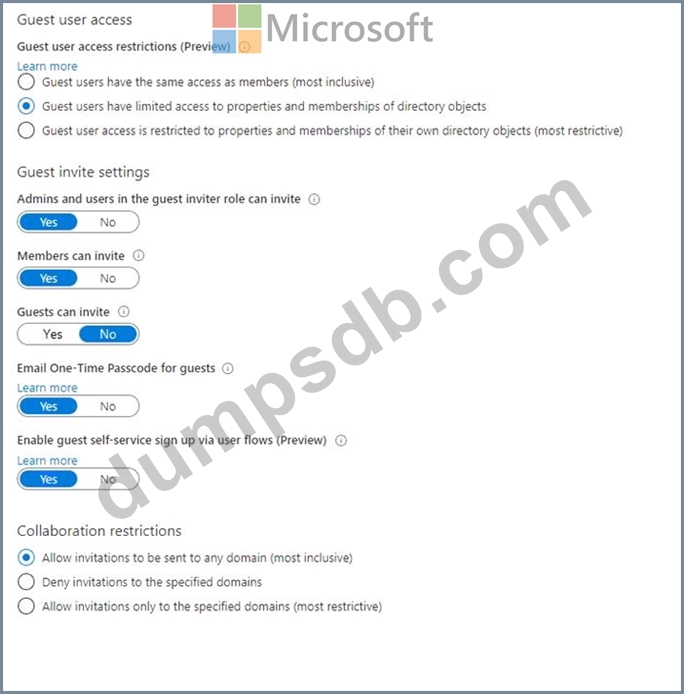
A user named [email protected] shares a Microsoft SharePoint Online document library to the users shown in the following table.
Which users will be emailed a passcode?
Question 179
Hotspot Question
You have an Azure subscription that is onboarded to Microsoft Entra Permissions Management.
You need to perform the following actions:
- Identify billable Azure resources.
- Create a rule to remove permissions for unused resources.
Which two options should you use in the Entra Permissions Management portal? To answer, select the appropriate options in the answer area.
NOTE: Each correct selection is worth one point.

Question 180
You have a Microsoft 365 E5 subscription that contains three users named User1, User2, and User3.
You need to configure the users as shown in the following table.
Which portal should you use to configure each user? To answer, drag the appropriate portals to the correct users. Each portal may be used once, more than once, or not at all. You may need to drag the split bar between panes or scroll to view content.
NOTE: Each correct selection is worth one point.
