

Question 76
Case Study 2 - Contoso, Ltd
Overview
Contoso, Ltd. is a consulting company that has a main office in Montreal and three branch offices in Seattle, Boston, and Johannesburg.
Existing Environment
Microsoft 365 Environment
Contoso has a Microsoft 365 E5 tenant. The tenant contains the administrative user accounts shown in the following table.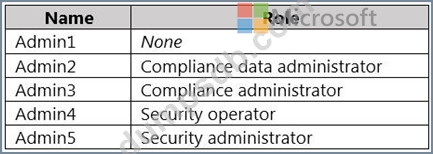
Users store data in the following locations:
SharePoint sites
OneDrive accounts
Exchange email
Exchange public folders
Teams chats
Teams channel messages
When users in the research department create documents, they must add a 10-digit project code to each document. Project codes that start with the digits 999 are confidential.
SharePoint Online Environment
Contoso has four Microsoft SharePoint Online sites named Site1, Site2, Site3, and Site4.
Site2 contains the files shown in the following table.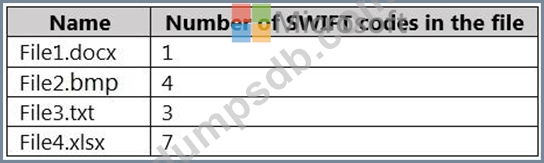
Two users named User1 and User2 are assigned roles for Site2 as shown in the following table.
Site3 stores documents related to the company's projects. The documents are organized in a folder hierarchy based on the project.
Site4 has the following two retention policies applied:
Name: Site4RetentionPolicy1
- Locations to apply the policy: Site4
- Delete items older than: 2 years
- Delete content based on: When items were created
Name: Site4RetentionPolicy2
- Locations to apply the policy: Site4
- Retain items for a specific period: 4 years
- Start the retention period based on: When items were created
- At the end of the retention period: Do nothing
Problem Statements
Management at Contoso is concerned about data leaks. On several occasions, confidential research department documents were leaked.
Requirements
Planned Changes
Contoso plans to create the following data loss prevention (DLP) policy:
Name: DLPpolicy1
Locations to apply the policy: Site2
Conditions:
- Content contains any of these sensitive info types: SWIFT Code
- Instance count: 2 to any
Actions: Restrict access to the content
Technical Requirements
Contoso must meet the following technical requirements:
All administrative users must be able to review DLP reports.
Whenever possible, the principle of least privilege must be used.
For all users, all Microsoft 365 data must be retained for at least one year.
Confidential documents must be detected and protected by using Microsoft 365.
Site1 documents that include credit card numbers must be labeled automatically.
All administrative users must be able to create Microsoft 365 sensitivity labels.
After a project is complete, the documents in Site3 that relate to the project must be retained for
10 years.
You need to meet the technical requirements for the Site3 documents.
What should you create?
Question 77
You have a Microsoft 365 E5 subscription.
Users access their mailbox by using the following apps:
- Outlook Win32
- Outlook on the web
- Outlook for iOS and Android
You create a data loss prevention (DLP) policy named DLP1 that has the following settings:
- Location: Exchange email
- Status: On
- User notifications: On
- Notify users in Office 365 service with a policy tip: Enabled
Which apps display a policy tip when content is matched by using DLP1?
Question 78
Hotspot Question
You have a Microsoft 365 E5 subscription that contains two users named User1 and User2.
You create a sensitivity label that has the following settings:
- Name: Sensitivity1
- Define the scope for this label: Items
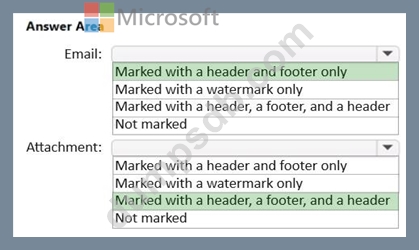
- Choose protection settings for files and emails: Mark the content of
files
- Add custom headers, footers, and watermarks to files and emails that
have this label applied
You make Sensitivity available to User1.
User1 performs the following actions:
- Creates a new email
- Adds a file named File1.docx as an attachment to the email
- Applies Sensitivity1 to the email
- Sends the email to User2
How will the email and the attachment be marked? To answer, select the appropriate options in the answer area.
NOTE: Each correct selection is worth one point.
Question 79
You have a Microsoft 365 E5 subscription.
You are implementing insider risk management.
You need to maximize the amount of historical data that is collected when an event is triggered.
What is the maximum number of days that historical data can be collected?
Question 80
Note: This question is part of a series of questions that present the same scenario. Each question in the series contains a unique solution that might meet the stated goals. Some question sets might have more than one correct solution, while others might not have a correct solution.
After you answer a question in this section, you will NOT be able to return to it. As a result, these questions will not appear in the review screen.
You implement Microsoft 365 Endpoint data loss prevention (Endpoint DLP).
You have computers that run Windows 10 and have Microsoft 365 Apps installed. The computers are joined to Azure Active Directory (Azure AD).
You need to ensure that Endpoint DLP policies can protect content on the computers.
Solution: You deploy the unified labeling client to the computers.
Does this meet the goal?