A developer using Oracle Cloud Infrastructure (OCI) API Gateway must authenticate the API requests to their web application. The authentication process must be implemented using a custom scheme which accepts string parameters from the API caller. Which method can the developer use In this scenario?
Correct Answer: B
Explanation Having deployed the authorizer function, you enable authentication and authorization for an API deployment by including two different kinds of request policy in the API deployment specification: An authentication request policy for the entire API deployment that specifies:The OCID of the authorizer function that you deployed to Oracle Functions that will perform authentication and authorization.The request attributes to pass to the authorizer function.Whether unauthenticated callers can access routes in the API deployment. An authorization request policy for each route that specifies the operations a caller is allowed to perform, based on the caller's access scopes as returned by the authorizer function. Using the Console to Add Authentication and Authorization Request Policies To add authentication and authorization request policies to an API deployment specification using the Console: Create or update an API deployment using the Console, select the From Scratch option, and enter details on the Basic Information page. For more information, see Deploying an API on an API Gateway by Creating an API Deployment and Updating API Gateways and API Deployments. In the API Request Policies section of the Basic Information page, click the Add button beside Authentication and specify: Application in <compartment-name>: The name of the application in Oracle Functions that contains the authorizer function. You can select an application from a different compartment. Function Name: The name of the authorizer function in Oracle Functions. Authentication Token: Whether the access token is contained in a request header or a query parameter. Authentication Token Value: Depending on whether the access token is contained in a request header or a query parameter, specify: Header Name: If the access token is contained in a request header, enter the name of the header. Parameter Name: If the access token is contained in a query parameter, enter the name of the query parameter. https://docs.cloud.oracle.com/en-us/iaas/Content/APIGateway/Tasks/apigatewayaddingauthzauthn.htm
Question 52
You are developing a polyglot serverless application using Oracle Functions. Which language cannot be used to write your function code?
Correct Answer: A
Explanation Overview of Functions: The serverless and elastic architecture of Oracle Functions means there's no infrastructure administration or software administration for you to perform. You don't provision or maintain compute instances, and operating system software patches and upgrades are applied automatically. Oracle Functions simply ensures your app is highly-available, scalable, secure, and monitored. With Oracle Functions, you can write code in Java, Python, Node, Go, and Ruby (and for advanced use cases, bring your own Dockerfile, and Graal VM). You can then deploy your code, call it directly or trigger it in response to events, and get billed only for the resources consumed during the execution. References: https://docs.cloud.oracle.com/en-us/iaas/Content/Functions/Concepts/functionsoverview.htm
Question 53
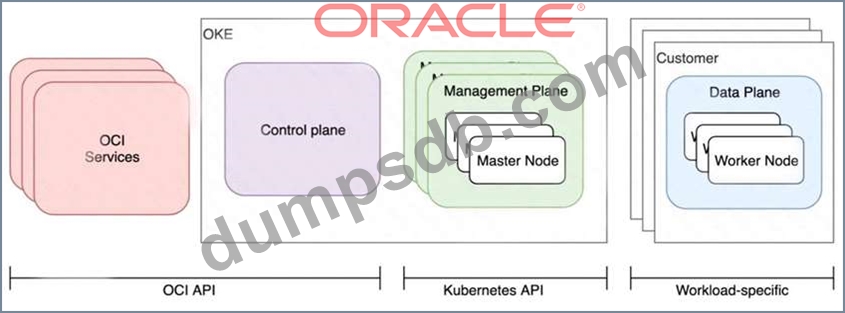
Who is responsible for patching, upgrading and maintaining the worker nodes in Oracle Cloud Infrastructure Container Engine for Kubernetes (OKE)?
Correct Answer: D
Explanation After a new version of Kubernetes has been released and when Container Engine for Kubernetes supports the new version, you can use Container Engine for Kubernetes to upgrade master nodes running older versions of Kubernetes. Because Container Engine for Kubernetes distributes the Kubernetes Control Plane on multiple Oracle-managed master nodes (distributed across different availability domains in a region where supported) to ensure high availability, you're able to upgrade the Kubernetes version running on master nodes with zero downtime. Having upgraded master nodes to a new version of Kubernetes, you can subsequently create new node pools running the newer version. Alternatively, you can continue to create new node pools that will run older versions of Kubernetes (providing those older versions are compatible with the Kubernetes version running on the master nodes). Note that you upgrade master nodes by performing an 'in-place' upgrade, but you upgrade worker nodes by performing an 'out-of-place' upgrade. To upgrade the version of Kubernetes running on worker nodes in a node pool, you replace the original node pool with a new node pool that has new worker nodes running the appropriate Kubernetes version. Having 'drained' existing worker nodes in the original node pool to prevent new pods starting and to delete existing pods, you can then delete the original node pool. Upgrading the Kubernetes Version on Worker Nodes in a Cluster: After a new version of Kubernetes has been released and when Container Engine for Kubernetes supports the new version, you can use Container Engine for Kubernetes to upgrade master nodes running older versions of Kubernetes. Because Container Engine for Kubernetes distributes the Kubernetes Control Plane on multiple Oracle-managed master nodes (distributed across different availability domains in a region where supported) to ensure high availability, you're able to upgrade the Kubernetes version running on master nodes with zero downtime. You can upgrade the version of Kubernetes running on the worker nodes in a cluster in two ways: (A) Perform an 'in-place' upgrade of a node pool in the cluster, by specifying a more recent Kubernetes version for new worker nodes starting in the existing node pool. First, you modify the existing node pool's properties to specify the more recent Kubernetes version. Then, you 'drain' existing worker nodes in the node pool to prevent new pods starting, and to delete existing pods. Finally, you terminate each of the worker nodes in turn. When new worker nodes are started in the existing node pool, they run the more recent Kubernetes version you specified. See Performing an In-Place Worker Node Upgrade by Updating an Existing Node Pool. (B) Perform an 'out-of-place' upgrade of a node pool in the cluster, by replacing the original node pool with a new node pool. First, you create a new node pool with a more recent Kubernetes version. Then, you 'drain' existing worker nodes in the original node pool to prevent new pods starting, and to delete existing pods. Finally, you delete the original node pool. When new worker nodes are started in the new node pool, they run the more recent Kubernetes version you specified. See Performing an Out-of-Place Worker Node Upgrade by Replacing an Existing Node Pool with a New Node Pool. Note that in both cases: The more recent Kubernetes version you specify for the worker nodes in the node pool must be compatible with the Kubernetes version running on the master nodes in the cluster. See Upgrading Clusters to Newer Kubernetes Versions). You must drain existing worker nodes in the original node pool. If you don't drain the worker nodes, workloads running on the cluster are subject to disruption. References: https://docs.cloud.oracle.com/en-us/iaas/Content/ContEng/Tasks/contengupgradingk8sworkernode.htm
Question 54
You have been asked to create a stateful application deployed in Oracle Cloud Infrastructure (OCI) Container Engine for Kubernetes (OKE) that requires all of your worker nodes to mount and write data to persistent volumes. Which two OCI storage services should you use?
Correct Answer: A,C
Question 55
You are implementing logging in your services that will be running in Oracle Cloud Infrastructure Container Engine for Kubernetes. Which statement describes the appropriate logging approach?
Correct Answer: C
Explanation Application and systems logs can help you understand what is happening inside your cluster. The logs are particularly useful for debugging problems and monitoring cluster activity. Most modern applications have some kind of logging mechanism; as such, most container engines are likewise designed to support some kind of logging. The easiest and most embraced logging method for containerized applications is to write to the standard output and standard error streams. Kubernetes also provides cluster-based logging to record container activity into a central logging subsystem. The standard output and standard error output of each container in a Kubernetes cluster can be ingested using an agent like Fluentd running on each node into tools like Elasticsearch and viewed with Kibana. And finally, monitor containers, pods, applications, services, and other components of your cluster. One can use tools such as Prometheus, Grafana, Jaeger for monitoring, visibility, and tracing the cluster. References: https://dzone.com/articles/5-best-security-practices-for-kubernetes-and-oracle-kubernetes-engine https://kubernetes.io/docs/concepts/cluster-administration/logging/ https://blogs.oracle.com/developers/5-best-practices-for-kubernetes-security