

Question 11
Upgrading the kernel as 2.6.36.7.1, and configure the system to Start the default kernel, keep the old kernel available.
Question 12
SIMULATION
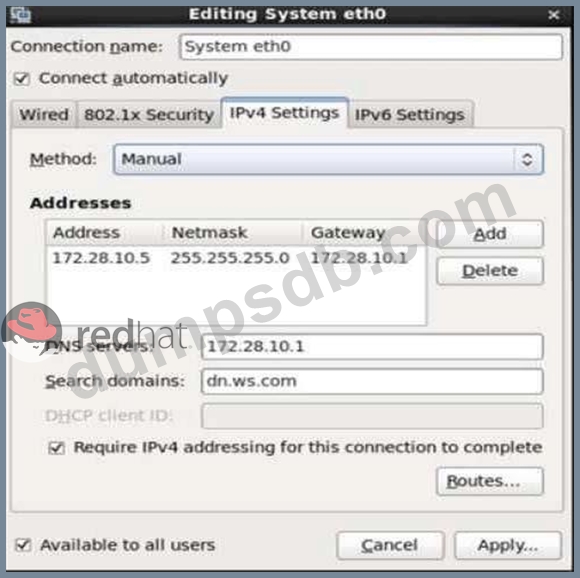
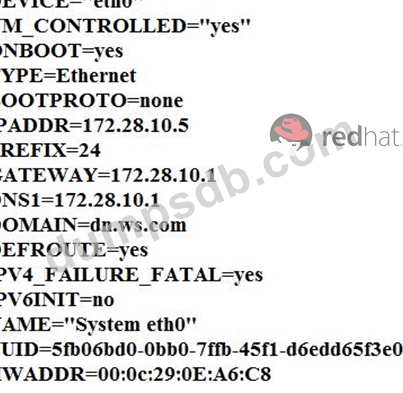
Configure your Host Name, IP Address, Gateway and DNS.
Host name: dtop5.dn.ws.com
IP Address: 172.28.10.5/4
Gateway: 172.28.10.1
DNS: 172.28.10.1

Question 13
14. Configure Container as a Service
As the user "wallah," configure a systemd service for the container:
- Container name: ascii2pdf
- Use the image named pdf created earlier.
- Service name: container-ascii2pdf
- Automatically start the service on system reboot without manual intervention.
- Configure the service to automatically mount /opt/file to /dir1 and /opt/progress to /dir2 in the container upon startup.
Question 14
CORRECT TEXT
Configure a HTTP server, which can be accessed through http://station.domain40.example.com.
Please download the released page from http://ip/dir/example.html.
Question 15
Configure Apache to serve content from /webdata on port 8080, allow the port in SELinux, and open it in the firewall.