A Machine Learning Specialist uploads a dataset to an Amazon S3 bucket protected with server- side encryption using AWS KMS. How should the ML Specialist define the Amazon SageMaker notebook instance so it can read the same dataset from Amazon S3?
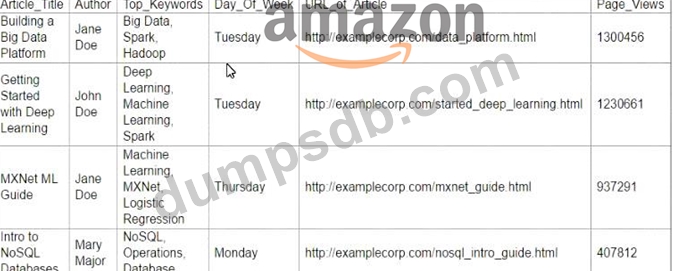
A Machine Learning Specialist is working with a media company to perform classification on popular articles from the company's website. The company is using random forests to classify how popular an article will be before it is published A sample of the data being used is below. Given the dataset, the Specialist wants to convert the Day-Of_Week column to binary values. What technique should be used to convert this column to binary values.
Correct Answer: C
Question 73
A company wants to enhance audits for its machine learning (ML) systems. The auditing system must be able to perform metadata analysis on the features that the ML models use. The audit solution must generate a report that analyzes the metadata. The solution also must be able to set the data sensitivity and authorship of features. Which solution will meet these requirements with the LEAST development effort?
Correct Answer: D
The solution that will meet the requirements with the least development effort is to use Amazon SageMaker Feature Store to set feature groups for the current features that the ML models use, assign the required metadata for each feature, and use Amazon QuickSight to analyze the metadata. This solution can leverage the existing AWS services and features to perform feature-level metadata analysis and reporting. Amazon SageMaker Feature Store is a fully managed, purpose-built repository to store, update, search, and share machine learning (ML) features. The service provides feature management capabilities such as enabling easy feature reuse, low latency serving, time travel, and ensuring consistency between features used in training and inference workflows. A feature group is a logical grouping of ML features whose organization and structure is defined by a feature group schema. A feature group schema consists of a list of feature definitions, each of which specifies the name, type, and metadata of a feature. The metadata can include information such as data sensitivity, authorship, description, and parameters. The metadata can help make features discoverable, understandable, and traceable. Amazon SageMaker Feature Store allows users to set feature groups for the current features that the ML models use, and assign the required metadata for each feature using the AWS SDK for Python (Boto3), AWS Command Line Interface (AWS CLI), or Amazon SageMaker Studio1. Amazon QuickSight is a fully managed, serverless business intelligence service that makes it easy to create and publish interactive dashboards that include ML insights. Amazon QuickSight can connect to various data sources, such as Amazon S3, Amazon Athena, Amazon Redshift, and Amazon SageMaker Feature Store, and analyze the data using standard SQL or built-in ML-powered analytics. Amazon QuickSight can also create rich visualizations and reports that can be accessed from any device, and securely shared with anyone inside or outside an organization. Amazon QuickSight can be used to analyze the metadata of the features stored in Amazon SageMaker Feature Store, and generate a report that summarizes the metadata analysis2. The other options are either more complex or less effective than the proposed solution. Using Amazon SageMaker Data Wrangler to select the features and create a data flow to perform feature-level metadata analysis would require additional steps and resources, and may not capture all the metadata attributes that the company requires. Creating an Amazon DynamoDB table to store feature-level metadata would introduce redundancy and inconsistency, as the metadata is already stored in Amazon SageMaker Feature Store. Using SageMaker Studio to analyze the metadata would not generate a report that can be easily shared and accessed by the company. References: 1: Amazon SageMaker Feature Store - Amazon Web Services 2: Amazon QuickSight - Business Intelligence Service - Amazon Web Services
Question 74
A Machine Learning Specialist was given a dataset consisting of unlabeled data The Specialist must create a model that can help the team classify the data into different buckets What model should be used to complete this work?
Correct Answer: A
Explanation K-means clustering is a machine learning technique that can be used to classify unlabeled data into different groups based on their similarity. It is an unsupervised learning method, which means it does not require any prior knowledge or labels for the data. K-means clustering works by randomly assigning data points to a number of clusters, then iteratively updating the cluster centers and reassigning the data points until the clusters are stable. The result is a partition of the data into distinct and homogeneous groups. K-means clustering can be useful for exploratory data analysis, data compression, anomaly detection, and feature extraction. References: K-Means Clustering: A tutorial on how to use K-means clustering with Amazon SageMaker. Unsupervised Learning: A video that explains the concept and applications of unsupervised learning.
Question 75
An aircraft engine manufacturing company is measuring 200 performance metrics in a time-series. Engineers want to detect critical manufacturing defects in near-real time during testing. All of the data needs to be stored for offline analysis. What approach would be the MOST effective to perform near-real time defect detection?
Correct Answer: D
Explanation The company wants to perform near-real time defect detection on a time-series of 200 performance metrics, and store all the data for offline analysis. The best approach for this scenario is to use Amazon Kinesis Data Firehose for ingestion and Amazon Kinesis Data Analytics Random Cut Forest (RCF) to perform anomaly detection. Use Kinesis Data Firehose to store data in Amazon S3 for further analysis. Amazon Kinesis Data Firehose is a service that can capture, transform, and deliver streaming data to destinations such as Amazon S3, Amazon Redshift, Amazon OpenSearch Service, and Splunk. Kinesis Data Firehose can handle any amount and frequency of data, and automatically scale to match the throughput. Kinesis Data Firehose can also compress, encrypt, and batch the data before delivering it to the destination, reducing the storage cost and enhancing the security. Amazon Kinesis Data Analytics is a service that can analyze streaming data in real time using SQL or Apache Flink applications. Kinesis Data Analytics can use built-in functions and algorithms to perform various analytics tasks, such as aggregations, joins, filters, windows, and anomaly detection. One of the built-in algorithms that Kinesis Data Analytics supports is Random Cut Forest (RCF), which is a supervised learning algorithm for forecasting scalar time series using recurrent neural networks. RCF can detect anomalies in streaming data by assigning an anomaly score to each data point, based on how distant it is from the rest of the data. RCF can handle multiple related time series, such as the performance metrics of the aircraft engine, and learn a global model that captures the common patterns and trends across the time series. Therefore, the company can use the following architecture to build the near-real time defect detection solution: Use Amazon Kinesis Data Firehose for ingestion: The company can use Kinesis Data Firehose to capture the streaming data from the aircraft engine testing, and deliver it to two destinations: Amazon S3 and Amazon Kinesis Data Analytics. The company can configure the Kinesis Data Firehose delivery stream to specify the source, the buffer size and interval, the compression and encryption options, the error handling and retry logic, and the destination details. Use Amazon Kinesis Data Analytics Random Cut Forest (RCF) to perform anomaly detection: The company can use Kinesis Data Analytics to create a SQL application that can read the streaming data from the Kinesis Data Firehose delivery stream, and apply the RCF algorithm to detect anomalies. The company can use the RANDOM_CUT_FOREST or RANDOM_CUT_FOREST_WITH_EXPLANATION functions to compute the anomaly scores and attributions for each data point, and use the WHERE clause to filter out the normal data points. The company can also use the CURSOR function to specify the input stream, and the PUMP function to write the output stream to another destination, such as Amazon Kinesis Data Streams or AWS Lambda. Use Kinesis Data Firehose to store data in Amazon S3 for further analysis: The company can use Kinesis Data Firehose to store the raw and processed data in Amazon S3 for offline analysis. The company can use the S3 destination of the Kinesis Data Firehose delivery stream to store the raw data, and use another Kinesis Data Firehose delivery stream to store the output of the Kinesis Data Analytics application. The company can also use AWS Glue or Amazon Athena to catalog, query, and analyze the data in Amazon S3. References: What Is Amazon Kinesis Data Firehose? What Is Amazon Kinesis Data Analytics for SQL Applications? DeepAR Forecasting Algorithm - Amazon SageMaker