The network was breached over the weekend System logs indicate that a single user's account was successfully breached after 500 attempts with a dictionary attack. Which of the following would BEST mitigate this threat?
Correct Answer: B
Account lockout would best mitigate the threat of a dictionary attack1
Question 587
Which of the following would typically require the most computing resources from the host computer?
Correct Answer: B
Explanation Windows is the operating system that typically requires the most computing resources from the host computer, compared to the other options. Computing resources include hardware components such as CPU, RAM, disk space, graphics card, and network adapter. The minimum system requirements for an operating system indicate the minimum amount of computing resources needed to install and run the operating system on a computer. The higher the minimum system requirements, the more computing resources the operating system consumes. According to the web search results, the minimum system requirements for Windows 10 and Windows 11 are as follows12: CPU: 1 GHz or faster with two or more cores (Windows 10); 1 GHz or faster with two or more cores on a compatible 64-bit processor (Windows 11) RAM: 1 GB for 32-bit or 2 GB for 64-bit (Windows 10); 4 GB (Windows 11) Disk space: 16 GB for 32-bit or 32 GB for 64-bit (Windows 10); 64 GB (Windows 11) Graphics card: DirectX 9 or later with WDDM 1.0 driver (Windows 10); DirectX 12 compatible with WDDM 2.0 driver (Windows 11) Network adapter: Ethernet or Wi-Fi (Windows 10); Ethernet or Wi-Fi that supports 5 GHz (Windows 11) The minimum system requirements for macOS Ventura are as follows: CPU: Intel Core i3 or higher, or Apple M1 chip RAM: 4 GB Disk space: 35.5 GB Graphics card: Metal-capable Network adapter: Ethernet or Wi-Fi The minimum system requirements for Chrome OS are as follows: CPU: Intel Celeron or higher RAM: 2 GB Disk space: 16 GB Graphics card: Integrated Network adapter: Ethernet or Wi-Fi The minimum system requirements for Android are as follows: CPU: 1 GHz or higher RAM: 512 MB Disk space: 8 GB Graphics card: OpenGL ES 2.0 Network adapter: Ethernet or Wi-Fi The minimum system requirements for Linux vary depending on the distribution, but a common example is Ubuntu, which has the following minimum system requirements: CPU: 2 GHz dual core processor or better RAM: 4 GB Disk space: 25 GB Graphics card: 1024 x 768 screen resolution Network adapter: Ethernet or Wi-Fi Based on the comparison of the minimum system requirements, Windows has the highest requirements for CPU, RAM, disk space, and graphics card, while Chrome OS and Android have the lowest requirements. macOS and Linux have moderate requirements, depending on the hardware and software configuration. Therefore, Windows is the operating system that typically requires the most computing resources from the host computer. References: Windows, macOS, Chrome OS, or Linux: Which Operating System Is Right for You?1 Comparison of operating systems3 Windows 10 vs 11 Minimum System Requirements: Why Need a New One?2 macOS Monterey - Technical Specifications Chrome OS - Wikipedia Android - Wikipedia Installation/SystemRequirements - Community Help Wiki
Question 588
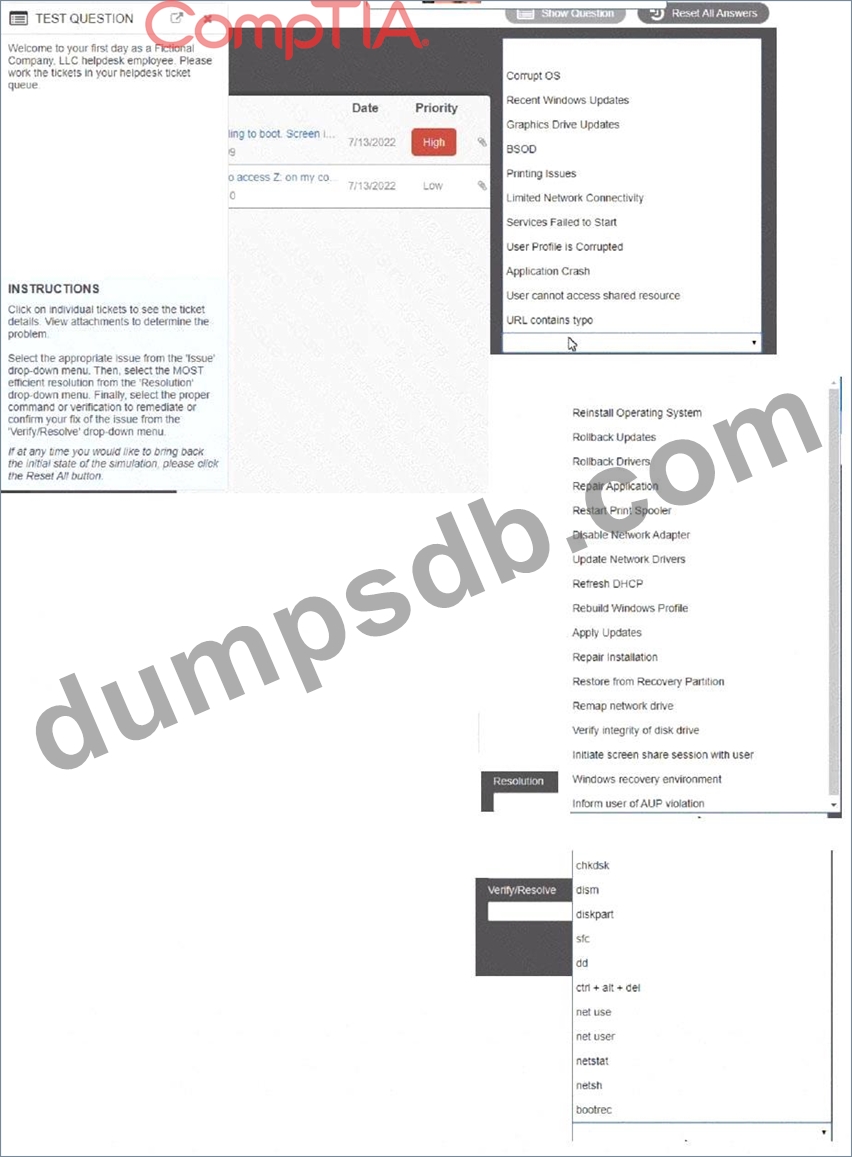
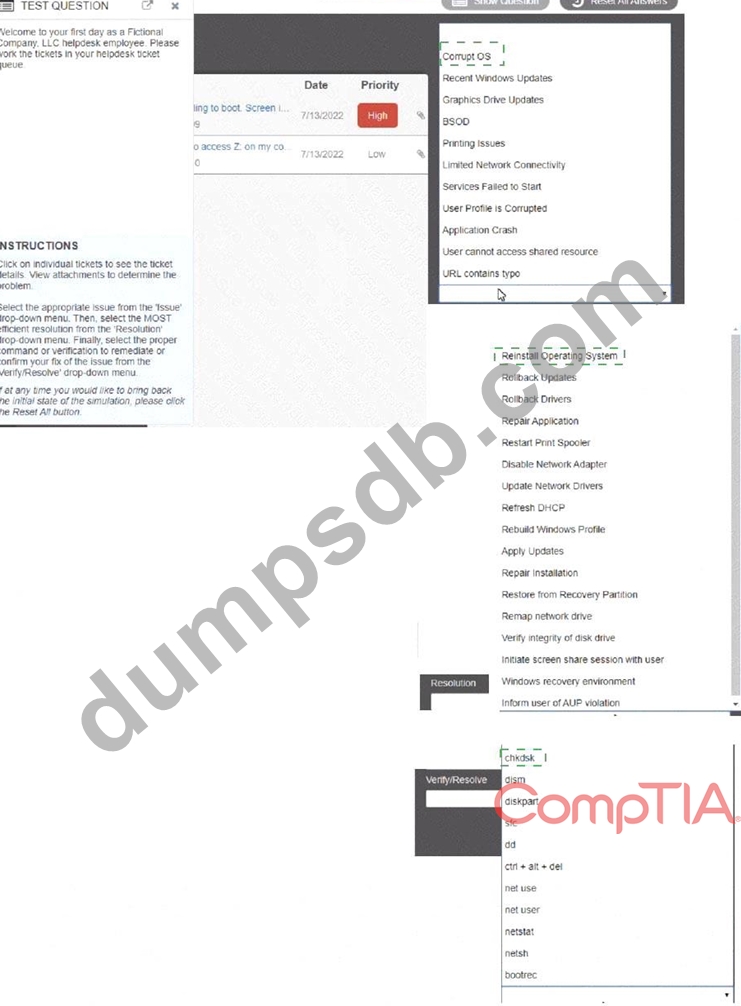
Welcome to your first day as a Fictional Company. LLC helpdesk employee. Please work the tickets in your helpdesk ticket queue. Click on individual tickers to see the ticket details. View attachments to determine the problem. Select the appropriate issue from the 'issue' drop-down menu. Then, select the MOST efficient resolution from the 'Resolution' drop-down menu. Finally, select the proper command or verification to remediate or confirm your fix of the issue from the Verify Resolve drop-down menu.
Correct Answer:
Explanation:
Question 589
A user is setting up a computer for the first time and would like to create a secondary login with permissions that are different than the primary login. The secondary login will need to be protected from certain content such as games and websites. Which of the following Windows settings should the user utilize to create the secondary login?
Correct Answer: B
Explanation To create a secondary login with different permissions in Windows 10, the user should utilize the Accounts setting. Here are the steps to create a new user account with different permissions: Right-click the Windows Start menu button. Select Control Panel. Select User Accounts. Select Manage another account. Select Add a new user in PC settings. Use the Accounts dialog box to configure a new account.1
Question 590
A client's device was recently used by multiple other users. The client reports their device is now running slower than usual. Which of the following steps should a technician take first? (Select two.)
Correct Answer: A,B
Comprehensive and Detailed In-Depth Explanation:The two best first steps are: * Perform a virus scan - Multiple users on a device increase the risk of malware, which can cause performance issues. * Check the startup programs - Unnecessary programs running at startup can slow down the system. * C. Back up the data - Important but not the first step for performance troubleshooting. * D. Disable the guest account - May prevent future unauthorized use but does not immediately fix the current issue. * E. Update the firmware - Firmware updates improve hardware stability but are unlikely to fix a sudden performance drop. * F. Reinstall the operating system - A last resort, as it erases data and takes significant time. Reference: CompTIA A+ 220-1102, Objective 2.4 - Malware and Security Threat Removal