

Question 21
-- Exhibit -
-- Exhibit --
Refer to the exhibit.
Based on the output of the tmsh interface show command, what is the issue?
Question 22
-- Exhibit-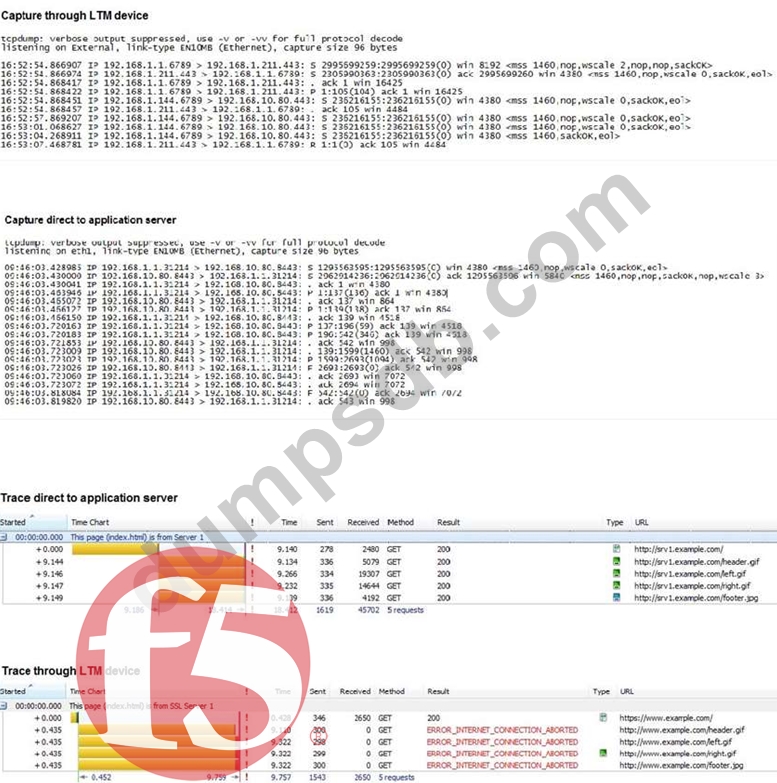
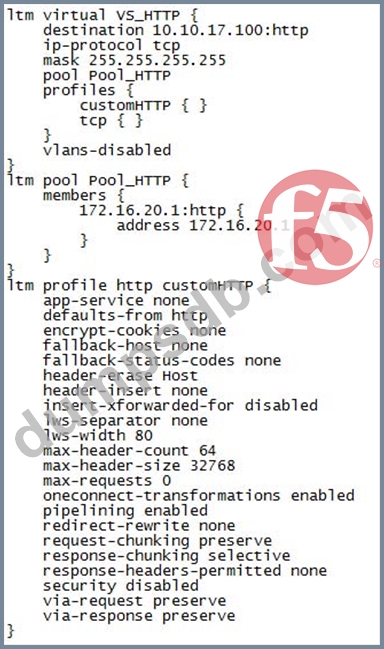
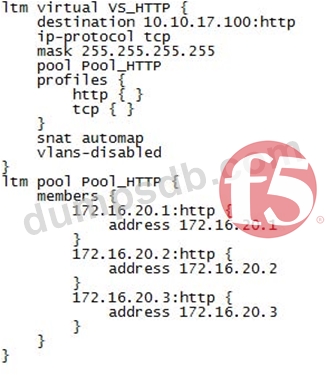
-- Exhibit -
Refer to the exhibits.
An LTM Specialist is troubleshooting an application configured on an LTM device on a one-armed configuration. The application is NOT working through the LTM device but does work when accessed directly via the application servers. The virtual server
192.168.1.211:443 is configured to SNAT using the address 192.168.1.144 and references a pool with the member 192.168.10.80:443. No Client or Server SSL profiles are associated. The LTM Specialist has collected two traffic captures to help determine the issue.
What is the problem with the configuration on the LTM device?
Question 23
-- Exhibit-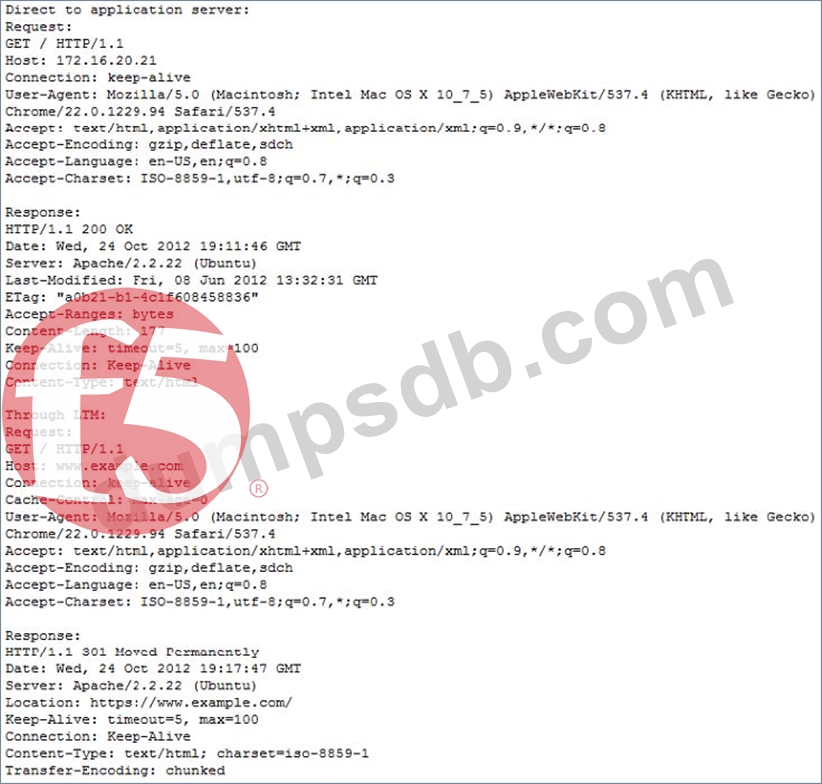
-- Exhibit -Refer to the exhibit. An LTM Specialist has created a virtual server to balance connections to a pool of
application servers and offload SSL decryption. Clients connect to the application at https://www.example.com/. The virtual server is configured with a clientssl profile but no serverssl profile. The application servers are listening on ports 80 and 443. Users are unable to connect to the application through the virtual server but are able to connect directly to the application server.
What is the root cause of the error?
Question 24
There are three servers in the pool: 172.16.20.1, 172.16.20.2, and 172.16.20.3, with the virtual IP address 10.0.20.88.
A user CANNOT connect to an HTTP application. To understand the problem and find a solution, the LTM Specialist runs two concurrent traces on the LTM device, with the following results:
Trace on client side:
tcpdump: verbose output suppressed, use -v or -vv for full protocol decode
listening on 0.0, link-type EN10MB (Ethernet), capture size 96 bytes
22:22:07.423759 IP 172.16.20.100.53875 > 10.0.20.88.80: S 998346084:998346084(0) win 5840
<mss 1460,sackOK,timestamp 67942058 0,nop,wscale 4>
22:22:07.424056 IP 10.0.20.88.80 > 172.16.20.100.53875: S 4671780:4671780(0) ack
998346085 win 4380 <mss 1460,nop,wscale 0,nop,nop,timestamp 2392362490 67942058,sackOK,eol> 22:22:07.424776 IP 172.16.20.100.53875 > 10.0.20.88.80: . ack 1 win 365 <nop,nop,timestamp
67942058 2392362490>
22:22:07.424790 IP 172.16.20.100.53875 > 10.0.20.88.80: P 1:149(148) ack 1 win 365 <nop,nop,timestamp 67942058 2392362490> 22:22:07.424891 IP 10.0.20.88.80 > 172.16.20.100.53875: . ack 149 win 4528
<nop,nop,timestamp 2392362491 67942058>
22:22:12.024850 IP 10.0.20.88.80 > 172.16.20.100.53875: R 1:1(0) ack 149 win 4528
6 packets captured
6 packets received by filter
0 packets dropped by kernel
Trace on server side:
tcpdump: verbose output suppressed, use -v or -vv for full protocol decode
listening on internal, link-type EN10MB (Ethernet), capture size 96 bytes
22:22:07.424881 IP 172.16.20.100.53875 > 172.16.20.2.80: S 51116678:51116678(0) win 4380 <mss 1460,nop,wscale 0,nop,nop,timestamp 2392362491 0,sackOK,eol>
22:22:08.424893 IP 172.16.20.100.53875 > 172.16.20.2.80: S 51116678:51116678(0) win 4380 <mss 1460,nop,wscale 0,nop,nop,timestamp 2392363491 0,sackOK,eol>
22:22:09.625082 IP 172.16.20.100.53875 > 172.16.20.2.80: S 51116678:51116678(0) win 4380 <mss 1460,nop,wscale 0,nop,nop,timestamp 2392364691 0,sackOK,eol>
22:22:10.825194 IP 172.16.20.100.53875 > 172.16.20.2.80: S 51116678:51116678(0) win 4380 <mss 1460,sackOK,eol>
4 packets captured 4 packets received by filter 0 packets dropped by kernel
What should the LTM Specialist do to solve the problem?
Question 25
-- Exhibit -
-- Exhibit -
Refer to the exhibit.
An LTM Specialist is investigating reports that users are unable to perform some commands through an FTP virtual server. The LTM Specialist performs a capture on the server side of the LTM device.
What is the issue with the application?