Which information can FortiSIEM retrieve from FortiClient EMS through an API connection?
Correct Answer: D
The correct answer is D. ZTNA tags. FortiSIEM 7.4 includes FortiEMS endpoint tagging integration. The FortiSIEM 7.4 User Guide states that FortiSIEM supports discovery of FortiEMS servers by using the FortiEMS Management Server API with basic username/password authentication. It also explains that after FortiEMS discovery, FortiSIEM can tag or untag a host by using classification tags on the FortiEMS server. In a ZTNA deployment, those tags are imported by member Fortinet devices, especially FortiGate firewalls, and are referenced in ZTNA firewall rules. The guide gives a common use case in which a host is tagged as suspicious or potentially compromised so firewall rules can isolate it or allow only minimal traffic. Host software versions, FortiSIEM license information, and host login credentials are not the FortiEMS API information relevant to this ZTNA tagging workflow. The API integration supports retrieving FortiEMS-managed host context and using classification/ZTNA tags for automated response and policy enforcement.
Question 12
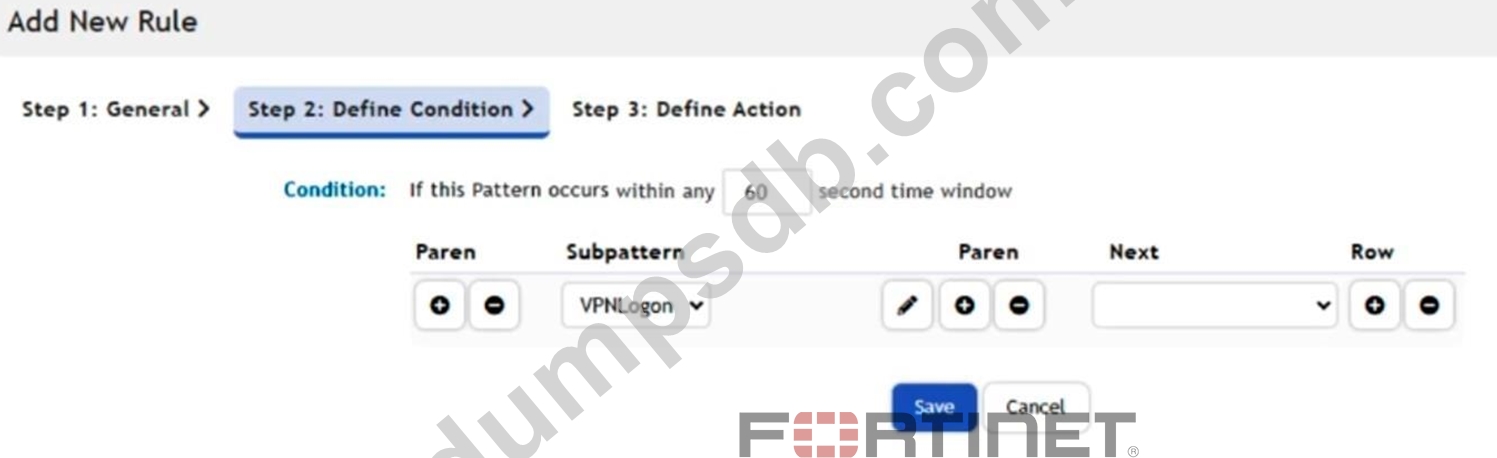
Refer to the exhibit. When the subpattern is matched, what does the time condition of 60 seconds mean?
Correct Answer: D
The 60-second time window defines the aggregation and evaluation period for the rule. FortiSIEM evaluates whether the specified subpattern conditions occur within that 60-second interval before triggering the rule.
Question 13
Refer to the exhibit. According to the automation policy configuration shown in the exhibit, what happens if an associated rule triggers?
Correct Answer: B
When an associated rule triggers, FortiSIEM performs all selected actions in the automation policy. In this case, it will send an email/SMS/webhook, run the remediation script, invoke the integration policy (even if none is currently defined), and create a case. All checked actions are executed. The correct answer is B because FortiSIEM automation policies are designed to execute the actions selected in the policy when the policy criteria match. The FortiSIEM Study Guide states that automation policy actions define what occurs when policy criteria match. It lists possible automation actions such as sending an alert, invoking an integration policy, sending SNMP or HTTPS XML notifications, opening a remedy ticket or creating a FortiSIEM case, sending email or SMS, and running a remediation script. The same Study Guide explains that users can configure "any combination of actions." Therefore, there is no single-action precedence rule where remediation overrides all other selected actions or email runs only because it appears first. If multiple action checkboxes are selected, FortiSIEM executes the configured selected actions according to the automation policy. In the exhibit, multiple actions are selected, including email/SMS /webhook, remediation/script, integration policy, and case creation. Option C is incorrect because the absence of a defined integration policy does not make FortiSIEM ignore the other selected actions. The policy runs the selected configured actions.
Question 14
Refer to the exhibit. If the Capture Variable step ingests the source IP address from an incident and the Block Source IP on FGT step blocks that source IP address on the configured firewall, what will happen when this playbook is executed?
Correct Answer: C
The Capture Variable step extracts a single source IP address from the incident and passes that same value to each downstream firewall connector. As a result, the same source IP address will be blocked on all three configured firewalls when the playbook executes.
Question 15
An analyst wants to create a rule from a newly created analytics search. What is the quickest method?
Correct Answer: C
The quickest way to create a rule from an existing analytics search in FortiSIEM is to go to the Analytics tab and select Actions > Create Rule. This automatically converts the current search filters and parameters into a correlation rule template, saving time compared to manually re- entering all the search criteria.