You have a Microsoft 365 subscription and an on-premises Active Directory domain that syncs by using Azure AD Connect. You need to change the Membership type of a group from Assigned (static) to Dynamic User. What should you use?
Correct Answer: A
Question 2
You have a Microsoft Office 365 subscription. You plan to upgrade from Microsoft Skype for Business to Microsoft Teams. You use the following workloads in Skype for Business: * Audio/video conferencing * Dial-in conferencing * Enterprise Voice * Persistent Chat * Chat You need to ensure that users can evaluate Microsoft Teams while maintaining PSTN calling by using the Skype for Business client. Which coexistence mode should you use?
Note: This question is part of a series of questions that present the same scenario. Each question in the series contains a unique solution that might meet the stated goals. Some question sets might have more than one correct solution, while others might not have a correct solution. After you answer a question in this section, you will NOT be able to return to it. As a result, these questions will not appear in the review screen. Your company has a Microsoft 365 subscription that uses an Azure Active Directory (Azure AD) tenant named contoso.com. You need to prevent guest users in the tenant from using cameras during Microsoft Teams meetings. Solution: From the Microsoft 365 admin center, you modify the Sharing settings. Does this meet the goal?
Correct Answer: B
Guest access in Teams allows people outside you organization to access teams and channels. When you turn on Guest Access, you can turn on or off features guests users can or can't use. Reference: https://docs.microsoft.com/en-us/microsoftteams/set-up-guests
Question 4
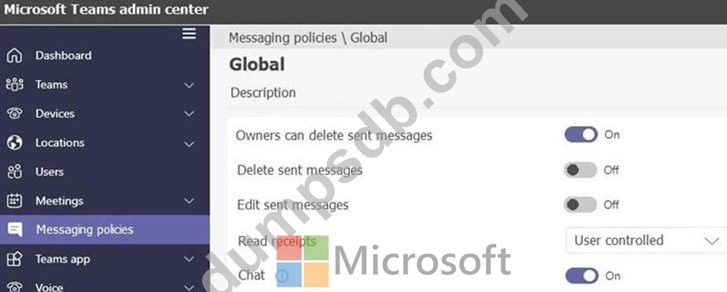
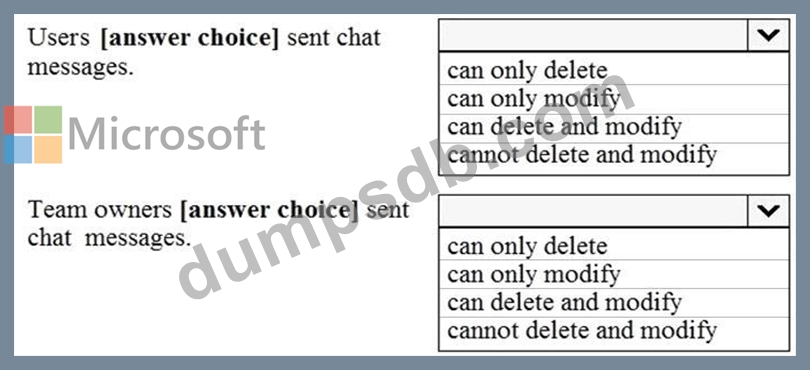
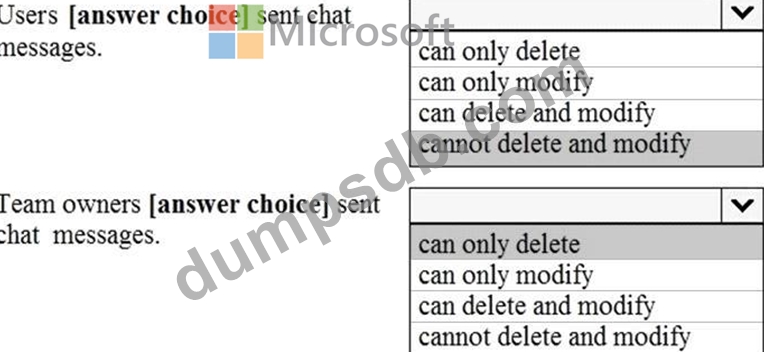
Your company has a Microsoft 365 subscription. The company's only messaging policy is a global messaging policy configured as shown in the following exhibit. Use the drop-down menus to select the answer choice that completes each statement based on the information presented in the graphic. NOTE: Each correct selection is worth one point.
Note: This question is part of a series of questions that present the same scenario. Each question in the series contains a unique solution that might meet the stated goals. Some question sets might have more than one correct solution, while others might not have a correct solution. After you answer a question in this section, you will NOT be able to return to it. As a result, these questions will not appear in the review screen. Your company has 10 offices in North America and Europe. The company has 5,000 users. You plan to deploy Microsoft Teams for all the users. You run a pilot project for the planned deployment. You need to identify the network packet loss from the pilot computers to Microsoft Teams during calls. Solution: From the Microsoft Teams admin center, you run the Network Planner. Does this meet the goal?
Correct Answer: B
Explanation/Reference: Plan and Configure a Microsoft Teams Environment Testlet 2 Case study This is a case study. Case studies are not timed separately. You can use as much exam time as you would like to complete each case. However, there may be additional case studies and sections on this exam. You must manage your time to ensure that you are able to complete all questions included on this exam in the time provided. To answer the questions included in a case study, you will need to reference information that is provided in the case study. Case studies might contain exhibits and other resources that provide more information about the scenario that is described in the case study. Each question is independent of the other questions in this case study. At the end of this case study, a review screen will appear. This screen allows you to review your answers and to make changes before you move to the next section of the exam. After you begin a new section, you cannot return to this section. To start the case study To display the first question in this case study, click the Next button. Use the buttons in the left pane to explore the content of the case study before you answer the questions. Clicking these buttons displays information such as business requirements, existing environment, and problem statements. If the case study has an All Information tab, note that the information displayed is identical to the information displayed on the subsequent tabs. When you are ready to answer a question, click the Question button to return to the question. Overview Contoso, Ltd. is a pharmaceutical company that has 3,000 users in offices across North America. Existing Environment Active Directory The network contains an on-premises Active Directory domain. All user accounts are in departmental organizational units (OUs). Microsoft Office 365 All users are assigned a Microsoft Office 365 E5 license and are enabled for the following services: * Microsoft Yammer * Microsoft Exchange Online * Microsoft SharePoint Online * Microsoft OneDrive for Business * Azure Active Directory (Azure AD) * Azure AD dynamic group membership Microsoft Skype for Business Contoso has an on-premises deployment of Microsoft Skype for Business Server 2015. All the latest cumulative updates are installed on all the servers. The following services are used in Skype for Business Server 2015: * Meetings * PSTN calling * Instant messaging (IM) * Federation to external companies Departments Contoso has the following departments: * IT * Sales * Human resources (HR) * Research and development (R&D) All groups are created by using dynamic group membership that use the department attribute. Requirements Business Goals Contoso identifies the following business goals: * Migrate the maximum number of users to Microsoft Teams. * Minimize administrative effort. Device Requirements Contoso identifies the following device requirements: * Replace Skype for Business IP phones with Microsoft Teams phones. * All Microsoft Teams phones must be set to lock automatically after 60 seconds. Meeting and Live Event Requirements Contoso identifies the following meeting and live event requirements: * Requirement1: Guest users must be able to join live events. * Requirement2: Guest users must always wait in a meeting lobby. * Requirement3: Contoso users must always bypass the meeting lobby when they join meetings by using the Microsoft Teams client. * Requirement4: After the upgrade to Microsoft Teams, all meetings must be scheduled by using Microsoft Teams. Calling Requirements Contoso identifies the following calling requirements: * Migrate all existing auto attendants and response groups to Office 365. * Minimize the on-premises PSTN infrastructure. Technical Requirements Guest users must be prevented from making private calls. Security Requirements Contoso has the following security requirements for the Microsoft Teams deployment: * The number of ports allowed on the company's firewall must be limited. * Team names must be prevented from containing the name of any products produced by Contoso. * Users in the R&D group must be prevented from sending chat messages to users in other departments. * To meet the company's compliance policy, users in the sales department must continue to use on-premises Skype for Business for IM and calling only. Pilot Project Contoso begins a pilot project for the upgrade to Microsoft Teams. You identify the following issues during the pilot project: * Microsoft Teams users report that they often receive continuous notifications from the Microsoft Teams client for 20 minutes. * Two pilot users in the HR department report that they are not members of the HR team.