An organization is implementing URL blocking using Cisco Umbrell a. The users are able to go to some sites but other sites are not accessible due to an error. Why is the error occurring?
Correct Answer: A
Other features are dependent on SSL Decryption functionality, which requires the Cisco Umbrella root certificate. Having the SSL Decryption feature improves: Custom URL Blocking-Required to block the HTTPS version of a URL. ... Umbrella's Block Page and Block Page Bypass features present an SSL certificate to browsers that make connections to HTTPS sites. This SSL certificate matches the requested site but will be signed by the Cisco Umbrella certificate authority (CA). If the CA is not trusted by your browser, an error page may be displayed. Typical errors include "The security certificate presented by this website was not issued by a trusted certificate authority" (Internet Explorer), "The site's security certificate is not trusted!" (Google Chrome) or "This Connection is Untrusted" (Mozilla Firefox). Although the error page is expected, the message displayed can be confusing and you may wish to prevent it from appearing. To avoid these error pages, install the Cisco Umbrella root certificate into your browser or the browsers of your users-if you're a network admin. Reference: https://docs.umbrella.com/deployment-umbrella/docs/rebrand-cisco-certificate-import-information certificate. Having the SSL Decryption feature improves: Custom URL Blocking-Required to block the HTTPS version of a URL. ... Umbrella's Block Page and Block Page Bypass features present an SSL certificate to browsers that make connections to HTTPS sites. This SSL certificate matches the requested site but will be signed by the Cisco Umbrella certificate authority (CA). If the CA is not trusted by your browser, an error page may be displayed. Typical errors include "The security certificate presented by this website was not issued by a trusted certificate authority" (Internet Explorer), "The site's security certificate is not trusted!" (Google Chrome) or "This Connection is Untrusted" (Mozilla Firefox). Although the error page is expected, the message displayed can be confusing and you may wish to prevent it from appearing. To avoid these error pages, install the Cisco Umbrella root certificate into your browser or the browsers of your users-if you're a network admin. Other features are dependent on SSL Decryption functionality, which requires the Cisco Umbrella root certificate. Having the SSL Decryption feature improves: Custom URL Blocking-Required to block the HTTPS version of a URL. ... Umbrella's Block Page and Block Page Bypass features present an SSL certificate to browsers that make connections to HTTPS sites. This SSL certificate matches the requested site but will be signed by the Cisco Umbrella certificate authority (CA). If the CA is not trusted by your browser, an error page may be displayed. Typical errors include "The security certificate presented by this website was not issued by a trusted certificate authority" (Internet Explorer), "The site's security certificate is not trusted!" (Google Chrome) or "This Connection is Untrusted" (Mozilla Firefox). Although the error page is expected, the message displayed can be confusing and you may wish to prevent it from appearing. To avoid these error pages, install the Cisco Umbrella root certificate into your browser or the browsers of your users-if you're a network admin. Reference: https://docs.umbrella.com/deployment-umbrella/docs/rebrand-cisco-certificate-import-information
Question 32
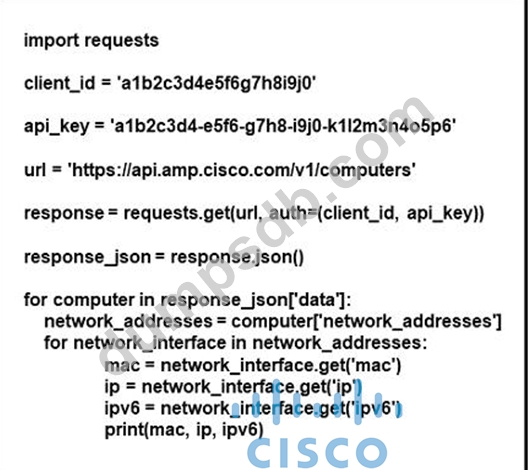
Refer to the exhibit. What does the API do when connected to a Cisco security appliance?
Correct Answer: D
Explanation The call to API of "https://api.amp.cisco.com/v1/computers" allows us to fetch list of computers across your organization that Advanced Malware Protection (AMP) sees. Reference: https://api-docs.amp.cisco.com/api_actions/details?api_action=GET+%2Fv1% 2Fcomputers&api_host=api.apjc.amp.cisco.com&api_resource=Computer&api_version=v1 The call to API of "https://api.amp.cisco.com/v1/computers" allows us to fetch list of computers across your organization that Advanced Malware Protection (AMP) sees. Reference: Explanation The call to API of "https://api.amp.cisco.com/v1/computers" allows us to fetch list of computers across your organization that Advanced Malware Protection (AMP) sees. Reference: https://api-docs.amp.cisco.com/api_actions/details?api_action=GET+%2Fv1% 2Fcomputers&api_host=api.apjc.amp.cisco.com&api_resource=Computer&api_version=v1
Question 33
What is the difference between Cross-site Scripting and SOL Injection attacks?
Correct Answer: C
Question 34
Which service allows a user export application usage and performance statistics with Cisco Application Visibility and control?
Correct Answer: B
Question 35
Which two protocols must be configured to authenticate end users to the Cisco WSA? (Choose two.)