

Question 51
-- Exhibit -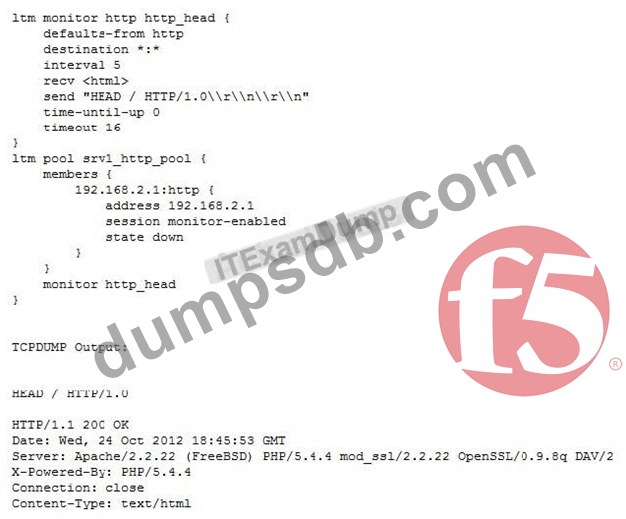
-- Exhibit -Refer to the exhibit.
An LTM Specialist is troubleshooting a new HTTP monitor on a pool. The pool member is functioning correctly when accessed directly through a browser. However, the monitor is marking the member as down. The LTM Specialist captures the monitor traffic via tcpdump.
What is the issue?
Question 52
An LTM Specialist is troubleshooting an issue with a new virtual server. When connecting through the virtual server, clients receive the message "The connection was reset" in the browser, although connections directly to the pool member show the application is functioning correctly.
ltm pool srv1_https_pool {
members {
192.168.2.1:https{
address 192.168.2.1
}
}
}
ltm virtual https_example_vs {
destination 192.168.1.155:https
ip-protocol tcp
mask 255.255.255.255
pool srv1_https_pool
profiles {
http { }
tcp { }
}
snat automap
vlans-disabled
}
How should the LTM Specialist resolve this issue?
Question 53
-- Exhibit -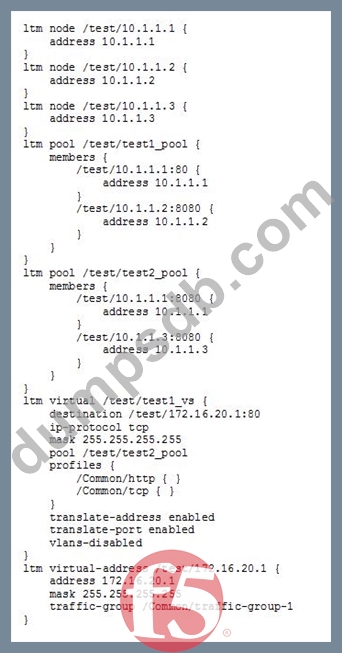
-- Exhibit --
Refer to the exhibit.
An LTM Specialist is reviewing the 'test' partition.
Which objects, in order, can be removed from the partition?
Question 54
Given the log entry:
011f0005:3: HTTP header (32800) exceeded maximum allowed size of 32768 (Client sidE.vip=/Common/VS_web profile=http pool=/Common/POOL_web client_ip=10.0.0.1)
Which HTTP profile setting can be modified temporarily to resolve the issue?
Question 55
-- Exhibit -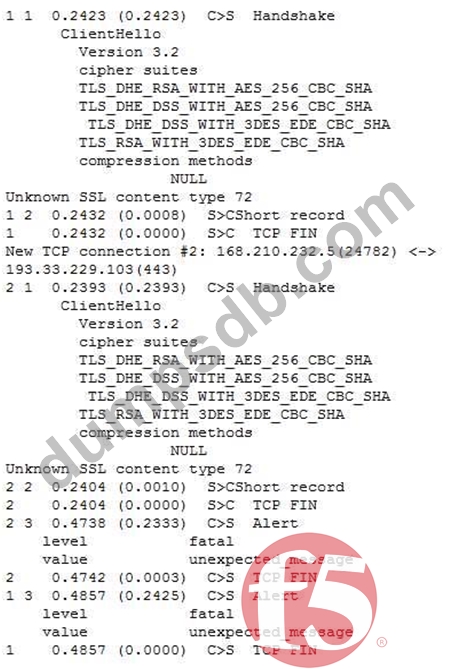
-- Exhibit --
Refer to the exhibit.
A client attempts to connect from a Google Chrome browser to a virtual server on a BIG-IP LTM. The virtual server is SSL Offloaded. When the client connects, the client receives an SSL error. After trying Mozilla Firefox and Internet Explorer browsers, the client still receives the same errors.
The LTM Specialist does an ssldump on the virtual server and receives the results as per the exhibit.
What is the problem?