

Question 71
-- Exhibit -
-- Exhibit --
Refer to the exhibits.
An LTM Specialist is troubleshooting an issue with one of the virtual servers on an LTM device, and all requests are receiving errors. Testing directly against the server generates no errors. The LTM Specialist has captured the request and response on both client and server sides of the LTM device.
What should the LTM Specialist do to fix this issue?
Question 72
An LTM Specialist is troubleshooting a problem on an eCommerce website. The user browses the online store using port 80, adding items to the shopping cart. The user then clicks the "Checkout" button on the site, which redirects the user to port 443 for the checkout process. Suddenly, the user's shopping cart is shown as empty. The shopping cart data is stored in memory on the server, and the default source address persistence profile is used on both virtual servers.
How should the LTM Specialist resolve this issue?
Question 73
-- Exhibit -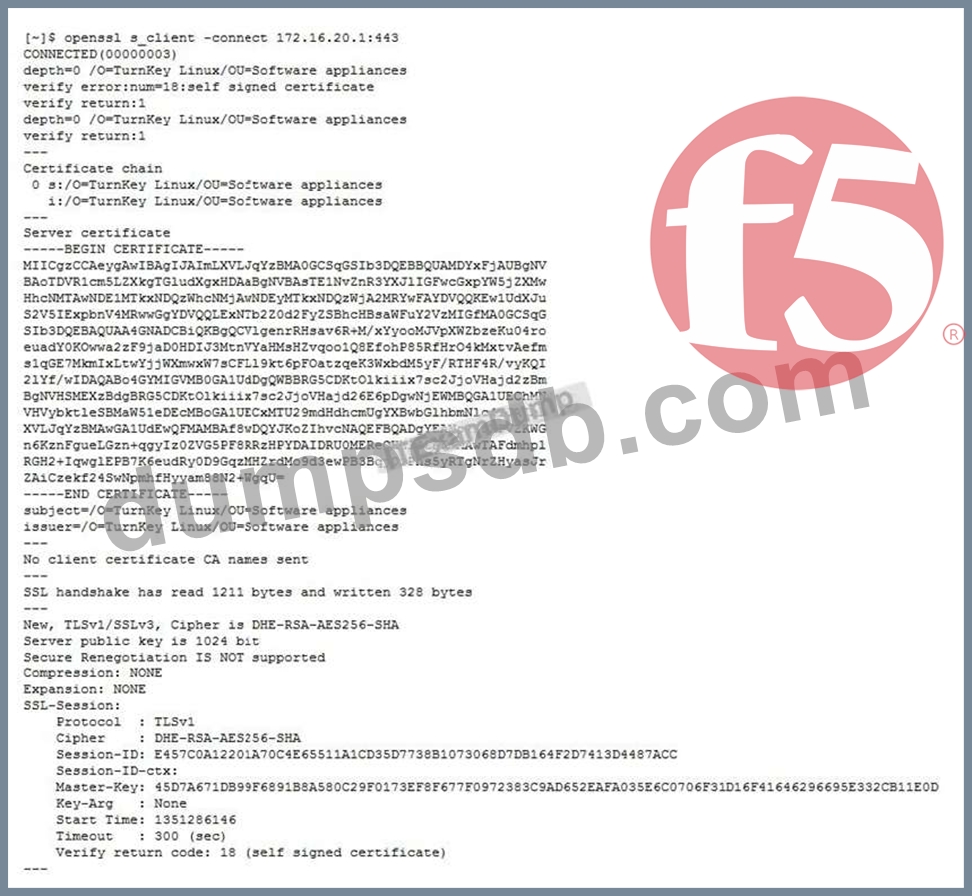
-- Exhibit -
Refer to the exhibit.
An LTM Specialist is troubleshooting an issue with SSL and is receiving the error shown when connecting to the virtual server. When connecting directly to the pool member, clients do NOT receive this message, and the application functions correctly. The LTM Specialist exports the appropriate certificate and key from the pool member and imports them into the LTM device. The LTM Specialist then creates the Client SSL profile and associates it with the virtual server.
What is the issue?
Question 74
An LTM Specialist is tasked with ensuring that the syslogs for the LTM device are sent to a remote syslog server.
The following is an extract from the config file detailing the node and monitor that the LTM device is using for the remote syslog server:
monitor
Syslog_15002 {
defaults from udp
dest *:15002
}
node 91.223.45.231 {
monitor Syslog_15002
screen RemoteSYSLOG
}
There seem to be problems communicating with the remote syslog server. However, the pool monitor shows that the remote server is up.
The network department has confirmed that there are no firewall rules or networking issues preventing the LTM device from communicating with the syslog server. The department responsible for the remote syslog server indicates that there may be problems with the syslog server. The LTM Specialist checks the BIG-IP LTM logs for errors relating to the remote syslog server. None are found. The LTM Specialist does a tcpdump:
tcpdump -nn port 15002, with the following results:
21:28:36.395543 IP 192.168.100.100.44772 > 91.223.45.231.15002: UDP, length 19
21:28:36.429073 IP 192.168.100.100.39499 > 91.223.45.231.15002: UDP, length 169
21:28:36.430714 IP 192.168.100.100.39499 > 91.223.45.231.15002: UDP, length 181
21:28:36.840524 IP 192.168.100.100.39499 > 91.223.45.231.15002: UDP, length 169
21:28:36.846547 IP 192.168.100.100.39499 > 91.223.45.231.15002: UDP, length 181
21:28:39.886343 IP 192.168.100.100.39499 > 91.223.45.231.15002: UDP, length 144 NotE. 192.168.100.100 is the self IP of the LTM device.
Why are there no errors for the remote syslog server in the log files?
Question 75
An LTM Specialist connects to an LTM device via the serial console cable and receives unreadable output.
The LTM Specialist is using the appropriate cable and connecting it to the correct serial port.
Which command should the LTM Specialist run through ssh to verify that the baud rate settings for the serial port are correct on the LTM device?