

Question 21
-- Exhibit -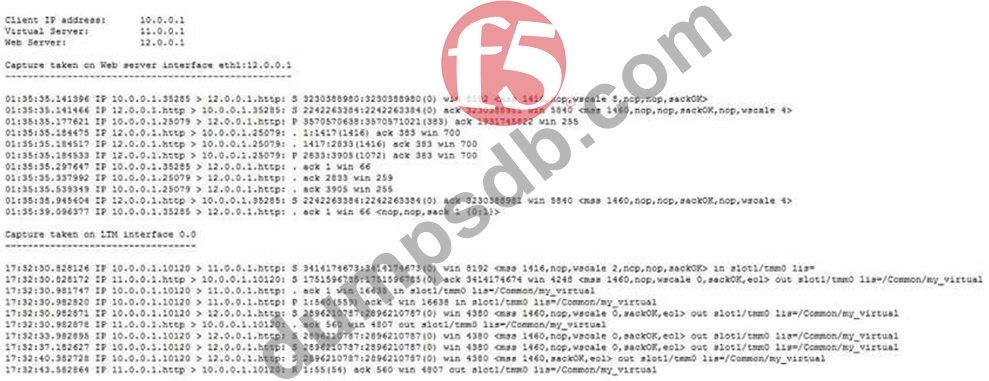
-- Exhibit --
Refer to the exhibit.
A pair of LTM devices are configured for HA. The LTM Specialist observes from a capture that there is a successful connection from a client directly to a web server and an unsuccessful connection from a client via the LTM device to the same web server.
Which two solutions will solve the configuration problem? (Choose two.)
Question 22
-- Exhibit-
-- Exhibit --
Refer to the exhibit.
The virtual server is listening on port 443.
What is the solution to the problem?
Question 23
There are three servers in the pool: 172.16.20.1, 172.16.20.2, and 172.16.20.3, with the virtual IP address
10.0.20.88.
A user CANNOT connect to an HTTP application. To understand the problem and find a solution, the LTM Specialist runs two concurrent traces on the LTM device, with the following results:
Trace on client side:
tcpdump: verbose output suppressed, use -v or -vv for full protocol decode listening on 0.0, link-type EN10MB (Ethernet), capture size 96 bytes
22:22:07.423759 IP 172.16.20.100.53875 > 10.0.20.88.80: S 998346084:998346084(0) win 5840 <mss
1460,sackOK,timestamp 67942058 0,nop,wscale 4>
22:22:07.424056 IP 10.0.20.88.80 > 172.16.20.100.53875: S 4671780:4671780(0) ack 998346085 win
4380 <mss 1460,nop,wscale 0,nop,nop,timestamp 2392362490 67942058,sackOK,eol>
22:22:07.424776 IP 172.16.20.100.53875 > 10.0.20.88.80: . ack 1 win 365 <nop,nop,timestamp 67942058
2392362490>
22:22:07.424790 IP 172.16.20.100.53875 > 10.0.20.88.80: P 1:149(148) ack 1 win 365
<nop,nop,timestamp 67942058 2392362490>
22:22:07.424891 IP 10.0.20.88.80 > 172.16.20.100.53875: . ack 149 win 4528 <nop,nop,timestamp
2392362491 67942058>
22:22:12.024850 IP 10.0.20.88.80 > 172.16.20.100.53875: R 1:1(0) ack 149 win 4528
6 packets captured
6 packets received by filter
0 packets dropped by kernel
Trace on server side:
tcpdump: verbose output suppressed, use -v or -vv for full protocol decode listening on internal, link-type EN10MB (Ethernet), capture size 96 bytes
22:22:07.424881 IP 172.16.20.100.53875 > 172.16.20.2.80: S 51116678:51116678(0) win 4380 <mss
1460,nop,wscale 0,nop,nop,timestamp 2392362491 0,sackOK,eol>
22:22:08.424893 IP 172.16.20.100.53875 > 172.16.20.2.80: S 51116678:51116678(0) win 4380 <mss
1460,nop,wscale 0,nop,nop,timestamp 2392363491 0,sackOK,eol>
22:22:09.625082 IP 172.16.20.100.53875 > 172.16.20.2.80: S 51116678:51116678(0) win 4380 <mss
1460,nop,wscale 0,nop,nop,timestamp 2392364691 0,sackOK,eol>
22:22:10.825194 IP 172.16.20.100.53875 > 172.16.20.2.80: S 51116678:51116678(0) win 4380 <mss
1460,sackOK,eol>
4 packets captured
4 packets received by filter
0 packets dropped by kernel
What should the LTM Specialist do to solve the problem?
Question 24
-- Exhibit -
-- Exhibit --
Refer to the exhibit.
A virtual server is set up on an LTM device as follows:
Virtual server address 78.24.213.79
Default Persistence ProfilE. source_addr, 600s.
Pool NamE. Pool1
Pool Members: 10.72.250.52:80 and 10.72.250.60:80 (both on Internal Vlan) There are several current connections to the virtual server, and pool member 10.72.250.52:80 has been set to a "Disabled" state.
A tcpdump on the Internal Vlan shows traffic going to 10.72.250.52:80.
How soon after the persistence table query was run can existing connections be refreshed/renewed to ensure that no requests are sent to 10.72.250.52?
Question 25
An LTM Specialist is troubleshooting an HTTP monitor. The pool member is accessible directly through a browser, but the HTTP monitor is marking the pool member as down.
GET / HTTP/1.1
HTTP/1.1 400 Bad Request DatE. Tue, 23 Oct 2012 21:39:07 GTM Server: Apache/2.2.22 (FreeBSD) PHP/5.4.4 mod_ssl/2.2.22 OpenSSL/0.9.8q DAV/2 Content-LengtH. 226 Connection: close Content-TypE. text/html; charset=iso-8859-1
How should the LTM Specialist resolve this issue?