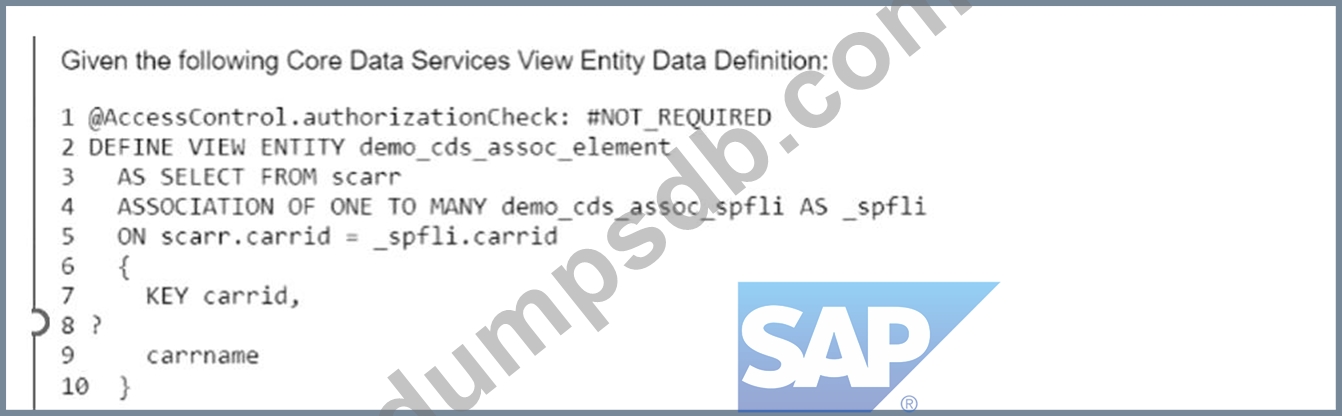
The "demo_ods_assoc_spfi data source referenced in line #4 contains a field "connid" which you would like to expose in the element list. Which of the following statements would do this if inserted on line #8?
Correct Answer: A
Explanation The statement that can be used to expose the field "connid" of the data source "demo_ods_assoc_spfli" in the element list is A. demo_ods_assoc_spfli.connid,. This statement uses the dot notation to access the field "connid" of the data source "demo_ods_assoc_spfli", which is an association defined on line #4. The association "demo_ods_assoc_spfli" links the data source "demo_ods" with the table "spfli" using the field "carrid". The statement also ends with a comma to separate it from the next element in the list12. You cannot do any of the following: B: demo_ods_assoc_spfli-connid/: This statement uses the wrong syntax to access the field "connid" of the data source "demo_ods_assoc_spfli". The dash notation is used to access the components of a structure or a table, not the fields of a data source. The statement also ends with a slash, which is not a valid separator for the element list12. C: spfli-connid,: This statement uses the wrong data source name to access the field "connid". The data source name should be "demo_ods_assoc_spfli",not "spfli". The statement also uses the wrong syntax to access the field "connid", as explained above12. D:_spfli.connid/: This statement uses the wrong data source name and the wrong separator to access the field "connid". The data source name should be "demo_ods_assoc_spfli", not "_spfli". The statement also ends with a slash, which is not a valid separator for the element list12. References: 1: ABAP CDS - SELECT, select_list - ABAP Keyword Documentation - SAP Online Help 2: ABAP CDS - SELECT, from - ABAP Keyword Documentation - SAP Online Help
Question 37
What are some characteristics of secondary keys for internal tables? Note: There are 3 correct answers to this question.
Correct Answer: A,B,D
Secondary keys are additional keys that can be defined for internal tables to optimize the access to the table using fields that are not part of the primary key. Secondary keys can be either sorted or hashed, depending on the table type and the uniqueness of the key. Secondary keys have the following characteristics1: A) Secondary keys must be chosen explicitly when you actually read from an internal table. This means that when you use a READ TABLE or a LOOP AT statement to access an internal table, you have to specify the secondary key that you want to use with the USING KEY addition. For example, the following statement reads an internal table itab using a secondary key sec_key: READ TABLE itab USING KEY sec_key INTO DATA(wa). If you do not specify the secondary key, the system will use the primary key by default2. B) Multiple secondary keys are allowed for any kind of internal table. This means that you can define more than one secondary key for an internal table, regardless of the table type. For example, the following statement defines an internal table itab with two secondary keys sec_key_1 and sec_key_2: DATA itab TYPE SORTED TABLE OF ty_itab WITH NON-UNIQUE KEY sec_key_1 COMPONENTS field1 field2 sec_key_2 COMPONENTS field3 field4. You can then choose which secondary key to use when you access the internal table1. D) Sorted secondary keys do NOT have to be unique. This means that you can define a sorted secondary key for an internal table that allows duplicate values for the key fields. A sorted secondary key maintains a predefined sorting order for the internal table, which is defined by the key fields in the order in which they are specified. For example, the following statement defines a sorted secondary key sec_key for an internal table itab that sorts the table by field1 in ascending order and field2 in descending order: DATA itab TYPE STANDARD TABLE OF ty_itab WITH NON-UNIQUE SORTED KEY sec_key COMPONENTS field1 ASCENDING field2 DESCENDING. You can then access the internal table using the sorted secondary key with a binary search algorithm, which is faster than a linear search3. The following are not characteristics of secondary keys for internal tables, because: C) Hashed secondary keys do NOT have to be unique. This is false because hashed secondary keys must be unique. This means that you can only define a hashed secondary key for an internal table that does not allow duplicate values for the key fields. A hashed secondary key does not have a predefined sorting order for the internal table, but uses a hash algorithm to store and access the table rows. For example, the following statement defines a hashed secondary key sec_key for an internal table itab that hashes the table by field1 and field2: DATA itab TYPE STANDARD TABLE OF ty_itab WITH UNIQUE HASHED KEY sec_key COMPONENTS field1 field2. You can then access the internal table using the hashed secondary key with a direct access algorithm, which is very fast. E) Secondary keys can only be created for standard tables. This is false because secondary keys can be created for any kind of internal table, such as standard tables, sorted tables, and hashed tables. However, the type of the secondary key depends on the type of the internal table. For example, a standard table can have sorted or hashed secondary keys, a sorted table can have sorted secondary keys, and a hashed table can have hashed secondary keys1.
Question 38
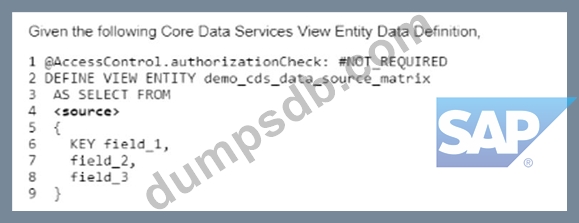
Which of the following types are permitted to be used for <source> on line #4? Note: There are 2 correct answers to this question.
Correct Answer: A,B
The <source> clause in the CDS View Entity Data Definition can be used to specify the data source for the view entity. The <source> clause can accept different types of data sources, depending on the type of the view entity1. * A database table from the ABAP Dictionary: This is a valid type of data source for a CDS View Entity Data Definition. A database table from the ABAP Dictionary is a table that is defined in the ABAP Dictionary using the keyword TABLE or TABLE OF. The name of the database table must be unique within its namespace and must not contain any special characters2. * A CDS DDIC-based view: This is also a valid type of data source for a CDS View Entity Data Definition. A CDS DDIC-based view is a view that is defined in the Core Data Services using the keyword DEFINE VIEW ENTITY. The name of the CDS DDIC-based view must be unique within its namespace and must not contain any special characters3. You cannot do any of the following: * An external view from the ABAP Dictionary: This is not a valid type of data source for a CDS View Entity Data Definition. An external view from the ABAP Dictionary is a view that is defined in an * external application using any language supported by SAP, such as SQL, PL/SQL, or Java. The name of the external view must be unique within its namespace and must not contain any special characters4. * A database view from the ABAP Dictionary: This is not a valid type of data source for a CDS View Entity Data Definition. A database view from the ABAP Dictionary is a view that is defined in an external application using any language supported by SAP, such as SQL, PL/SQL, or Java. The name of the database view must be unique within its namespace and must not contain any special characters4. References: 1: CDS DDL - DEFINE VIEW ENTITY - ABAP Keyword Documentation - SAP Online Help 2: ABAP Dictionary Tables - SAP Online Help 3: CDS DDL - DEFINE VIEW ENTITY - ABAP Keyword Documentation - SAP Online Help 4: ABAP Dictionary Views - SAP Online Help
Question 39
In which products must you use the ABAP Cloud Development Model? Note: There are 2 correct answers to this question.
Correct Answer: A,B
The ABAP Cloud Development Model is the ABAP development model to build cloud-ready business apps, services, and extensions. It comes with SAP BTP and SAP S/4HANA. It works with public or private cloud, and even on-premise1. However, the complete ABAP Cloud Development Model, including the cloud-optimized ABAP language and public local SAP APIs and extension points, is available only in SAP BTP ABAP Environment and in the 2208/2022 versions of the SAP S/4HANA editions1. Therefore, you must use the ABAP Cloud Development Model in SAP BTP, ABAP environment and SAP S/4HANA Cloud, private edition. You can also use it in SAP S/4HANA on premise, but it is not mandatory. You cannot use it in SAP S/4HANA Cloud, public edition, because it does not allow custom ABAP code2. Reference: 1: ABAP Cloud | SAP Blogs 2: SAP S/4HANA Cloud Extensibility - Overview and Comparison | SAP Blogs
Question 40
You have two internal tables itab1 and itab2.What is true for using the expression itab1 = corresponding #( itab2 )? Note: There are 2 correct answers to this question.
Correct Answer: B,C
The expression itab1 = corresponding #( itab2 ) is a constructor expression with the component operator CORRESPONDING that assigns the contents of the internal table itab2 to the internal table itab1. The following statements are true for using this expression: * B: itab1 and itab2 must have at least one field name in common. This is because the component operator CORRESPONDING assigns the identically named columns of itab2 to the identically named columns of itab1 by default, according to the rules of MOVE-CORRESPONDING for internal tables. If itab1 and itab2 do not have any field name in common, the expression will not assign any value to itab1 and it will remain initial or unchanged1 * C: Fields with the same name and the same type will be copied from itab2 to itab1. This is because the component operator CORRESPONDING assigns the identically named columns of itab2 to the identically named columns of itab1 by default, according to the rules of MOVE-CORRESPONDING for internal tables. If the columns have the same name but different types, the assignment will try to perform a conversion between the types, which may result in a loss of precision, a truncation, or a runtime error, depending on the types involved1 The following statements are false for using this expression: * A: Fields with the same name but with different types may be copied from itab2 to itab1. This is not true, as explained in statement C. The assignment will try to perform a conversion between the types, which may result in a loss of precision, a truncation, or a runtime error, depending on the types involved1 * D: itab1 and itab2 must have the same data type. This is not true, as the component operator CORRESPONDING can assign the contents of an internal table of one type to another internal table of a different type, as long as they have at least one field name in common. The target type of the expression is determined by the left-hand side of the assignment, which is itab1 in this case. The expression will create an internal table of the same type as itab1 and assign it to itab11 References: CORRESPONDING - Component Operator - ABAP Keyword Documentation