Given the following Core Data Service View Entity Data Definition: 1 @AccessControl.authorizationCheck: #NOT_REQUIRED 2 DEFINE VIEW ENTITY demo_flight_info_join 3 AS SELECT 4 FROM scarr AS a 5 LEFT OUTER JOIN scounter AS c 6 LEFT OUTER JOIN sairport AS p 7 ON p.id = c.airport 8 ON a.carrid = c.carrid 9 { 10 a.carridAS carrier_id, 11 p.idAS airport_id, 12 c.countnumAS counter_number 13 } In what order will the join statements be executed?
Correct Answer: A
Explanation The order in which the join statements will be executed is: scarr will be joined with scounter first and the result will be joined with sairport. This is because the join statements are nested from left to right, meaning that the leftmost data source is joined with the next data source, and the result is joined with the next data source, and so on. The join condition for each pair of data sources is specified by the ON clause that follows the data source name. The join type for each pair of data sources is specified by the join operator that precedes the data source name. In this case, the join operator is LEFT OUTER JOIN, which means that all the rows from the left data source are included in the result, and only the matching rows from the right data source are included. If there is no matching row from the right data source, the corresponding fields are filled with initial values1. Therefore, the join statements will be executed as follows: First, scarr AS a will be joined with scounter AS c using the join condition a.carrid = c.carrid. This means that all the rows from scarr will be included in the result, and only the rows from scounter that have the same value for the carrid field will be included. If there is no matching row from scounter, the countnum field will be filled with an initial value. Second, the result of the first join will be joined with sairport AS p using the join condition p.id = c.airport. This means that all the rows from the first join will be included in the result, and only the rows from sairport that have the same value for the id field as the airport field from the first join will be included. If there is no matching row from sairport, the id field will be filled with an initial value. References: 1: Join - ABAP Keyword Documentation
Question 12
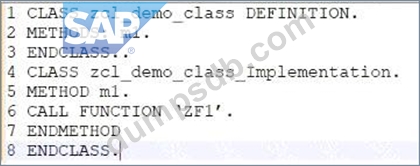
Given the following code in an SAP S/4HANA Cloud private edition tenant: The class zcl_demo_class is in a software component with the language version set to "ABAP Cloud". The function module ZF1' is in a different software component with the language version set to "Standard ABAP". Both the class and function module are customer created. Regarding line #6, which of the following are valid statements? Note: There are 2 correct answers to this question.
Correct Answer: A,B
The ABAP Cloud Development Model requires that only public SAP APIs and extension points are used to access SAP functionality and data. These APIs and extension points are released by SAP and documented in the SAP API Business Hub1. Customer-created function modules are not part of the public SAP APIs and are not released for cloud development. Therefore, calling a function module directly from an ABAP Cloud class is not allowed and will result in a syntax error. However, there are two possible ways to call a function module indirectly from an ABAP Cloud class: * Create a wrapper class or interface for the function module and release it for cloud development. A wrapper is a class or interface that encapsulates the function module and exposes its functionality through public methods or attributes. The wrapper must be created in a software component with the language version set to "Standard ABAP" and must be marked as released for cloud development using the annotation @EndUserText.label. The wrapper can then be called from an ABAP Cloud class using the public methods or attributes2. * Use the ABAP Cloud Connector to call the function module as a remote function call (RFC) from an ABAP Cloud class. The ABAP Cloud Connector is a service that enables the secure and reliable communication between SAP BTP, ABAP environment and on-premise systems. The function module must be exposed as an RFC-enabled function module in the on-premise system and must be registered in the ABAP Cloud Connector. The ABAP Cloud class can then use the class cl_rfc_destination_service to get the destination name and the class cl_abap_system to create a proxy object for the function module. The proxy object can then be used to call the function module3. References: 1: SAP API Business Hub 2: Creating an ABAP Cloud Project | SAP Help Portal 3: Calling Remote Function Modules | SAP Help Portal
Question 13
After you created a database table in the RESTful Application Programming model, what do you create next?
Correct Answer: B
After you created a database table in the RESTful Application Programming model (RAP), the next step is to create a projection view on the database table. A projection view is a CDS artefact that defines a view on one or more data sources, such as tables, views, or associations. A projection view can select, rename, or aggregate the fields of the data sources, but it cannot change the properties of the fields, such as whether they are read-only or not. The properties of the fields are inherited from the data sources or the behaviour definitions of the business objects12. For example: * The following code snippet defines a projection view ZI_AGENCY on the database table /DMO/AGENCY: define view ZI_AGENCY as select from /dmo/agency { key agency_id, agency_name, street, city, region, postal_code, country, phone_number, url } The projection view is used to expose the data of the database table to the service definition, which is the next step in the RAP. The service definition is a CDS artefact that defines the interface and the binding of a service. A service is a CDS entity that exposes the data and the functionality of one or more business objects as OData, InA, or SQL services. A service definition can specify the properties of the fields of a service, such as whether they are filterable, sortable, or aggregatable12. For example: * The following code snippet defines a service definition ZI_AGENCY_SRV that exposes the projection view ZI_AGENCY as an OData service: define service ZI_AGENCY_SRV { expose ZI_AGENCY as Agency; } You cannot do any of the following: * A. A metadata extension: A metadata extension is a CDS artefact that defines additional annotations for a CDS entity, such as a business object, a service, or a projection view. A metadata extension can specify the properties of the fields of a CDS entity for UI or analytical purposes, such as whether they are visible, editable, or hidden. However, a metadata extension is not the next step after creating a database table in the RAP, as it is not required to expose the data of the database table to the service definition. A metadata extension can be created later to customize the UI or analytical application that uses the service12. * C. A data model view: A data model view is a CDS artefact that defines a view on one or more data sources, such as tables, views, or associations. A data model view can select, rename, or aggregate the fields of the data sources, and it can also change the properties of the fields, such as whether they are read-only or not. The properties of the fields are defined by the annotations or the behaviour definitions of the data model view. A data model view is used to define the data model of a business object, which is a CDS entity that represents a business entity or concept, such as a customer, an order, or a product. However, a data model view is not the next step after creating a database table in the RAP, as it is not required to expose the data of the database table to the service definition. A data model view can be created later to define a business object that uses the database table as a data source12. * D. A service definition: A service definition is a CDS artefact that defines the interface and the binding of a service. A service is a CDS entity that exposes the data and the functionality of one or more business objects as OData, InA, or SQL services. A service definition can specify the properties of the fields of a service, such as whether they are filterable, sortable, or aggregatable. However, a service definition is not the next step after creating a database table in the RAP, as it requires a projection view * or a data model view to expose the data of the database table. A service definition can be created after creating a projection view or a data model view on the database table12. References: 1: ABAP CDS - Data Definitions - ABAP Keyword Documentation - SAP Online Help 2: ABAP CDS - Service Definitions - ABAP Keyword Documentation - SAP Online Help
Question 14
Using ABAP SQL, which select statement selects the mat field on line #17?
Correct Answer: B
Explanation Using ABAP SQL, the select statement that selects the mat field on line #17 is: SELECT mat FROM demo_sales_cds_so_i_ve... This statement selects the mat field from the CDS view demo_sales_cds_so_i_ve, which is defined on line #1. The CDS view demo_sales_cds_so_i_ve is a projection view that projects the fields of the CDS view demo_sales_cds_so_i, which is defined on line #2. The CDS view demo_sales_cds_so_i is a join view that joins the fields of the database table demo_sales_so_i, which is defined on line #3, and the CDS view demo_sales_cds_material_ve, which is defined on line #4. The CDS view demo_sales_cds_material_ve is a value help view that provides value help for the material field of the database table demo_sales_so_i. The mat field is an alias for the material field of the database table demo_sales_so_i, which is defined on line #91. The other options are not valid because: A: SELECT mat FROM Material... is not valid because Material is not a valid data source in the given code. There is no CDS view or database table named Material. C: SELECT mat FROM demo_sales_so_i... is not valid because demo_sales_so_i is not a valid data source in the given code. There is no CDS view named demo_sales_so_i, only a database table. To access a database table, the keyword TABLE must be used, such as SELECT mat FROM TABLE demo_sales_so_i... D: SELECT mat FROM demo sales cds material ve... is not valid because demo sales cds material ve is not a valid data source in the given code. There is no CDS view or database table named demo sales cds material ve. The correct name of the CDS view is demo_sales_cds_material_ve, with underscores instead of spaces. References: 1: Projection Views - ABAP Keyword Documentation
Question 15
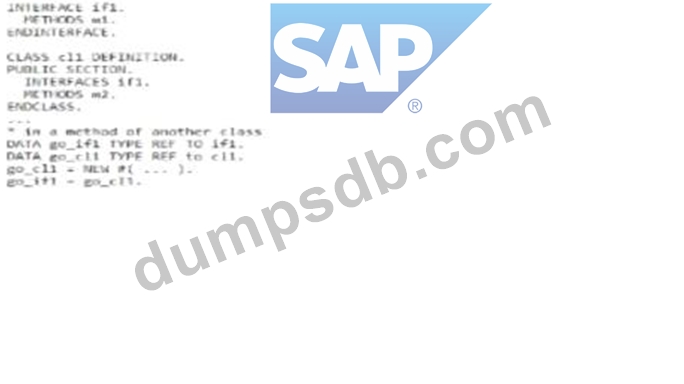
Exhibit: What are valid statements? Note: There are 3 correct answers to this question.
Correct Answer: A,B,E
Explanation The following are the explanations for each statement: A: This statement is valid. go_ifl may call method ml with go_ifl->ml(). This is because go_ifl is a data object of type REF TO ifl, which is a reference to the interface ifl. The interface ifl defines a method ml, which can be called using the reference variable go_ifl. The class cll implements the interface ifl, which means that it provides an implementation of the method ml. The data object go_ifl is assigned to a new instance of the class cll using the NEW operator and the inline declaration operator @DATA. Therefore, when go_ifl->ml() is called, the implementation of the method ml in the class cll is executed123 B: This statement is valid. Instead of go_cll = NEW #(...) you could use go_ifl = NEW cll(...). This is because go_ifl is a data object of type REF TO ifl, which is a reference to the interface ifl. The class cll implements the interface ifl, which means that it is compatible with the interface ifl. Therefore, go_ifl can be assigned to a new instance of the class cll using the NEW operator and the class name cll. The inline declaration operator @DATA is optional in this case, as go_ifl is already declared. The parentheses after the class name cll can be used to pass parameters to the constructor of the class cll, if any123 E: This statement is valid. go_ifl may call method m2 with go_ifl->m2(...). This is because go_ifl is a data object of type REF TO ifl, which is a reference to the interface ifl. The class cll implements the interface ifl, which means that it inherits all the components of the interface ifl. The class cll also defines a method m2, which is a public method of the class cll. Therefore, go_ifl can call the method m2 using the reference variable go_ifl. The method m2 is not defined in the interface ifl, but it is accessible through the interface ifl, as the interface ifl is implemented by the class cll. The parentheses after the method name m2 can be used to pass parameters to the method m2, if any123 The other statements are not valid, as they have syntax errors or logical errors. These statements are: C: This statement is not valid. go_cll may call method ml with go_cll->ifl~ml(). This is because go_cll is a data object of type REF TO cll, which is a reference to the class cll. The class cll implements the interface ifl, which means that it inherits all the components of the interface ifl. The interface ifl defines a method ml, which can be called using the reference variable go_cll. However, the syntax for calling an interface method using a class reference is go_cll->ml(), not go_cll->ifl~ml(). The interface component selector ~ is only used when calling an interface method using an interface reference, such as go_ifl->ifl~ml(). Using the interface component selector ~ with a class reference will cause a syntax error123 D: This statement is not valid. Instead of go_cll = NEW #() you could use go_ifl = NEW #(...). This is because go_ifl is a data object of type REF TO ifl, which is a reference to the interface ifl. The interface ifl cannot be instantiated, as it does not have an implementation. Therefore, go_ifl cannot be assigned to a new instance of the interface ifl using the NEW operator and the inline declaration operator @DATA. This will cause a syntax error or a runtime error. To instantiate an interface, you need to use a class that implements the interface, such as the class cll123 References: INTERFACES - ABAP Keyword Documentation, CLASS - ABAP Keyword Documentation, NEW - ABAP Keyword Documentation