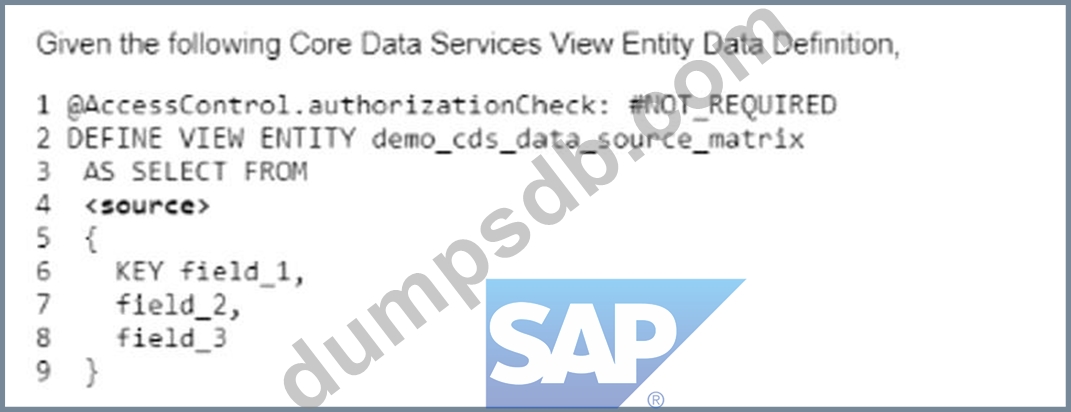
Which of the following types are permitted to be used for <source> on line #4? Note: There are 2 correct answers to this question.
Correct Answer: A,B
The <source> clause in the CDS View Entity Data Definition can be used to specify the data source for the view entity. The <source> clause can accept different types of data sources, depending on the type of the view entity1. * A database table from the ABAP Dictionary: This is a valid type of data source for a CDS View Entity Data Definition. A database table from the ABAP Dictionary is a table that is defined in the ABAP Dictionary using the keyword TABLE or TABLE OF. The name of the database table must be unique within its namespace and must not contain any special characters2. * A CDS DDIC-based view: This is also a valid type of data source for a CDS View Entity Data Definition. A CDS DDIC-based view is a view that is defined in the Core Data Services using the keyword DEFINE VIEW ENTITY. The name of the CDS DDIC-based view must be unique within its namespace and must not contain any special characters3. You cannot do any of the following: * An external view from the ABAP Dictionary: This is not a valid type of data source for a CDS View Entity Data Definition. An external view from the ABAP Dictionary is a view that is defined in an external application using any language supported by SAP, such as SQL, PL/SQL, or Java. The name of the external view must be unique within its namespace and must not contain any special characters4. * A database view from the ABAP Dictionary: This is not a valid type of data source for a CDS View Entity Data Definition. A database view from the ABAP Dictionary is a view that is defined in an external application using any language supported by SAP, such as SQL, PL/SQL, or Java. The name of the database view must be unique within its namespace and must not contain any special characters4. References: 1: CDS DDL - DEFINE VIEW ENTITY - ABAP Keyword Documentation - SAP Online Help 2: ABAP Dictionary Tables - SAP Online Help 3: CDS DDL - DEFINE VIEW ENTITY - ABAP Keyword Documentation - SAP Online Help 4: ABAP Dictionary Views - SAP Online Help
Question 27
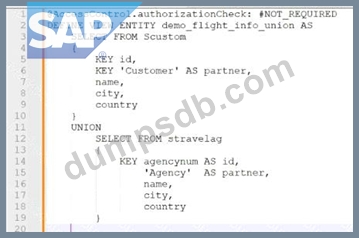
when you attempt to activate the definition, what will be the response?
Correct Answer: A
The response will be an activation error because the field names of the union do not match. This is because the field names of the union must match in order for the definition to be activated. The union operator combines the result sets of two or more queries into a single result set. The queries that are joined by the union operator must have the same number and type of fields, and the fields must have the same names1. In the given code, the field names of the union do not match, because the first query has the fields carrname, connid, cityfrom, and cityto, while the second query has the fields carrname, carrier_id, cityfrom, and cityto. The field connid in the first query does not match the field carrier_id in the second query. Therefore, the definition cannot be activated. References: 1: UNION - ABAP Keyword Documentation
Question 28
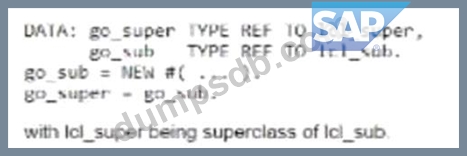
When accessing the subclass instance through go_super, what can you do? Note: There are 2 correct answers to this question.
Correct Answer: A,B
When accessing the subclass instance through go_super, you can do both of the following: * Access the inherited private components: A subclass inherits all the private attributes and methods of its superclass, unless they are explicitly overridden by the subclass. Therefore, you can access the inherited private components of the superclass through go_super, as long as they are not hidden by other attributes or methods in the subclass12. * Access the inherited public components: A subclass inherits all the public attributes and methods of its superclass, unless they are explicitly overridden by the subclass. Therefore, you can access the inherited public components of the superclass through go_super, as long as they are not hidden by other attributes or methods in the subclass12. You cannot do any of the following: * Call a subclass specific public method: A subclass does not have any public methods that are not inherited from its superclass. Therefore, you cannot call a subclass specific public method through go_super12. * Call inherited public redefined methods: A subclass does not have any public methods that are redefined from its superclass. Therefore, you cannot call inherited public redefined methods through go_super12. References: 1: Object Oriented - ABAP Development - Support Wiki 2: Inheritance and Instantiation - ABAP Keyword Documentation
Question 29
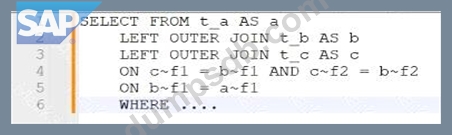
In this nested join below in which way is the join evaluated?
Correct Answer: C
The nested join is evaluated from the top to the bottom in the order of the ON conditions. This means that the join expression is formed by assigning each ON condition to the directly preceding JOIN from left to right. The join expression can be parenthesized implicitly or explicitly to show the order of evaluation. In this case, the implicit parentheses are as follows: SELECT * FROM (a INNER JOIN (b INNER JOIN c ON b~c = c~c) ON a~b = b~b) This means that the first join expression is b INNER JOIN c ON b~c = c~c, which joins the columns of tables b and c based on the condition that b~c equals c~c. The second join expression is a INNER JOIN (b INNER JOIN c ON b~c = c~c) ON a~b = b~b, which joins the columns of table a and the result of the first join expression based on the condition that a~b equals b~b. The final result set contains all combinations of rows from tables a, b, and c that satisfy both join conditions. References: 1: SELECT, FROM JOIN - ABAP Keyword Documentation - SAP Online Help
Question 30
Which type of legacy code does SAP recommend you eliminate when you review modifications as part of an SAP S/4HANA system conversion? Note: There are 2 correct answers to this question.
Correct Answer: B,D
SAP recommends that you eliminate the following types of legacy code when you review modifications as part of an SAP S/4HANA system conversion: * Code that now is identical to a standard SAP object. This type of code is redundant and unnecessary, as it does not provide any additional functionality or customization. It can also cause conflicts or errors during the system conversion, as the standard SAP object may have changed or been replaced in SAP S /4HANA. Therefore, you should delete this type of code and use the standard SAP object instead. * Code that can be redesigned as a key user extension. This type of code is usually related to UI or business logic adaptations that can be achieved using the in-app tools provided by SAP S/4HANA. By redesigning this type of code as a key user extension, you can simplify and standardize your code base, reduce maintenance efforts, and avoid compatibility issues during the system conversion. Therefore, you should migrate this type of code to the key user extensibility framework and delete the original code. The other types of legacy code are not recommended to be eliminated, as they may still be relevant or necessary for your business processes. However, you should still review and adjust them according to the SAP S/4HANA simplification items and best practices. These types of code are: * Code that supports a critical business process. This type of code is essential for your business operations and cannot be easily replaced or removed. However, you should check if this type of code is compatible with SAP S/4HANA, and if not, you should adapt it accordingly. You should also consider if this type of code can be optimized or enhanced using the new features and capabilities of SAP S /4HANA. * Code that has less than 10% usage according to usage statistics. This type of code is rarely used and may not be worth maintaining or converting. However, you should not delete this type of code without verifying its relevance and impact on your business processes. You should also consider if this type of code can be replaced or consolidated with other code that has higher usage or better performance. References: Custom Code Management (CCM) During an SAP S/4HANA Conversion, Custom Code Migration Guide for SAP S/4HANA 2020