Using ABAP SQL, which select statement selects the mat field on line #17?
Correct Answer: B
Explanation Using ABAP SQL, the select statement that selects the mat field on line #17 is: SELECT mat FROM demo_sales_cds_so_i_ve... This statement selects the mat field from the CDS view demo_sales_cds_so_i_ve, which is defined on line #1. The CDS view demo_sales_cds_so_i_ve is a projection view that projects the fields of the CDS view demo_sales_cds_so_i, which is defined on line #2. The CDS view demo_sales_cds_so_i is a join view that joins the fields of the database table demo_sales_so_i, which is defined on line #3, and the CDS view demo_sales_cds_material_ve, which is defined on line #4. The CDS view demo_sales_cds_material_ve is a value help view that provides value help for the material field of the database table demo_sales_so_i. The mat field is an alias for the material field of the database table demo_sales_so_i, which is defined on line #91. The other options are not valid because: A). SELECT mat FROM Material... is not valid because Material is not a valid data source in the given code. There is no CDS view or database table named Material. C). SELECT mat FROM demo_sales_so_i... is not valid because demo_sales_so_i is not a valid data source in the given code. There is no CDS view named demo_sales_so_i, only a database table. To access a database table, the keyword TABLE must be used, such as SELECT mat FROM TABLE demo_sales_so_i... D). SELECT mat FROM demo sales cds material ve... is not valid because demo sales cds material ve is not a valid data source in the given code. There is no CDS view or database table named demo sales cds material ve. The correct name of the CDS view is demo_sales_cds_material_ve, with underscores instead of spaces. References: 1: Projection Views - ABAP Keyword Documentation
Question 17
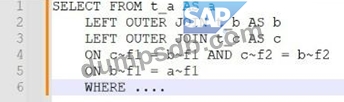
In this nested join below in which way is the join evaluated?
Correct Answer: C
Explanation The nested join is evaluated from the top to the bottom in the order of the ON conditions. This means that the join expression is formed by assigning each ON condition to the directly preceding JOIN from left to right. The join expression can be parenthesized implicitly or explicitly to show the order of evaluation. In this case, the implicit parentheses are as follows: SELECT * FROM (a INNER JOIN (b INNER JOIN c ON b~c = c~c) ON a~b = b~b) This means that the first join expression is b INNER JOIN c ON b~c = c~c, which joins the columns of tables b and c based on the condition that b~c equals c~c. The second join expression is a INNER JOIN (b INNER JOIN c ON b~c = c~c) ON a~b = b~b, which joins the columns of table a and the result of the first join expression based on the condition that a~b equals b~b. The final result set contains all combinations of rows from tables a, b, and c that satisfy both join conditions. References: 1: SELECT, FROM JOIN - ABAP Keyword Documentation - SAP Online Help
Question 18
when you attempt to activate the definition, what will be the response?
Correct Answer: A
The response will be an activation error because the field names of the union do not match. This is because the field names of the union must match in order for the definition to be activated. The union operator combines the result sets of two or more queries into a single result set. The queries that are joined by the union operator must have the same number and type of fields, and the fields must have the same names1. In the given code, the field names of the union do not match, because the first query has the fields carrname, connid, cityfrom, and cityto, while the second query has the fields carrname, carrier_id, cityfrom, and cityto. The field connid in the first query does not match the field carrier_id in the second query. Therefore, the definition cannot be activated. References: 1: UNION - ABAP Keyword Documentation
Question 19
In this nested join below in which way is the join evaluated?
Correct Answer: C
The nested join is evaluated from the top to the bottom in the order of the ON conditions. This means that the join expression is formed by assigning each ON condition to the directly preceding JOIN from left to right. The join expression can be parenthesized implicitly or explicitly to show the order of evaluation. In this case, the implicit parentheses are as follows: SELECT * FROM (a INNER JOIN (b INNER JOIN c ON b~c = c~c) ON a~b = b~b) This means that the first join expression is b INNER JOIN c ON b~c = c~c, which joins the columns of tables b and c based on the condition that b~c equals c~c. The second join expression is a INNER JOIN (b INNER JOIN c ON b~c = c~c) ON a~b = b~b, which joins the columns of table a and the result of the first join expression based on the condition that a~b equals b~b. The final result set contains all combinations of rows from tables a, b, and c that satisfy both join conditions.
Question 20
Which statement can you use to change the contents of a row of data in an internal table?
Correct Answer: B
Explanation The statement that can be used to change the contents of a row of data in an internal table is MODIFY table. The MODIFY table statement can be used to change the contents of one or more rows of an internal table, either by specifying the table index, the table key, or a condition. The MODIFY table statement can also be used to change the contents of a database table, by specifying the table name and a work area or an internal table. The MODIFY table statement can use the TRANSPORTING addition to specify which fields should be changed, and the WHERE addition to specify which rows should be changed. The other statements are not suitable for changing the contents of a row of data in an internal table, as they have different purposes and effects. These statements are: APPEND table: This statement can be used to add a new row of data to the end of an internal table, either by specifying a work area or an inline declaration. The APPEND table statement does not change the existing rows of the internal table, but only increases the number of rows by one. INSERT table: This statement can be used to insert a new row of data into an internal table, either by specifying the table index, the table key, or a sorted position. The INSERT table statement does not change the existing rows of the internal table, but only shifts them to make room for the new row. The INSERT table statement can also be used to insert a new row of data into a database table, by specifying the table name and a work area or an inline declaration. UPDATE table: This statement can be used to update the contents of a database table, by specifying the table name and a work area or an internal table. The UPDATE table statement can use the SET addition to specify which fields should be updated, and the WHERE addition to specify which rows should be updated. The UPDATE table statement does not affect the internal table, but only the corresponding database table. References: MODIFY table - ABAP Keyword Documentation, APPEND table - ABAP Keyword Documentation, INSERT table - ABAP Keyword Documentation, UPDATE table - ABAP Keyword Documentation